15" PowerBook Battery Life Tests
[ Mac Tips ] [ Next Tip ]
On September 20, 2003 I received a new 15" PowerBook from Apple.
This is the new model with a 1.25 GHz G4 CPU and a Superdrive.
However, the battery seems pitifully small, rated at 46 watts. This
is smaller than the most recent TiBooks (61 watts) and about the
same size as an iBook battery (45 watts). I originally figured that
I was getting about 2 hours battery life in a fairly conservative
operating mode as opposed to the 4.5 hours claimed by Apple.
Actually I never expected to get 4 hours, but less than 2 is not
acceptable. During a call to AppleCare, the technician claimed that
a battery life of between 2 to 5 hours is in spec, the advertising
notwithstanding.
The whole driving force for the work I did on this page was
driven by the fact that the battery, IMHO, is undersized for this
particular computer. Therefore I needed to know how to squeeze as
much out of the battery as possible. It is one of the more power
hungry models, yet it has one of the smallest batteries. This was
probably done in an effort by Apple to cram all that stuff into a
1" thick case. I would have preferred a little thicker computer and
a MUCH bigger battery.
It is possible that a 1 GHz PowerBook running at Reduced
performance, with minimum RAM installed, no Bluetooth or Airport,
minimal screen backlighting, no keyboard backlighting and doing
very light duty work (so that the graphic processor has nothing to
do) MAY touch 4 hours. However, this isn't anything close to a real
world case. Remember that "truth in advertising" is one of the
world's greatest oxymorons.
Update. In Dec 2005, I ran a different series of power
consumption tests and I actually did get 4 hours and 17 minutes
from this PowerBook, but only in a condition where the computer was
not very useable, see Apple Laptop
Power Consumption Tests as well as the information in this
page.
A few days after the Powerbook arrived OS 10.2.8 came out and I
upgraded immediately because there was a claim that an SSH security
bug had been patched. After the upgrade, I noticed that the
indicated battery life had decreased from 2 hours to about 1.5
hours. However, the actual run time of the computer seemed to have
become a little better. This got me to wondering what was going
on.
I used a freeware program called X-Charge to
monitor actual battery run time in some tests and found that the
battery life predictor in the OS is wrong, at least for this
particular computer. It consistently underestimates the time
remaining by about 1/3 all through a linear discharge. Computers
are normally pretty good at doing linear regressions, but this part
of the OS isn't doing so well in my case. Others have reported that
the lifetime estimator is fairly accurate, some getting 2+ hours of
estimated and real battery life, some much less.
Another shareware program, XBattery, reports the
current drawn while running from the battery along with battery
voltage. I imagine that the CPU inside the battery that keeps track
of battery charge state is providing this reporting and the program
just plots the result. In any event, this current meter can be used
to judge the draw of various modes of operation. It reports current
in 1 mA increments, but it also drifts around by 10 to 50 mA for no
apparent reason so many readings are required before a consistent
result can be obtained. The integration time for the current
reporting is also quite long and the response to step load changes
is underdamped. It takes about 5 minutes to get a "stable" reading
and even that reading may be inconsistent. The readings have to be
taken several times after several step load changes to find a
consistent value for a step change in current. I figure that even
if the absolute accuracy of the current indication isn't very good,
it should be ok for relative readings.
The overall result is that the current drawn by this Powerbook
can vary by nearly 2.5 times depending on use and settings and I
don't believe that I've explored the high end enough yet to find
the top. For battery powered operation, the highest loads are of
not very great interest. The load is so high that the battery life
would be an hour or less. Since I'll never run that way on a
battery, knowing the worst battery life is of little interest. The
value in the tests is in determining which of the possible
operating configurations are the heavy hitters in battery life and
in optimizing them as much as possible.
I've done two types of tests. The first series of tests is the
measurement of current draw while turning on or off some feature. I
picked sets of features that made some sense for battery powered
operation, mostly these tests were run at the Reduced performance
setting. It is no surprise that the backlight intensity is the big
swing factor at a 60% increase between no backlight and full
backlight. If you want to get maximum run time, turn the backlight
down as far as you can stand it. There is also a significant
current draw related to the CPU settings between Highest and
Reduced, 24%. The Airport is next at 14%. The rest of the changes
all together, don't add up to the load of the Airport card.
The other set of tests are actual run time tests where I set the
machine in some state, and then run it that way until the thing
shuts down. I then record the time. Since these take longer to run
(like 4-6 hours counting the time to recharge for another test) I
have fewer of these but I will probably add to them later.
Current Draw Tests
To make the results of these tests more easily interpreted, I
have elected to represent them in percent. This gives a relative
importance to each power saving (or consuming) feature. These
percentages will roughly relate to run time changes on a single
battery charge.
Display Backlight Intensity is evaluated relative to the
backlight off. Since running with the backlight off is generally
impractical the numbers are a little misleading, but there are
times when you can get the ambient light just right to work with
text even with the backlight off. Maybe this is how Apple gets 4.5
hours.
Bluetooth should be turned off if you have no Bluetooth
enabled devices. It doesn't consume a lot of power, but if you
never use it, why run it?
Airport power consumption is significant. If you are
nowhere near a network, turn it off too. You can elect to leave
Bluetooth and Airport icons on your menu bar so that it is easy to
activate or deactivate them.
The Internal Speakers do draw some power. If you want to
listen to music, consider headphones or external speakers.
Headphones won't bother people nearby (such as in an airplane) and
at a fixed location, external speakers sound MUCH better than the
internal ones. I choose different volume levels for the headphone
and speaker tests just to set the volume to a reasonable listening
level. The volume with the headphones was at 50% and with the
speakers it was 100%.
CPU Performance is a very significant factor in power
draw. Use the reduced setting when running on battery power. Your
PowerBook will also run cooler.
Keyboard Backlighting draws some power but having it
turned up is good for working in a dark environment. The test was
done with the keyboard lit all the time. You can have a bright
keyboard and still reduce power consumption by setting the keyboard
backlight to extinguish after a few seconds of inactivity.
USB Devices draw power from the computer unless they are
running from a powered USB hub. I have a powered hub and the test
shows that it indeed has no impact. Depending of your USB
configuration, your milage may differ.
Note that hard disk power consumption isn't on this list. This
is simply because I have no control over the disk spindown (or
lack thereof). During all my testing, the "Put the hard disk to
sleep when possible" box was checked. However, this option doesn't
actually seem to do anything. In almost 3 years, I've never caught
my iBook or PowerBook disk spinning down in OS X. The iBook disk
would spin down in OS 9. My son's beige G3 will indeed spin down
the disk (including the external SCSI disk) while running OS X but
the laptops don't. Therefore, it's not part of the tests. The
internal disks are rated at a little more than 2 watts which is
roughly 20% of the computer's power consumption in an otherwise
conservative setting. Getting it to spin down when not needed could
add up to a half hour to the battery life.
The current draw also depends on what you are doing. Simple text
entry doesn't tax the CPU very much. Running iTunes does. Running a
graphically intensive game will make the computer work even harder.
If you want to run through a whole airplane flight, consider the
type of work that you will do. Save the computer's battery for the
stuff that you really need a computer for. If you just want to
listen to music, get an iPod instead of running your computer
down.
By the way, for listening to music on an airplane, you might
want to consider a set of noise canceling headphones. These work
great however you might not be able to hear those annoying
announcements or the guy next to you snoring....
Current Draw Test Results
| Item Tested |
Current Increase |
Notes |
Backlight Intensity
relative to no backlight |
18% |
Set at 1 bar |
| 36% |
Set at 8 bars |
| 60% |
Full Intensity |
| Running iTunes |
12% |
Reduced Performance |
| 24% |
Highest Performance |
| Airport |
14% |
Relative to Airport off |
| Internal Speakers |
3.5% |
Relative to headphones |
| Keyboard backlight |
3% |
Keyboard lit all the time |
| Bluetooth |
2% |
Relative to Bluetooth off |
| USB Load |
0% |
A powered hub draws no current from the computer. |
Run Time Tests
In these tests I set the computer into the state that I wanted
to evaluate and then let it run the battery all the way down using
X-charge as a monitor. It plots a graph of the battery capacity vs
time so that after the machine is placed back on the charger and
awakened, the data can be read off the graph to within a minute or
so. For most of these tests, the discharge rate was quite linear.
During the tests with Highest performance, there is a bump at the
bottom which appears to be the computer being forced to Reduced
performance at the end of the battery life.
The computer was set not to sleep at all and the display effects
were turned off so that the computer could be started and left to
finish the test. Whatever I wanted it to be doing was set up so
that it would do it until the bitter end.
Unless otherwise noted, the conditions are as I would use the
computer around my own house when on battery power.
Conditions
| CPU Performance |
Reduced |
| Backlight Intensity |
2 Bars |
| Screen Effects |
Never |
| Keyboard Brightness |
Full but set to extinguish in 10 seconds |
| Sleep |
Never |
| Bluetooth |
Off |
| Airport |
On |
| All Cables |
Unplugged |
The results are not surprising. The more you do and the faster
you want to do it, the less time that you'll have to do it in. I've
also recorded the run time that Apple calculates for reference. The
real result and Apple's calculation stay reasonably consistent over
these constant load tests. If you change your operating mode during
a session (such as by starting a DVD or a graphics intensive game)
you may see the prediction change abruptly.
I'll be adding more data later as I have time to gather it.
Run Time Tests
| Test Mode |
Apple's Estimate |
Test Result |
Notes |
| Minutes |
| Average Light Duty Use |
100 |
163 |
e-mail, text editing, web surfing, iChat |
| Play CD in iTunes |
80 |
137 |
A CD was set to play over and over with headphones |
| DVD Test |
78 |
110 |
external speakers connected |
| Pocket Tanks |
N/A |
80 |
Highest performance, fan running intermittently |
| 88 |
110 |
Reduced Performance, fan didn't run |
| Doing Nothing |
144 |
220 |
Bluetooth & Airport off
Display backlight 1 bar
Reduced performance
Apps running, X-charge, Finder, XBattery
Just sitting there doing nothing |
I noted an interesting effect during the Pocket Tanks run with
Highest Performance enabled. At about the time that the computer
reminded me that I was running in reserve power, the current draw
decreased from 3.1 amps to about 1.6 amps and the battery voltage
abruptly increased by 100 mV or so before starting to decay again.
I will speculate that the system was forced to Reduced Performance
mode in an effort to conserve power. Note that for this computer,
the "normal" light load current is about 1.2 amps so that this game
demanded over twice the "normal" load.
When fully charged, the battery runs at about 12.58 volts. At
full discharge, the voltage gets down to 10.37 volts. During
discharge, the battery voltage decreases more or less linearly and
the current increases proportionally. This is probably due to the
action of the power regulators in the computer. They want to supply
constant power to the computer so that when the input voltage
decreases, the regulators compensate by drawing more current to
keep the delivered power constant. This is the normal response of a
regulated DC to DC converter.
Just to set an upper bound, I set the computer up for light duty
with virtually everything either off or at minimum usable
conditions and let it sit to simulate a very light load. For this
computer and this battery, this condition results in a maximum
achievable duration of 3 hours and 40 minutes, still 25% short of
Apple's claim.
10.2.8 Update
On Oct 3, 2003 Apple re-released 10.2.8 with a couple of bug
fixes. One of them was to the battery life indicator. It did
something. It behaves completely differently and at least in the
last half of the battery life is fairly close. However, during a
single trial, it was wildly inaccurate at the very beginning of the
discharge.
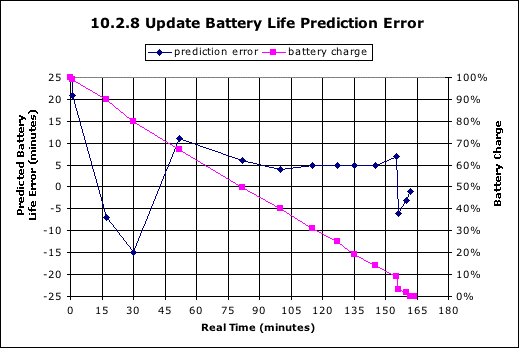 This is the result of a single test. The
computer was set in my normal mode and I was doing web surfing,
email, Solitaire Until Dawn, and iChat for most of the test. The
discharge was pretty linear until the last few minutes when the
power manager abruptly changed the state of charge. Also, the first
indication provided was over 4 hours and the indicator changed
wildly for the first minute or so. It didn't actually settle down
for an hour.
This is the result of a single test. The
computer was set in my normal mode and I was doing web surfing,
email, Solitaire Until Dawn, and iChat for most of the test. The
discharge was pretty linear until the last few minutes when the
power manager abruptly changed the state of charge. Also, the first
indication provided was over 4 hours and the indicator changed
wildly for the first minute or so. It didn't actually settle down
for an hour.
The actual battery life was nearly identical to the previous
test in the same conditions. Although I didn't time it accurately
under 10.2.7, the ultimate battery life has stayed roughly the same
under the same load conditions. Those that are having battery life
problem where the life is significantly shorter than the data
presented here probably actually have a bad battery and should get
it replaced. It is unlikely that the initial release of 10.2.8 did
their batteries in. It is more likely that the battery died on its
own at roughly the same time or was already on the way out. New
batteries with manufacturing defects are more likely to die in the
first few charge cycles than later and 10.2.8 came out just a few
days after the new PowerBooks started reaching customers.
Those that are having serious battery problems should get a copy
of X-charge or XBattery and run their own tests. Presenting Apple
with printed evidence of a malformed discharge curve may go a long
way in convincing them to replace a bad battery.
Panther Update
I received Panther (10.3) on about October 27, 2003 and in a
couple of days I had rerun my standard usage test. Panther did not
change my actual battery life at all. I did notice that after
periods of inactivity, the hard disk would actually spin down under
Panther, but not during actual usage so that didn't help. If your
computer is set to sleep in just a few minutes of inactivity, this
is a much more effective way of preventing waste of the battery's
precious energy.
After a period of usage with Xbattery running, it has recorded
the reported capacity of my battery which has settled at 3.7 ah or
very nearly at the spec for the battery. Others are reporting up to
4.5 ah and yet other are reporting much less.
Run this command in Terminal:
ioreg -l -w 0 | grep IOBatteryInfo
to get a report of the battery performance direct from the OS.
It'll look like this:
{"Capacity"=3711,"Amperage"=1200,"Current"=3702,"Voltage"=12487,"Flags"=1090519045}
The numbers are in "milli" units. 3711 = 3.711 and such.
- "Capacity" is the total battery capacity reported by the
battery when fully charged.
- "Amperage" will show the current draw to or from the battery.
If the number is 1200, this indicates that the charger is
connected. On older versions of Panther, this number is bogus
unless the computer is actually running on the battery. Later
versions of Panther have fixed this bug. If the computer is running
from a power adaptor, the battery current will be zero once the
battery is charged. Positive numbers mean charge current, negative
numbers mean discharge current.
- "Current" is the capacity left in the battery in its current
state of charge.
- "Voltage" is the current battery voltage.
There is a command script available at Angry Kitchen
Appliances that packages this information more neatly. Xbattery
packages it even more neatly yet.
Battery Update
Apple released an update to the battery manager about the same
time as 10.3.2. I reran my standard test and I got exactly the same
battery life as before. The difference is that the battery life
indicator was improved again and the indication of the total
capacity of the battery changed back to the value that I got the
first time that I ran a battery calibration. XBattery has kept a
running log of the indicated capacity of my battery ever since I
installed it. My battery capacity is now indicated at 3.944 Ah,
just under the spec for the battery. A new 15" AlBook battery
should have about 4.4 Ah of capacity
Notes on Lithium-Ion Batteries
The Good, the Bad and the Ugly
Apple, as well as most other laptop computer manufacturers, has
selected the Lithium Ion technology for its batteries. There are
several implications of this selection, some good, some not so
good.
Lithium Ion batteries currently have the highest energy density
figures of merit for any common battery technology. Smaller and
lighter batteries allow the design of smaller and lighter portable
equipment. This is a good thing. However, this does not come
without cost. Lithium Ion batteries also have the highest life
cycle cost of the common battery technologies.
Battery
University provides an excellent tutorial of the details for
those that are interested, but the bottom line is that Lithium Ion
batteries:
- Cost more to initially purchase
- Are more touchy about being properly charged (resulting in a
more expensive battery charger)
- Have limited life. They start to die from the day that they are
made.
There have been lots of consumer complaints about the lifetime
of Lithium Ion batteries. There is a reason for it. Nobody wants to
replace a battery that costs more than $100 every couple of years,
but with this technology, its just a fact of life. Maybe in the
future when the manufacturing technology improves, the lifetime
will improve also, but the simple fact is that for now, 3 years or
300 cycles (whichever comes first) is about it from a good battery.
Less can be expected from one that was poorly manufactured.
Further, even some of them made with a good overall manufacturing
process will die much sooner than they should due to latent and
undetected manufacturing defects.
There doesn't seem to be a way around the 3 year limit. The
batteries will degrade if they are used or not used. They can be
made to degrade faster if they are discharged completely flat more
than once a month or so. There is some evidence that the lifetime
in storage can be optimized a little if the battery is left at 40%
charge but even this is not a large effect.
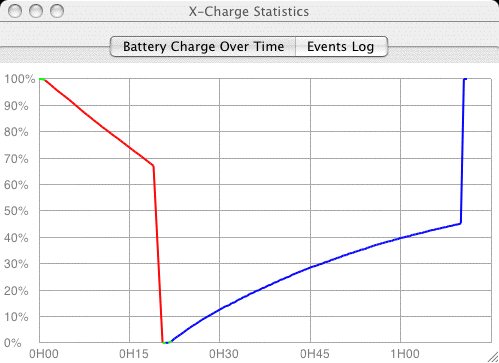 This is an iBook battery on its very last
legs as shown on an X-Charge capacity plot. When one of the four
cells in this battery starts to degrade faster than the others, the
voltage on that cell will drop rapidly when that cell discharges
and the whole battery will seem to die suddenly. In this case, you
may not even get the 10 minute warning, the voltage collapses so
fast that the only response the computer has is to suddenly go to
sleep. You can see the same thing on the recharge curve. When the
one dead cell rises in voltage, the other cells are still mostly
charged and the recharge curve terminates suddenly too.
This is an iBook battery on its very last
legs as shown on an X-Charge capacity plot. When one of the four
cells in this battery starts to degrade faster than the others, the
voltage on that cell will drop rapidly when that cell discharges
and the whole battery will seem to die suddenly. In this case, you
may not even get the 10 minute warning, the voltage collapses so
fast that the only response the computer has is to suddenly go to
sleep. You can see the same thing on the recharge curve. When the
one dead cell rises in voltage, the other cells are still mostly
charged and the recharge curve terminates suddenly too.
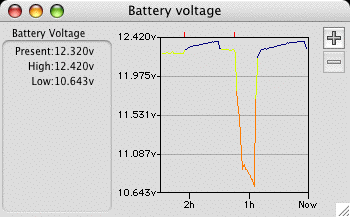 This same event was recorded by XBattery.
XBattery plots actual voltage in addition to calculated capacity.
In this case, the rapid decrease (and increase) of the voltage can
be detected. When a whole cell dies, the battery voltage should
drop by 3 volts, but you can't ever see that because the computer
cuts it off at a reduction of about 2 volts.
This same event was recorded by XBattery.
XBattery plots actual voltage in addition to calculated capacity.
In this case, the rapid decrease (and increase) of the voltage can
be detected. When a whole cell dies, the battery voltage should
drop by 3 volts, but you can't ever see that because the computer
cuts it off at a reduction of about 2 volts.
When a battery gets into this shape, it is history. There is
nothing that you can do except to buy another battery or be
tethered to your power adapter.
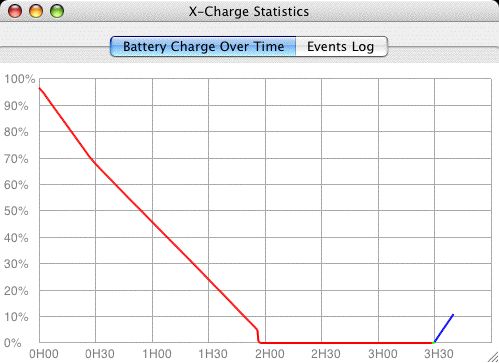 This
is an X-Charge plot of a still ok PowerBook battery that came with
the computer. However, this one has degraded to about 75% of its
former self. This is pretty normal degradation for a year of
service. The battery discharge curve is mostly linear except for
the first half hour were the load was higher. However, at the very
end, it got to about 5% capacity and abruptly died. This trend will
continue to higher and higher percentages until it looks like the
iBook battery shown above.
This
is an X-Charge plot of a still ok PowerBook battery that came with
the computer. However, this one has degraded to about 75% of its
former self. This is pretty normal degradation for a year of
service. The battery discharge curve is mostly linear except for
the first half hour were the load was higher. However, at the very
end, it got to about 5% capacity and abruptly died. This trend will
continue to higher and higher percentages until it looks like the
iBook battery shown above.
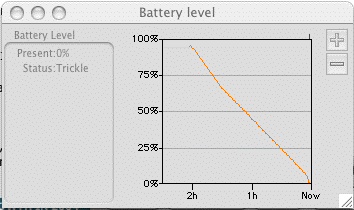 The is the same plot from XBattery. It shows
exactly the same data, but it isn't quite as easy to read.
The is the same plot from XBattery. It shows
exactly the same data, but it isn't quite as easy to read.
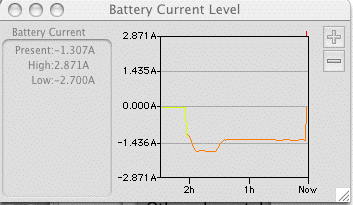 However, XBattery also plots current. Note
that a the current is higher (the curve is lower because discharge
current is defined as negative current) during the first half hour
when I was playing Pocket Tanks. This game demands more graphics
processor performance and results in higher discharge rates.
However, XBattery also plots current. Note
that a the current is higher (the curve is lower because discharge
current is defined as negative current) during the first half hour
when I was playing Pocket Tanks. This game demands more graphics
processor performance and results in higher discharge rates.
The uptick at the very end is when I plugged the computer back
in to capture the screen shots. The voltage had increased abruptly
because the battery was being charged.
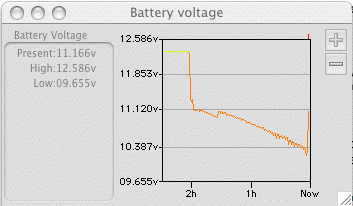 When fully charged, the battery voltage is
about 12.3 volts, but during the very first part of the discharge,
it decreases by over a volt. Then the voltage on the battery
decreases pretty linearly (except for the kink when I quit Pocket
Tanks and the load decreased) until about 10.3 volts when the
computer sleeps and no more data is taken. As time goes on and this
battery degrades more, the voltage will drop below 10.3 volts
sooner and sooner until eventually it becomes unusable.
When fully charged, the battery voltage is
about 12.3 volts, but during the very first part of the discharge,
it decreases by over a volt. Then the voltage on the battery
decreases pretty linearly (except for the kink when I quit Pocket
Tanks and the load decreased) until about 10.3 volts when the
computer sleeps and no more data is taken. As time goes on and this
battery degrades more, the voltage will drop below 10.3 volts
sooner and sooner until eventually it becomes unusable.
Because the batteries die on their own, it is not a good plan to
buy a spare battery unless you actually use it often. It will die
almost as fast as the primary battery. When you do buy a new
battery, try to determine the date of manufacture and pick a fresh
one, just as you would look at the expiration dates on milk cartons
at the supermarket. Batteries sold at discount have probably
already expired and the vendor knows it. That's why he sells them
cheap. Batteries for computers that are currently in production are
probably fairly fresh as the stock will be consumed. This assumes
that the computer manufacturer properly allocates batteries to
production and aftermarket sale. Batteries for computers long out
of production will almost certainly be stale. If you buy a laptop
computer at the end of its production run and the battery model is
not being reused in current production, then you can be pretty sure
that you'll only be able to find stale batteries as replacements
when you need one. If you do go for the "end of product life"
computer at closeout discount, try to pick one that uses a battery
that has been carried over to the newest model. That way, when you
need a battery, there might still be some in current
production.
A Year Later
I've had the PowerBook for a little more than a year and I find
that, overall, the battery life is not adequate for most laptop
usage. The computer just draws too much power due to the higher
performance processor and the larger screen. The extra power also
means extra heat. This computer tends to run too warm to
comfortably keep on my lap.
As a portable desktop computer however, it does great. The
screen is large, bright and sharp. The processor performance is
good enough for almost every usage (at least with today's software)
and the keyboard is good.
When I travel now, I tend to take my old 500 MHz dual USB iBook.
There are several reasons I do this.
- The iBook is smaller and packs easier
- The iBook has less replacement cost so that if I lose or damage
it in travel, the loss is not as severe
- The life on the battery is easily double that of the Powerbook.
I typically get 4+ hours on the iBook vs 2+ hours on the PowerBook.
Further, the battery in the PowerBook is dying now barely makes 90
min. I also have a 2nd battery for the iBook already.
My wife now has a 12" iBook G4 so I ran some tests on current
draw on the three machines. These were all done with an aggressive
power conservation strategy. The Airport is off and the processor
performance is set to reduced. I ran the tests with 3 screen
brightness, off, one bar and max. As expected, the faster computers
draw more current and therefore won't last as long on a
battery.
Running Current Comparison
| Computer |
Clock Speed |
Screen Off
Amps |
Screen Dim (1 Bar)
Amps |
Screen Full Bright
Amps |
| 15" PowerBook |
1.25 GHz |
0.97 |
1.23 |
1.54 |
| 12" iBook G4 |
1.07 GHz |
0.67 |
0.73 |
1.02 |
| 12" iBook G3 |
500 MHz |
0.53 |
0.65 |
0.91 |
As expected, the slower computers draw less current. Further,
the screen size matters. The Powerbook has almost twice the screen
area to update and illuminate. Set with a dim screen, the iBook G3
draws half the current as the PowerBook G4. For the same battery
capacity, it will run twice as long. This matters a lot on an
airplane. Further, the smaller computer is easier to use in a
cramped airplane coach seat.
I'm beginning to believe that the best arrangement for desktop
and portable utility would be TWO computers. The smallest possible
laptop and a smoking desktop (like an iMac G5) won't cost that much
more than a really nice laptop and provide better utility in both
situations.
A Year+ Later and a New Battery
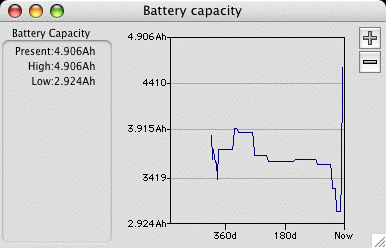 After 14 months, the original Apple battery was
beginning to show its age. It's capacity was declining rapidly as
can be seen in the graph. Under normal loads, it was providing only
a little more than an hour of service. As the XBattery graph shows
the early days, the reported capacity of the battery was jumping
all over the place, mostly because of system software updates that
changed how the battery was used and reported. After the first few
months however, the downward trend was obvious. This particular
battery never reported as much as 4 ah, if it met spec it should
have at least been about 4.5 ah. At last report it was under 3 ah
and declining quickly.
After 14 months, the original Apple battery was
beginning to show its age. It's capacity was declining rapidly as
can be seen in the graph. Under normal loads, it was providing only
a little more than an hour of service. As the XBattery graph shows
the early days, the reported capacity of the battery was jumping
all over the place, mostly because of system software updates that
changed how the battery was used and reported. After the first few
months however, the downward trend was obvious. This particular
battery never reported as much as 4 ah, if it met spec it should
have at least been about 4.5 ah. At last report it was under 3 ah
and declining quickly.
Instead of buying an Apple battery, I decided to try the Newer Technology battery. This
one was claimed to have 10% or so higher capacity than the Apple
battery at the same price. However, it's downside is that when it
runs down, it WON'T put the computer to sleep. It'll just go
on until the computer shuts down without warning causing a total
loss of any unsaved work. This battery started at 4 ah out of the
box, improved to 4.45 ah after one discharge/charge cycle, improved
again to 4.9 ah after the second cycle. This probably where it will
stay for awhile before it starts its inevitable death spiral. It
also runs the computer for 3 full hours with the airport running
and 4 bars of screen brightness. The best I could ever do with the
old battery was 2 hr 40 min with no airport and one bar of screen
brightness.
While I haven't actually run the battery down in a full power
conservation mode, when I set the screen brightness to one bar and
turn the airport off, the projected battery life is just over 4
hours, far better than it has ever been before. Based on the
difference in current consumption (1.2 vs 1.5 amps), this is just
about right.
However, to avoid beating up on the battery by discharging it
too deeply, I have to keep an eye on the state of charge and plug
back in when the battery voltage reaches 10 volts (as reported by
XBattery). The computer will shut down at 9 volts but since the
battery voltage fades quickly below 10 volts, this is less than 5
minutes difference. The Apple battery will put the computer to
sleep at 10 volts.
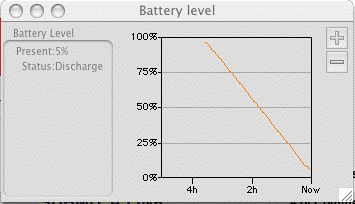 I ran a similar discharge test on the
Newer Technology battery and I find that not only does it have
considerably more capacity that my old and tired Apple battery,
it's discharge characteristics are markedly different. While the
XBattery capacity plot looks pretty linear (because the load was
nearly constant, the following curves tell a different story.
I ran a similar discharge test on the
Newer Technology battery and I find that not only does it have
considerably more capacity that my old and tired Apple battery,
it's discharge characteristics are markedly different. While the
XBattery capacity plot looks pretty linear (because the load was
nearly constant, the following curves tell a different story.
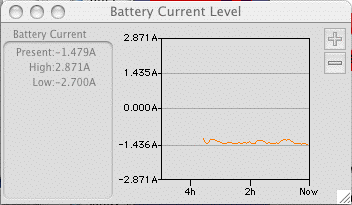 Just for reference, the load current is
similar to the previous test except no Pocket Tanks this time.
Just for reference, the load current is
similar to the previous test except no Pocket Tanks this time.
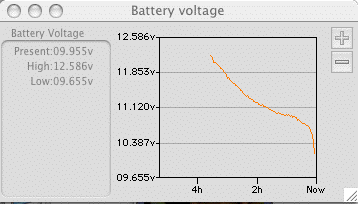 However, the voltage characteristic is very
different. The voltage stays higher longer at the beginning and
folds over more gradually at the end. Since this battery doesn't
activate the sleep mode by itself, I had to do it. The Apple
battery cuts off at 10.3 volts because there isn't much life in the
battery after that. I let this discharge go to 10 volts but it is
clear that the battery is done.
However, the voltage characteristic is very
different. The voltage stays higher longer at the beginning and
folds over more gradually at the end. Since this battery doesn't
activate the sleep mode by itself, I had to do it. The Apple
battery cuts off at 10.3 volts because there isn't much life in the
battery after that. I let this discharge go to 10 volts but it is
clear that the battery is done.
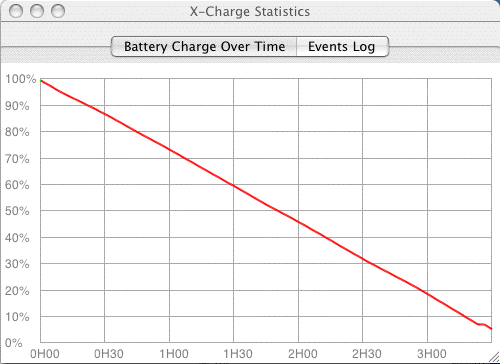 X-Charge thinks that the battery
isn't quite done at about 5% capacity. At the very end of the
discharge, the capacity curve starts heading down again but never
reaches zero as the Apple battery does. This probably indicates
that the characteristics of the battery monitor computer in this
battery are different that the one that is in the Apple battery.
What's more is that it lasted 3 hours and 30 minutes, something
that the Apple battery NEVER did.
X-Charge thinks that the battery
isn't quite done at about 5% capacity. At the very end of the
discharge, the capacity curve starts heading down again but never
reaches zero as the Apple battery does. This probably indicates
that the characteristics of the battery monitor computer in this
battery are different that the one that is in the Apple battery.
What's more is that it lasted 3 hours and 30 minutes, something
that the Apple battery NEVER did.
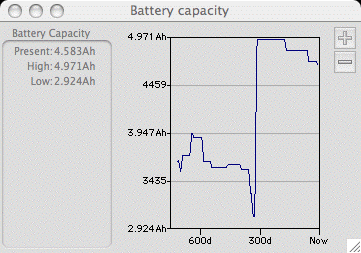 Yet another year has gone by and the
Newer battery is starting to show its age. This is the capacity
plot over a full year of usage. The capacity is down something near
10% which is pretty good for a year. I would have expected more
like 20%.
Yet another year has gone by and the
Newer battery is starting to show its age. This is the capacity
plot over a full year of usage. The capacity is down something near
10% which is pretty good for a year. I would have expected more
like 20%.
A little over 300 days back, the battery was changed. There are
several small steps on the large up-slope of the new battery that
were points were the battery was cycled. After 3 cycles, it had
attained it's full capacity. Each subsequent downstep was a deep
battery cycle that forced a recalibration and each time the battery
lost a little capacity due to aging. The original Apple battery,
starting at over 800 days back also improved after a few cycles
before it started it's death spiral.
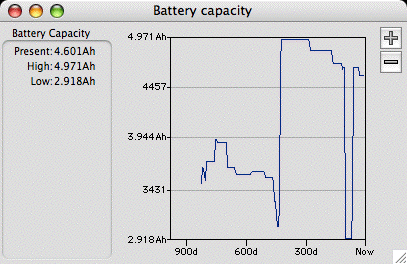 After another 120 days or
so, the Newer battery is continuing to degrade. The big blip about
100 days back was short stint on the original Apple battery. Each
step in the curve represents a "calibration" of the battery.
After another 120 days or
so, the Newer battery is continuing to degrade. The big blip about
100 days back was short stint on the original Apple battery. Each
step in the curve represents a "calibration" of the battery.
This particular Newer battery was an early one that won't force
the computer to sleep when it becomes discharged. Apparently, the
more recent batteries from Newer now work properly in this
regard.
Impending Death of the NewerTech Battery
I bought the NewerTech battery sometime in late 2004. It's now
late 2007 and the battery is showing its age. I hadn't been using
the PowerBook much on the battery simply because it gets to hot to
use on a lap and I was traveling with an older iBook. The iBook got
much better battery life and, because it was so slow, it didn't get
hot. The PowerBook was being used as a portable desktop computer
where it did very well. Therefore, the battery didn't get exercised
very much, it only had 103 full cycles on it in 3 years.
However, yesterday, I was using it without the charger. I
noticed that is said that it had an hour to go which was reasonable
for the amount of usage that it had just received. Then a minute
later, I got the reserve power warning. Then it went to sleep in a
couple of minutes. What had happened?
First, the sleep issue. When the battery was new, NewerTech
claimed that the battery would not put the computer to sleep when
it ran out of gas, now it is doing that. All through Panther and
Tiger, it had acted as NewerTech claimed. However, I have Leopard
now and maybe that changed the behavior of the computer some. I
really don't know, but something has changed.
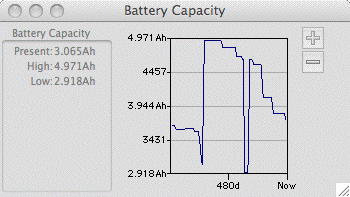 Second, the apparent power crash. The graph
at the left shows the computed capacity of the battery over four
complete discharge/charge cycles as recorded by MyBattery. The
first discharge started at the very left edge of the graph. Note
that the capacity was decaying normally for a little while to about
66% and then just dropped. On the following charge cycle the
battery apparently recovered to about 40% and then the computer
said it was good. This is a symptom of a seriously wounded battery.
On the next three discharge/charge cycles, the battery apparently
IMPROVED. On the last discharge cycle, it got to 20% before
crashing and the improvements were getting incrementally smaller.
This battery is clearly still wounded, but cycling it apparently
increased it's capability as the discharge time was improving
too.
Second, the apparent power crash. The graph
at the left shows the computed capacity of the battery over four
complete discharge/charge cycles as recorded by MyBattery. The
first discharge started at the very left edge of the graph. Note
that the capacity was decaying normally for a little while to about
66% and then just dropped. On the following charge cycle the
battery apparently recovered to about 40% and then the computer
said it was good. This is a symptom of a seriously wounded battery.
On the next three discharge/charge cycles, the battery apparently
IMPROVED. On the last discharge cycle, it got to 20% before
crashing and the improvements were getting incrementally smaller.
This battery is clearly still wounded, but cycling it apparently
increased it's capability as the discharge time was improving
too.
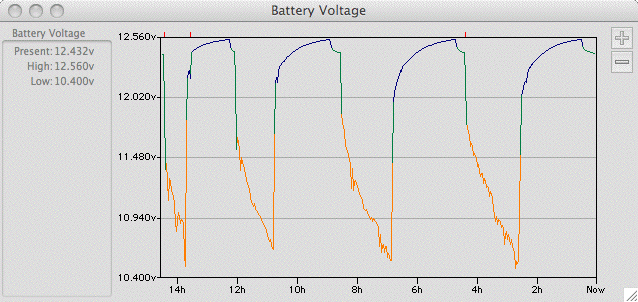 This curve is the same event. It shows the
battery voltage. At the left is an abrupt drop in battery voltage
that occurred when the charger was unplugged. This drop is due to
the internal resistance of the battery, about a volt at a load
current of about 1.5 amps. Then the discharge occurred, but it was
quite noisy. The noise is occurring because the internal resistance
of the battery is unstable. When the voltage got almost to 10.4
volts, the computer went to sleep. The rapid rise following is the
very first part of the charge cycle. Then the battery would charge
until the voltage reaches about 12.56 volts and the charge shuts
off. The battery voltage decays slowly for about 15 minutes. When
it had stabilized, I started another discharge cycle.
This curve is the same event. It shows the
battery voltage. At the left is an abrupt drop in battery voltage
that occurred when the charger was unplugged. This drop is due to
the internal resistance of the battery, about a volt at a load
current of about 1.5 amps. Then the discharge occurred, but it was
quite noisy. The noise is occurring because the internal resistance
of the battery is unstable. When the voltage got almost to 10.4
volts, the computer went to sleep. The rapid rise following is the
very first part of the charge cycle. Then the battery would charge
until the voltage reaches about 12.56 volts and the charge shuts
off. The battery voltage decays slowly for about 15 minutes. When
it had stabilized, I started another discharge cycle.
Note that at the beginning of each discharge, the battery
voltage dropped a little less each time as the internal resistance
of the battery was apparently becoming less. Also note that on
subsequent discharges, there was less noise on the discharge. If
you look back at the voltage plot when the battery was new, there
is not nearly as much noise. Note that this data is recorded only
once every 15 seconds so that there is a very good chance that
there is a lot going on that is under sampled and doesn't show up in
this data.
This kind of instability can only be bad. The battery is clearly
wounded and nearing the end of it's life although it might go a
little longer before it dies completely.
This is the history of this battery. It's
total capacity continues to degrade as all Li-ion batteries will.
After 5 or 6 complete charge/discharge cycles, the battery began to
behave "normally" although with reduced total capacity. This can
never be recovered.
After a couple of weeks floating on charge in the computer, the
NewerTech battery began to return to it flakey ways, dropping out
somewhere in the discharge. A couple more power cycles brought it
back again but it is clear that the battery will fail completely
fairly soon.
Death of the NewerTech Battery
It's November 2008 and the NewerTech battery is four full years
old and it's reached the point of near uselessness. The Apple
battery is degraded, but it still lasts 90 minutes at full screen
brightness with the Airport running. It was weak however and it
took a full discharge and recharge cycle to recover. This battery
will be toast soon as well.
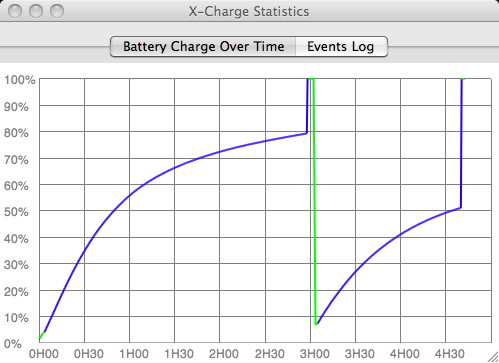 I normally use the Powerbook on a
desktop and plugged in. However, while visiting the in-laws I was
using it from the Apple battery which died abruptly without
warning. I plugged in the other one and it died even more quickly.
This plot is the recharge curve of these batteries, the NewerTech
battery first because it was in the computer, then the Apple
battery. From this result, I figured that BOTH batteries were
toast, or nearly so.
I normally use the Powerbook on a
desktop and plugged in. However, while visiting the in-laws I was
using it from the Apple battery which died abruptly without
warning. I plugged in the other one and it died even more quickly.
This plot is the recharge curve of these batteries, the NewerTech
battery first because it was in the computer, then the Apple
battery. From this result, I figured that BOTH batteries were
toast, or nearly so.
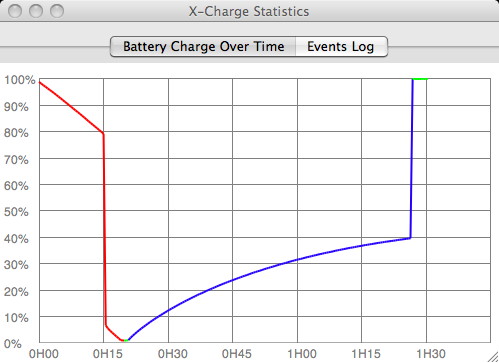 A full discharge and recharge
cycle of the NewerTech battery shows the problem. After 15 minutes,
it just died.
A full discharge and recharge
cycle of the NewerTech battery shows the problem. After 15 minutes,
it just died.
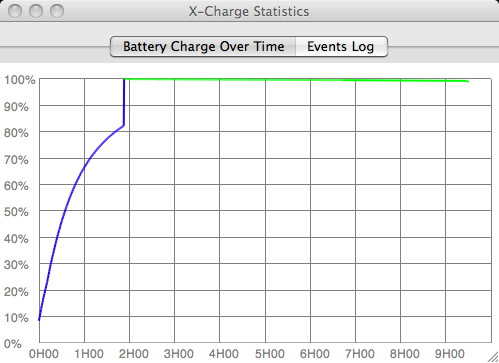 Another recharge didn't look a lot different
from the first recharge.
Another recharge didn't look a lot different
from the first recharge.
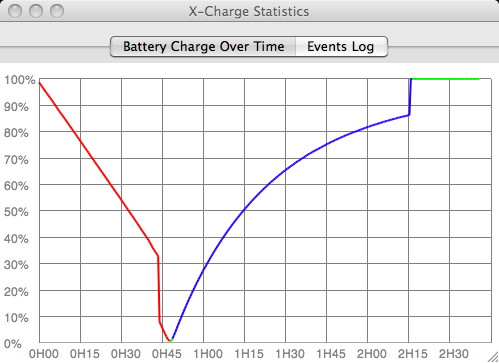 A final discharge resulted in
only 45 minutes of runtime, and the recharge cycle is not
materially changed. This battery is not reliable.
A final discharge resulted in
only 45 minutes of runtime, and the recharge cycle is not
materially changed. This battery is not reliable.
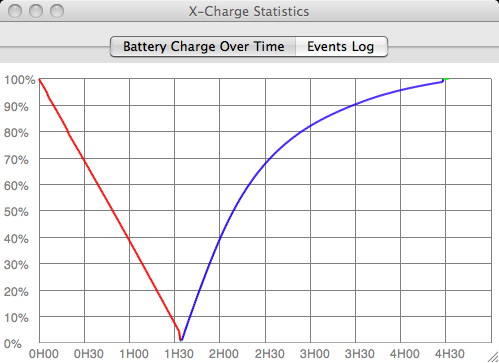 However, the Apple battery
recovered after it's first recharge as indicated by this
discharge/recharge cycle. It represents a degraded, but still
usable battery. The runtime of 90 minutes compares to about 3 hours
when the battery was new.
However, the Apple battery
recovered after it's first recharge as indicated by this
discharge/recharge cycle. It represents a degraded, but still
usable battery. The runtime of 90 minutes compares to about 3 hours
when the battery was new.
A New Apple Battery
It's January 2009 and I've started using the PowerBook as my
travel computer as the iBook (purchased in June 2001) has mostly
died. The CCF tube in the backlight often fails to come on or
flickers off after a few minutes. It has been relegated to a
battery charger for its, still good, battery that my wife uses as a
2nd battery for her iBook. But since the PowerBook is now my travel
computer, I need a new battery for it.
The NewerTech battery has been put out it's misery so all I've
got is the one weak Apple Battery, not sufficient for use away from
AC power.
I have elected to purchase another Apple battery because the
original one lasted longer than the NewerTech battery. Even though
the Apple battery has lower rated capacity that a new NewerTech one
(by about 10%) my experience indicates that the Apple battery may
hold up longer. This one will probably outlast the computer which
is now 5 1/2 years old. The data doesn't show as many days as there
are in 5 1/2 years but days are only recorded when the computer is
actually used with MyBattery running. Since 2006, the PowerBook has
spent many days sleeping all day as I used an iMac for daily
work.
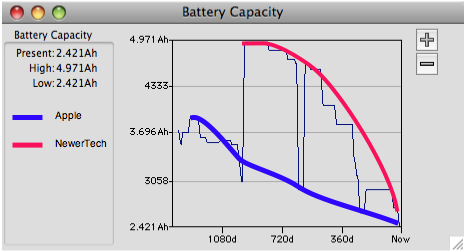 This is the "final" capacity curve
for these two batteries. The NewerTech battery started out better
but degraded much faster. Maybe this is because the NewerTech
battery actually spent more time in the computer and accumulated
more charge/discharge cycles.
This is the "final" capacity curve
for these two batteries. The NewerTech battery started out better
but degraded much faster. Maybe this is because the NewerTech
battery actually spent more time in the computer and accumulated
more charge/discharge cycles.
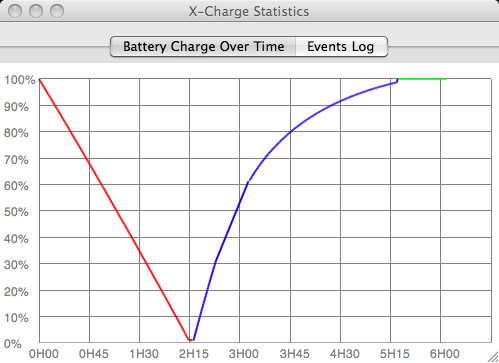 This is the
most recent discharge/charge curve for this battery. The computer
was set to it's "do nothing mode" for minimum current consumption
and it still did 2:15. When the discharge started, the computer
predicted 2:19. The battery is at about 2.4 Ah vs 4 Ah when new so
I didn't expect it to last this long. However, the current drawn
during the discharge varied between 1 and 1.1 amp increasing in
current as the battery voltage decreased. This is less than I can
recall it ever has been. The lowest actual data on this page is 1.4
amps and I remember that the current in the minimum consumption
case used to be 1.27 A. There have been 3 OS rev's (using 10.5.6
now) since I took the original data and couple of firmware revs.
Maybe Apple found a way to make the computer draw less current.
This is the
most recent discharge/charge curve for this battery. The computer
was set to it's "do nothing mode" for minimum current consumption
and it still did 2:15. When the discharge started, the computer
predicted 2:19. The battery is at about 2.4 Ah vs 4 Ah when new so
I didn't expect it to last this long. However, the current drawn
during the discharge varied between 1 and 1.1 amp increasing in
current as the battery voltage decreased. This is less than I can
recall it ever has been. The lowest actual data on this page is 1.4
amps and I remember that the current in the minimum consumption
case used to be 1.27 A. There have been 3 OS rev's (using 10.5.6
now) since I took the original data and couple of firmware revs.
Maybe Apple found a way to make the computer draw less current.
This will compare to the new battery after it gets cycled a few
times.
 The new Apple M1048
battery arrived on Jan 27, 2009. As delivered, it had a 25% charge
level. It got charged immediately and left to trickle charge
overnight.
The new Apple M1048
battery arrived on Jan 27, 2009. As delivered, it had a 25% charge
level. It got charged immediately and left to trickle charge
overnight.
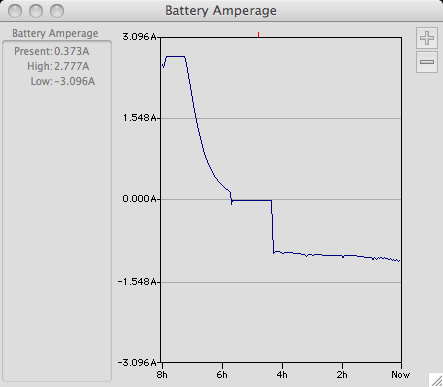
The charge portion of the curve starts at the very left at -8
hours. The timeline on the XBattery plots is for waking time only.
There are little orange tick marks along the tops of the curves
that show when there was a period of sleep. The thing to note is
that the charge current stays virtually flat for the first hour or
so. The older battery would usually display an almost immediate
decrease in charge current and the charge cycles would take much
longer, over 3 hours. This one charged in a little more than 2
hours. The computer then reported that the capacity of the new
battery is 4.503 Ah. This may change a little over the next two or
three discharge/charge cycles.
The test discharge in the "do nothing" mode (brightness=1 tick,
AP and BT off, only XCharge and XBattery running, Time Machine off)
started at 1.01 amps and finished at 1.160 amps. This is shown from
-4 hours and Now.
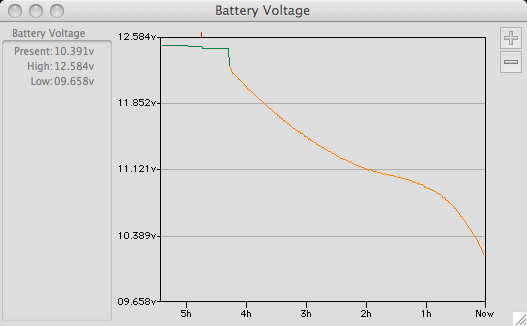 The discharge voltage curve
started off at 12.236 volts and finished at 10.204 volts although
the last update on the screen was a little higher. The eyeball
integral of this curve is about 11.2 volts.
The discharge voltage curve
started off at 12.236 volts and finished at 10.204 volts although
the last update on the screen was a little higher. The eyeball
integral of this curve is about 11.2 volts.
Taking the average current to be 1.075 amps, the average voltage
to be 11.2 volts and the duration of the discharge at 4.25 hours,
this works out to a capacity of about 51 watt-hours, pretty close
to the 50 watt-hour spec for the battery. The amp-hour indicated by
these numbers is 4.6 Ah, pretty close to the 4.5 Ah reported after
the first charge.
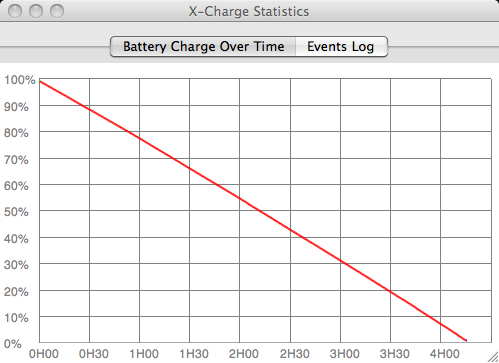 The discharge capacity curve is
a straight line ending at virtually zero capacity. This indicates
that the little computer in the battery had a pretty good handle on
the battery's capability.
The discharge capacity curve is
a straight line ending at virtually zero capacity. This indicates
that the little computer in the battery had a pretty good handle on
the battery's capability.
I'm going to cycle this battery three times before I take more
data as Li-ion batteries often require some exercise before they
develop full capacity.
The 2nd discharge test under the same conditions ran just a
little longer, 4:20, and the reported battery capacity increased
just a little to 4.633 Ah, otherwise it is the same. This battery
appears to be conditioned and is virtually exactly what Apple
claims it to be.
I reran the run time tests that I had done years ago in late
2003 to see what might have changed in all that time. The only
difference this time, besides the new battery, is that the computer
is running Leopard. For these tests, I turned Time Machine off as
well.
Run Time Tests, New Apple Battery
| Test Mode |
Apple's Estimate |
Test Result |
Notes |
| Minutes |
| Average Light Duty Use |
214 |
218 |
e-mail, text editing, web surfing, some short periods of
intensive processor use |
| Play CD in iTunes |
189 |
169 |
A CD was set to play over and over with headphones |
| DVD Test |
148 |
141 |
long enough to play through one long DVD |
| Pocket Tanks |
predict |
run |
Highest performance, fan running intermittently |
| 155 |
144 |
Reduced Performance, fan didn't run |
| Doing Nothing |
261 |
260 |
Bluetooth & Airport off
Display backlight 1 bar
Reduced performance
Apps running, X-charge, Finder, XBattery
Just sitting there doing nothing |
What changed, besides much better run times, is that the run
time indicator is much more accurate. This is probably due to any
of a number of software updates that have happened since 2003. The
computer now has enough run time to be useful as a laptop computer
even though the heat would prevent usage on a lap for that
long.
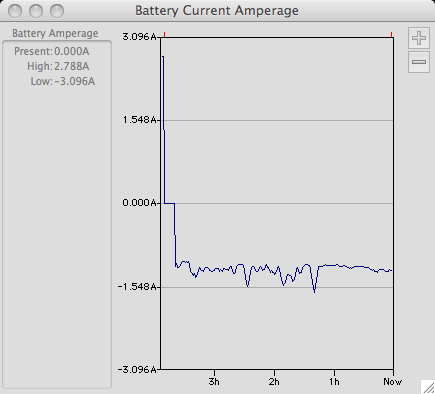 This is the running current during
the "light duty" test. There were times when the CPU usage went to
max (in Reduced processor mode) and the system drew more current.
There were times that I wasn't doing much at all and the current
stayed pretty constant. This mix is probably representative of what
I would expect during my usage of a laptop computer while running
on a battery.
This is the running current during
the "light duty" test. There were times when the CPU usage went to
max (in Reduced processor mode) and the system drew more current.
There were times that I wasn't doing much at all and the current
stayed pretty constant. This mix is probably representative of what
I would expect during my usage of a laptop computer while running
on a battery.
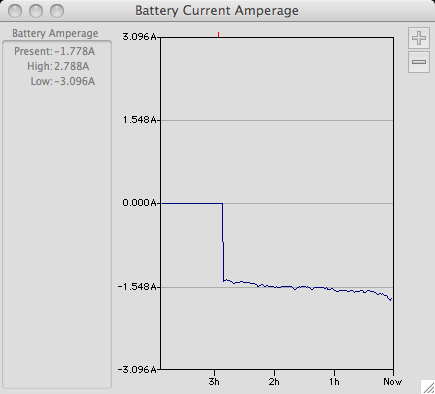 The CD discharge current is a lot
less noisy because the load is constant over time EXCEPT that there
is a trend for the current to increase as the voltage (next curve)
decreases. The current increase is more pronounced at the very end
where the battery voltage is collapsing rapidly.
The CD discharge current is a lot
less noisy because the load is constant over time EXCEPT that there
is a trend for the current to increase as the voltage (next curve)
decreases. The current increase is more pronounced at the very end
where the battery voltage is collapsing rapidly.
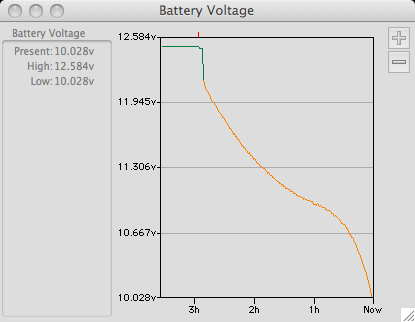 At the very end of the discharge,
the voltage dies off rapidly as the last of the charge in the
battery is extracted The power conversion electronics in the
computer wants to supply constant power to the computer so that the
battery has to supply more current to make up for the loss of
voltage over time.
At the very end of the discharge,
the voltage dies off rapidly as the last of the charge in the
battery is extracted The power conversion electronics in the
computer wants to supply constant power to the computer so that the
battery has to supply more current to make up for the loss of
voltage over time.
The DVD test drew even more current, 1.8 to 2.0 amps, and
correspondingly ran shorter. However, it was long enough to get
through Start Wars Episode III from the beginning to the end of the
credits. After watching Episode III for just the 2nd time, I came
to the conclusion that it was a pretty crummy movie.
18 Months on the Apple Battery
I had been running that same battery for about 18 months without
calibration. When I ran it flat again with minimal usage, minimal
brightness and wireless turned off, it ran for 3:45, just a little
less than when it was new. This is good.
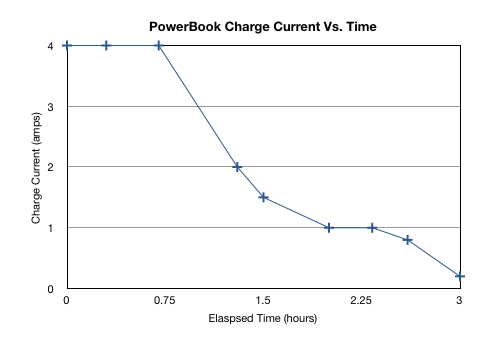 I recharged the battery from an
inverter running from my trailer battery to see what the charge
current looked like over time. This is it. The data was taken at
irregular intervals until the computer indicated that it was
charged somewhere between 2.5 and 3 hours with the computer
sleeping all during the charge. The residual current at the end is
the overhead current of the inverter running with no load.
I recharged the battery from an
inverter running from my trailer battery to see what the charge
current looked like over time. This is it. The data was taken at
irregular intervals until the computer indicated that it was
charged somewhere between 2.5 and 3 hours with the computer
sleeping all during the charge. The residual current at the end is
the overhead current of the inverter running with no load.
[ Mac Tips ] [ Next Tip ]
This page has been accessed  times since Sep 26, 2003
© 2003-2012 George Schreyer
Created 26 Sept 2003
Last Updated February 22, 2012