Thoughts On Computer Upgrades
[ Previous Tip ] [ Mac Tips ] [ Next Tip ]
Note: This page is a running commentary on my experiences and expectations about computer upgrades. Since it was originally written, it has been edited and updated many times to keep it current. The timeline may seem a bit jumpy in places but new information was added in the place that it seemed most appropriate for cohesive story.
It's mid-2005 and I thinking about my next computer. I've been buying and upgrading personal computers since 1979. My very first computer was a 16 bit LSI-11 with a 10 meg hard disk and a romping 60 kB of RAM. At this time an "advanced" personal computer was an S-100 box with some 8 bit processor in it. The LSI-11 computer was fine for UCSD Pascal software development and it made me a bunch of money. Since then I've gone through Z-80's, 8086's, and the whole variety of Motorola processors in a bunch of Macintosh's. Although I've never personally owned a DOS/Wintel machine and probably won't ever, I do use Wintel stuff at work, but only because I don't have a choice. If they offered me a Mac (fat chance), I'd take it in a heartbeat. Windows is a POS. A day doesn't go by without Windows finding some way to irritate me.
Over the years, I've developed a philosophy on upgrades. Since there is always a newer and better computer to buy, the question is how much better does it have to be to justify buying it. One can spend a fortune "upgrading" to marginally better hardware with relatively little performance improvement. In order to more or less keep up with the times and still not break the bank, I've developed some personal upgrade rules.
After many years of iterations I had settled on what I call the "4X" rule. In order to justify the expense the new computer or upgrade needs to have 4 times the capability in processing speed, RAM and disk as compared to the existing computer. This has worked pretty well and kept me at least near the state of the art. By the time that those criteria are met, the graphics hardware has usually improved significantly as well.
When I buy a computer, I plan to use it pretty much box stock. I usually upgrade RAM because new computers never come with enough, but the rest of the hardware stays the way that it came. Open architectures that allow various pieces to be upgraded piecemeal don't hold much appeal for me. One can spend a fortune on "goodies" to enhance the performance of a computer. I'd rather wait and save my pennies to get a whole new computer in one shot and get everything upgraded at once.
I've done CPU upgrades on several older Macintoshes, taking them from PPC 601's or 603e's to G3's. These all worked and materially extended the usefulness of the computers, but they were all a hassle with special drivers and some hardware incompatibilities or kludges required. I don't want to mess with this again, especially since the newest computers have so much CPU smoke out of the box such that they won't need an upgrade during their normal service lives.
One serious problem with Macintosh computers is that they last so damn long virtually eliminating a major forcing function for an upgrade. The hardware seems to be reliable and the OS and apps stay useful for a very long period of time. I can still run applications dating from 1984 on my PowerBook G4. I have used the original 128k Macintosh for some software development and the fat Mac, MacPlus, Mac II, Quadra 700 and PowerMac 6100 at work (before my workplace turned to the dark side). My oldest personal Mac, a Classic, is over 15 years old and it still works and runs OS 7.5.5 which was released many years after the computer. Even though it is not of much value anymore I keep it around anyway. I've got several others in the 10 to 12 year range, all of which still work and none of which get used.
If an old computer craps out it is easier to justify a replacement. However, it if still plugs along it is harder to justify an upgrade to a newer model. PC hardware, especially the cheaper stuff, seems to fall by the wayside in maybe 3 years or so, either by hardware failure or because the newest OS and apps won't run on it well or at all. Macs seem to keep their utility for 7 or more years. By that time, they have fallen WAY behind even though they may still work fine in comparison to what they did when they were new.
As of 2003 or so my 4x rule started falling apart. Computers in the olden days were always so short of resources that improvements in any performance parameter really helped. Newer computers have grown in capability faster than many applications can use those capabilities so that many newer computers actually have excess resources for most tasks. One exception is gaming where the newer games seem to require the most available smoke and then some.
Old computers also do not hold their value very well so that selling them after a couple of years usually amounts to a near total loss. I either keep them (haven't figured out why yet) or give them to a local school. This means that unless one cycles through computers less than every year, selling the old ones doesn't do much to help offset the cost of a new one.
My immediate previous computer was a 500 MHz G3 iBook with 640 meg of RAM and 10 gig of disk. It was clear that the computer was hurting for processor performance and disk even when it was new, but the amount of RAM seemed to be adequate. When I upgraded, I nearly met the 4x rule. My current computer is a 1.25 GHz Aluminum G4 PowerBook with 2 Gigs of RAM and 80 gig of disk. It is almost 4x as fast based on what it does, it has over 3x the RAM and 8x the disk.
For the next upgrade I could really blow some bucks and get a dual or quad 2.5 GHz G5 that would meet the 4x requirement for performance. However, for RAM and disk I'm not sure that another 4x is really needed at this time. It is clear that I don't really need the RAM that is in my PowerBook now. I really haven't noticed an overwhelming improvement over the 512 meg of RAM that it came with. There have been times where the extra RAM helps, but it is probably not worth what it cost (about $400). I could use some more disk, but I don't need 4x even after almost 2 years. Another 50% would probably cover me for quite a while. I don't keep video on the computer which would be the next up and coming disk hog. I have no plans or desire to dive into HD TV because I hardly watch TV anyway. Besides, this is what iPods are for now. Home video could eat disk in large chunks. I've found that I need about 40G free to work with 2 hours of conventional home video, HD would probably triple that.
What is really complicating the issue is that this PowerBook G4 is still adequate. It took 2 years but I've done what I wanted to do when I bought it and I really don't need more smoke especially since the intensive tasks that I bought it for are, for the most part, complete.
In 2003 after two years of service, I ran the iBook out of gas and I needed a new computer. I had used the iBook to create about half of my music collection. I was able to rip all my existing CDs and digitize part of my LP's and cassette tapes. I could have done them all except that my iTunes Library outgrew the disk in the iBook. I bought the PowerBook G4 the day that it was announced in September 2003 to finish my music library, to digitize my video library (with the aid of a new mini-DV camcorder and an old 8 mm analog camcorder) and to digitize my still photo collection (with the aid of an inexpensive scanner) and then to organize my entire digital still photo collection. I also wanted to play Return to Castle Wolfenstein which was totally unusable on the iBook. It's taken me two years, but I have about 5000 tunes, 19,000 photos and 20 years of home video in digital form (consuming about 600 DVD's, two copies each of the rendered movies and the original iMovie projects). I played through RtCW twice. The G4 was up to the tasks although sometimes it took some careful disk resource management to accomplish it.
I really don't NEED a new computer because this G4 has already done the heavy lifting but I'm going to get one anyway when I really feel the need for a new toy. So, what to do for the next computer upgrade which is probably more than a year away anyway?
After using laptops exclusively since 2001 and most of the time since 1995 (PowerBook 100, PowerBook 1400, original dual USB iBook and 15" Aluminum PowerBook), I figured that I was probably going to stay with laptops and never buy another desktop computer. After using this PowerBook for two years, I have had to rethink that position. The PowerBook is a great computer and it has been completely reliable, but it has one serious inherent and unavoidable problem.
It is too fast.
If there is one thing that a laptop is supposed to do that a desktop can't, it is to run on a lap and without external power. However, the faster a laptop computer is, the more power it consumes and the shorter it's battery life will be. The battery is the one difficult to replace resource that I need when I am on the road. The battery life of this computer is barely 3 hours if I really push conservation. 2 hours is more typical. My older iBook will do better than that (about 5 hours) primarily because it is slow and has a small screen. For most of what I do away from my desk, a small slower computer is adequate. The iBook is lighter, smaller, easier to pack and carry, runs cooler, fits in constrained spaces (such as airline coach seats) better and runs longer than the PowerBook.
Another serious problem related to speed is heat. Most of the power that comes from the battery has to leave as heat. The balance of the shed energy is visible light that radiates from the display. The PowerBook, even in reduced performance mode, simply runs too hot to keep on my lap, even though it is called a "laptop" computer. It should be more correctly called a portable desktop computer as it simply cannot be used on a lap for any extended period of time. The iBook, slow as it is, is much more user friendly when it comes to case temperature.
If I want a real fast laptop computer, I'm not going to get good battery life and it'll run too hot. Fast computers can be slowed to reduce power consumption and heat, but they will still consume more power and get hotter than a slower computer set to reduce consumption.
As a portable desktop computer, the Powerbook is outstanding. I use it that way when I travel between my home and mountain cabin. It sits on a desk in both places. If I'm going sit at my desk to work, I prefer to use the Powerbook. It does everything well enough and the screen is big and bright. However, as a laptop computer, the thing simply sucks. It gets too hot to keep on my lap. Apple pretty much admits this simple fact on their support pages. If I want to sit on the couch and watch a DVD or do some light work, I prefer to use the iBook. It can sit on my lap comfortably without getting more than just barely warm. The metal case of the PowerBook is good for providing a heat sink for the computer but bad as a thermal interface to the user. The case will conduct heat over large areas of the computer where it can be shed by convection. However the bottom, which tends to get the hottest, is the surface that rests on the lap. Even sitting on a desk, the upper surface can get too warm for comfort. I have found that placing the computer on the edges of two mousepads allows some air to circulate under the computer and the whole thing runs significantly cooler.
The iBook dissipates about 2/3 as much heat as the PowerBook when running and it has a polycarbonate case with much poorer thermal conductivity. The internally generated heat doesn't get to the outer surface nearly as well and the bottom of the computer gets only warm, not hot. However, this means that the computer is not as well cooled. If it made as much heat as the PowerBook, the fan would have to run much more often. Actually, in 5 years, I've only heard the fan on this iBook come on once, this was due to a rouge printer driver that went nuts and consumed ALL of the CPU for an extended period of time. Even with better convection cooling, the PowerBook fan comes on quite regularly when it is doing any significant work, sometimes BOTH fans come on.
I don't see any way around this heat and power problem with ANY kind of high performance laptop computer unless there is a significant change in the power/performance ratio of the CPU, more efficient display backlighting and better management of the power consumption of the disk. The performance that is packed into laptops these days simply outstrips their source of power and their ability to shed heat. Most laptops allow, or automatically switch to, reduced CPU performance to reduce power consumption and heat when lightly loaded with further reductions possible when operated on the battery. Even this is typically not enough as the speed reduction provided is not extreme enough. Further, laptops with larger screens and faster graphics electronics are even harder to trim down.
The ultimate solution to the power and heat problem is to consume less power and therefore shed less heat. However, this comes at a cost. The computer cannot be expected to have performance approaching that of a desktop machine that doesn't have such power and heat constraints.
In the PC world, there is a device called a "DTR" or DeskTop Replacement computer. This is just a laptop on steroids, so much so that it can't be used on the lap at all. I just read a review of a dual core AMD unit that weighs in at about 15 lbs, consumes up to 200 watts of AC power and runs well less than an hour on its battery. It also costs close to $4,000. It has 3 fans on the bottom so that one cannot even put it on a lap without blocking the air flow to the fans. This is nuts. If one should want desktop performance, then one should simply buy a desktop machine. It is this kind of beast that Apple has refused to design because, IMHO, it is an ungraceful kludge. This is the primary reason that there never was a G5 PowerBook.
CMOS processors consume more power the faster that they are clocked. However, the relationship isn't linear. Power grows much faster than speed so that power consumption can go up by a factor of 4 at twice the clock speed. This means that a dual core processor at a given clock speed will do the same work as a single processor at twice the clock speed but at half the power PROVIDED that the OS can dole out processes to each processor efficiently and actually use both cores. This is the route that high end laptops will have to take to provide better performance without melting down. Fortunately, the Mac OS is pretty good at keeping multiprocessor machines load balanced, at least for dual core machines.
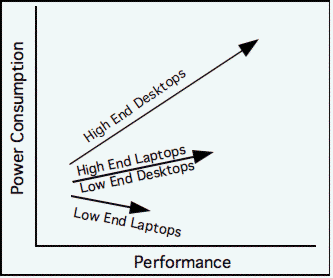 Until the CPU inside the laptop evolves to be both faster and have lower power consumption, I don't see this getting any better. I believe that desktop computers will continue to get faster with increases in power consumption and the larger laptops will get marginally faster with constant to slightly increasing power consumption. It will be interesting to see what path the smaller laptops take. The combination of significantly higher performance and significantly lower power consumption at the same time will depend on how well the CPU makers do their job and how well the computer manufacturers can design power conserving operational modes.
This graph is similar to one published by DEC in the 70's describing the evolution of the VAX product line, although on their curve, power consumption was replaced by cost. Not a lot has changed in 30 years.
I'd like to digress for a bit and discuss convergence and divergence. These are new-speak buzzwords describing the feature sets of personal electronic devices. A convergent device tries to combine (converge) several different functions in one device, such as an iTunes enabled cellphone/camera, a pda/cellphone/camera or an MP3 player/FM radio/voice recorder. A divergent device tries to separate functions and optimize the device's performance for one particular function. Examples are an original Sony Walkman or an iPod. Divergent devices are designed to do just one thing but in the best possible way.
IMHO, convergent devices are typically less than spectacular. The design compromises required to blend disparate functions leads to convoluted user interfaces and less usability for any particular function. On the other hand, if one desires all of the functions of a convergent device but implemented in divergent devices, then one often needs to carry around several different devices.
If one function of a convergent device becomes obsolete or stops functioning, then the whole device must be replaced, usually at some significant cost. With divergent devices, each function can be replaced or upgraded individually by replacing only that device.
The individual functions of convergent devices typically provide a much lower level of performance than that function implemented in a divergent device. A cellphone/MP3 player/camera usually takes worse pictures than the cheapest dedicated camera, typically has limited utility as a music player and might actually work well as a cellphone until the usage of the other functions flattens the battery.
I typically don't need all of the functions of a convergent device on the same day. I can't take a camera with me to work so any device that contains one (which is most of them now) is useless to me. I don't carry a cellphone with me so having one combined with my music player doesn't do anything for me at all. Overall, I have been more satisfied with divergent technology because I can pick the function that I need to carry on any given day. Further, that function tends to work better.
This discussion of divergence and convergence brings me back to the high end laptop. This device tries to be convergent in combining the performance and display characteristics of a desktop device with the portability of a laptop. It doesn't, and can't, succeed at either job because the requirements are just too diverse and often mutually exclusive.
I am beginning to think that the hot setup for the next computer upgrade will be two computers, a small lightweight laptop optimized for minimal power consumption to take on the road and a desktop optimized for performance to do the intensive stuff such as video rendering and heavy gaming. The middle of the road high performance laptop will do neither job as well.
A high end laptop that is powerful and sort of portable tends to cost as much or more than a good desktop and a low end laptop combined. For example, as of early 2006, a 20" iMac costs $1699, and a G4 iBook costs $999 which totals $2698. A 17" MacBook Pro costs....$2799 or $101 more than the other two combined. The MacBook Pro is as fast as the iMac, but it has a smaller screen (same pixel count, but smaller pixels) and less than half the disk. It's way bigger than an iBook and runs MUCH hotter.
My old iBook won't last forever. Although I bought it in 2001 it still works and runs the latest version of the Mac OS. It'll probably be several years before the G3 iBook is not supported by a new OS release but that will happen eventually. At some point in time, the older hardware must be left behind. The original Mac used a Motorola 68000, support for that was dropped after OS 7.5.5. Support for the PPC 601 was dropped as of MacOS X. Even support for the earliest G3 based desktops was dropped as of 10.3.
This iBook has been seriously abused. It has been dropped hard twice so that the screen doesn't close squarely and sometimes it gets flakey if the screen is moved when it is on, but I still use it nearly every day as a bedside computer (for surfing during fits of insomnia). Someday, it'll die or become too obsolete and I will want to replace it. My Powerbook can't replace it well because it simply runs too hot to use while resting on my chest in bed. I can't easily reach the trackpad over the edge of the computer while I'm in bed because the computer is too wide. Further, it's 15" screen is too big. I can't easily see the whole thing with my glasses off at close range. I am nearsighted so that "close range" is really close. Further, the PowerBook doesn't travel as well as the iBook, it is just too big and it's not nearly the biggest laptop around. The PowerBook does perform as a portable desktop very well and I intend to be using it for years in that function when I travel back and forth between my home and mountain cabin.
There is one feature that is found on all laptops that is not found on any desktop. This is the built in Uninterruptable Power Supply in the form of the battery. A UPS can be really handy in areas with unstable AC power. They can be purchased for a desktop that will at least run it long enough to save all of the open files and shut down cleanly.
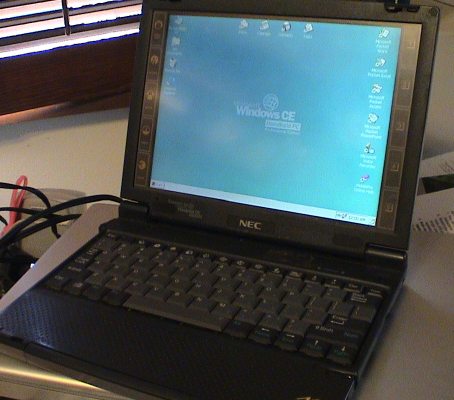 I'm assuming that Apple will eventually design a sub-notebook something like the Sony Viao laptops or this NEC MobilePro 800 which are much lighter than even the iBook. The NEC in the picture has the right size and weight, a good keyboard and it runs 10 hours on a new battery. It's about an inch smaller in length and width and about a quarter inch thinner than an iBook. An iBook weighs about 5 lbs, this guy weighs 2.5 lbs. However, it also has some serious issues. First, it runs Windows CE which is not acceptable. Second it has no disk at all, it runs from static RAM although a MicroDrive could be plugged into one of the CF card slots. If Apple could make something like this but with a 40+G disk, an optical drive, wireless and OS X, I would buy it in a heartbeat.
NAND flash RAM is coming down in cost and going up in reliability very quickly. It may be possible to dispense with the disk altogether and use only flash RAM in place of a disk. Another approach would be use a few gigabytes of flash RAM to buffer a future high capacity microdrive to control power consumption.
My 500 MHz iBook is my current road computer. It does the job marginally well and it has fairly low value so that if it is damaged or stolen, the loss isn't very great. My wife's 1 GHz iBook G4 is nearly ideal except that it is still a little too heavy. It won't burn DVDs but then again I really haven't had the need to do that on the road. It is fast enough and still runs about 5 hours on a new battery.
What do I do on the road that allows me to use a low end computer? Well, obviously not much that is really CPU intensive, see the table below. I'm not a "road warrior" who might need more smoke to take care of business while away for extended periods. I need to support personal tasks, mostly while "off duty" on business travel or while on vacation, which I plan to do more of upon retirement. A souped up PDA might work for some people, but I've got a PDA with an integral keyboard (Sony Clie). I also have a full size folding keyboard for it. It's small and light and travels well, but it doesn't do the job. The screen is just too small to render web pages adequately, it has no network connectivity and it doesn't do an adequate job of editing photos. Any kind of video is a lost cause. I tend to write web pages, such as this one, whenever I feel like it and I prefer to back up my still photos. With enough disk, or an external USB disk or hard disk based iPod, and a DVD burner in my proposed ideal laptop computer, I could edit and back up video while on vacation as well.
Light Weight Laptop Tasks
| Task |
Application |
Notes |
| Req'd |
Web Page Editing |
BBEdit Light |
none better for straight text editing |
| HTML Check |
Tidy plugin to BBEdit |
no point in writing incorrect or non standard HTML |
| Spell Check |
Excalibur |
BBEdit doesn't use the MacOS spell check function |
| Web Surfing |
Camino |
Safari, Firefox, Shiira, iCab, Opera all work fine too |
| email |
Mail |
can also use a browser to deal with webmail when needed |
| Photo Editing |
GraphicConverter |
iPhoto works but the library tends to get too big for a small disk. I prefer to keep my photos in a file based library as the "master" for an import to iPhoto which I do once I get home. iPhoto's searching/sorting and iPod integration is better than a file based photo archive. |
| Drawing |
EasyDraw |
I used to use MacDraw Pro but it will never port to the iMac. EasyDraw reads the older MacDraw Pro files fairly well. |
| Games |
Solitaire Til Dawn, Pocket Tanks |
just simple time wasters |
| Word Processing |
AbiWord or NeoOffice/J |
MS Word is too cumbersome for light duty work |
| Spreadsheet |
Excel |
still none better but don't use it much for personal work |
| Jukebox |
iTunes |
|
| Video |
iMovie |
back up camera but only used if a DVD burner is available |
| Backups |
Finder and Synchronize!Plus |
I have been converted to the religion of "BABU" or Born Again Back Up. |
| DVD Playback |
DVD Player |
Usually beats the drivel that is played on airplanes. |
Not
Req'd |
Heavy games |
I don't due much heavy gaming even at home |
| Business |
MS Office |
I don't do much business travel, and I don't need a computer to do business related work on the road either. I take the iBook for use in the hotel to pass the time, but I end up leaving it in the trunk of a rental car during the day. |
| Engineering |
The kind of engineering work I do would turn a laptop into a smoldering heap of slag and the software license is at least 10x the cost of the computer. |
| Heavy Photo Editing |
Photoshop or Aperture |
I don't need anything that isn't offered by GraphicConverter |
| Heavy Video Editing |
Apple Pro Apps |
I don't need anything that isn't offered by iMovie |
The key to "optimizing" a true laptop is to trim it down so that it is just barely good enough. Any extra performance beyond the minimum will result in excess battery drain, heat, size and weight. The real trick will be figuring out how to market the "lower" performance as a good thing.
It is interesting to speculate on how "light weight" a computer can be and still do an adequate job at various CPU intensive tasks. Fortunately, true speculation is not required. I already have a set of lower powered machines that can be compared, the G3 iBook, a G4 iBook and a G4 PowerBook. These machines bracket the performance range that I think is optimal.
System Characteristics
| System |
CPU Speed
(GHz) |
RAM
(GByte) |
Frontside Bus
(MHz) |
Disk
(GB) |
Graphics |
| Type |
VRAM
(MByte) |
| 12" Dual USB iBook G3 |
0.5 |
0.64 |
66 |
30 |
2X-AGP ATI Rage Mobility 128 |
8 |
| 12" iBook G4 |
1.07 |
1.25 |
133 |
100 |
4X AGP ATI Mobility Radeon 9200 |
32 |
| Aluminum 15" PowerBook G4 |
1.25 |
2 |
167 |
80 |
4X AGP ATI Mobility Radeon 9600 |
64 |
| 20" iMac Core Duo |
2 |
2 |
667 |
250 |
ATI Radeon X1600 |
128 |
System Performance
| Task |
iBook G3 |
iBook G4 |
PowerBook G4 |
iMac Core Duo |
| General User Input (text editing, word processing, drawing, spreadsheet) |
Adequate |
Adequate |
Adequate |
Adequate |
| DVD Playback |
Marginal, any significant background task can make playback jumpy |
Adequate |
Adequate |
Adequate |
| Web Quicktime Video Playback |
Skips Frames |
Adequate |
Adequate |
Adequate |
| ITunes Movie or TV Show Playback |
Video stalls completely |
Adequate |
Adequate |
Adequate |
Web WMV Video Playback
using Flip4Mac, the MS WMV player is inadequate |
Unusable |
A little jumpy at times |
Adequate |
Adequate |
| H.264 HD Video Playback |
Unusable |
Unusable |
Skips* |
Adequate |
| MP3 Encoding (iTunes) |
3-4x real time |
8-10x real time |
10-12x real time, CD read speed starting to have impact |
12-20x real time, CD read speed has significant impact |
| Photo Editing (iPhoto or GraphicConverter, NOT Photoshop) |
Adequate, slow during rotations |
Adequate |
Adequate |
Adequate |
| Video Editing (iMovie) |
Marginally Adequate, but disk limited to very small movies |
Adequate |
Adequate |
Adequate |
| Video Ripping (Handbrake) |
2.6 fps |
8.5 fps |
17 fps |
65 fps |
*Since Leopard Graphics Update 1.0, will play iTunes downloaded movies well. Still skips on 720p content.
From this table, it is pretty clear that for most video playback (not including H.264 HD content) the G3 iBook isn't cutting it, the PowerBook is somewhat overpowered and the 1 GHz G4 is very close to just right. It's the real time stuff where speed matters. If the G4 iBook could play all web video formats without skipping frames, it would be fully good enough. Since it will do Quicktime and DivX movies fine, but hurts with WMV, it is probably the performance of the player that is the difference.
H.264 HD seems to be another story, none of these G3 and G4 PPC based computers can handle 720p or even 480p playback. Apple claims that a G5 or better is needed.
For WMV playback, these computers are using Flip4Mac which is a damn sight better than the Microsoft Windows Media player, but it is still not quite good enough. I am assuming that Flip4Mac will get better with time as they optimize the code for the Macintosh, something that Microsoft never did. The PowerBook is only a little faster than the iBook and it does WMV (using Flip4Mac 2.0.2) well enough. Even the PowerBook tended to be marginal with the Microsoft Windows Media player.
The non-real time activities don't matter as much. These get done, just slower. Many of these tasks aren't sensitive to performance, the iMac is no better at text editing than the old iBook. Both get the job done with no perceptible difference in user experience, therefore both are adequate. In this kind of case, faster isn't better at all.
From this data, I would conclude that a Core Solo processor at 1+ GHz would be fully adequate for a sub-notebook like system. The lowest clock speeds for these processors is currently 1.6 GHz, I am assuming that they could be clocked down with reduced core voltage when running from the battery to conserve power even more.
It is obvious to me that one magic computer can never do it all in anything close to an optimal fashion. I'm thinking that a lower end iBook (or smaller) like thing and a higher end iMac like thing may be the best compromise between performance and portability without breaking the bank. If a path is taken to split the functions of a computer into a desktop computer optimized for performance and an ultra-light laptop computer optimized for portability, then a problem presents itself.
There is a downside to running two different computers to do similar things at different times. If you use one laptop for everything, then all your files follow you around. If you use TWO computers and you are not careful, you'll find the most recent version of a particular file may be on the OTHER computer and not easily accessible.
There are many utilities that allow two disks to be "synchronized" in whole or in part to allow the most recent versions of any file to be stored on both computers. This is really a partial solution as synchronization software can produce irritating results under some conditions. If you want to delete a file, you may have to delete it from BOTH computers before it will actually go away. Files that are updated on both computers since the last time that they were synchronized are problematic, the software usually cannot actually merge the files so it may keep both versions with one or both renamed in some way. This stuff is manageable with good synchronization software. Large folder based data structures, like iMovie projects, iPhoto Libraries and iTunes Libraries can get weird if just parts of the structures are updated. Databases, such as an address book file, need special attention so that all the entries get properly merged. .Mac subscribers can do some of this through .Mac. There is a software product that manages Sync Services between two or more computers on a local network. This is SyncTogether from MarkSpace. This product is new as of this writing (17Mar07) and, like most 1.0 versions, it could use a little work. It does function however, and keeps the stuff that support Sync Services, like the Address Book, iCal and Safari bookmarks synchronized.
On the desktop side, good processor smoke is pretty easy to obtain. For the next few years, all desktops will be running dual (or more) core processors with clocks running between 2 and 3 GHz even in the less expensive versions. The more expensive desktop towers are now running 4 total cores on two chips. The 2.5 GHz 4 core G5 PowerMac (late 2005) does this but it has to be water cooled. Things could get really crazy when CPUs come in 4 or more cores per chip. There are rumors of plans at Intel to put 16 cores on a chip. The IBM cell processor to be used in the PS 3 has nine cores. Moore's law may yet have legs. Instead of just raw clock speed, the scaling factor to achieve better performance is via parallelism. The assumption is that device geometries will continue to shrink from 90 nm, to 65 nm, to 45 nm to 32 nm or less allowing more cores to be placed on realizable die sizes so that die yield, and therefore cost, can be maintained. These systems would blow away my 4x rule for processor performance, at least for tasks where a multiple CPU system could be utilized. It's not entirely clear how most applications can make use of many cores efficiently, but we'll see such systems anyway because core count, not clock speed will be the new selling point in the higher end computers.
All this previous discussion of power conservation and heat has pretty much nothing to do with desktop computers. Except for the marginal cost of AC power, a computer can burn as much as it needs to with little impact if the thermal design of the computer can handle it. The one downside is that, unless designed properly, the fans needed to provide cooling can make quite a bit of noise. More efficient computers will need less cooling and therefore tend to run with less noise.
A medium to high performance desktop and an ultra-light laptop will have significantly different requirements. The table below indicates what kind of features that I would want on these systems. Note that neither system is the highest or lowest end systems that are likely to exist in their respective classes.
Expected System Features
| Feature |
Laptop |
Desktop |
Notes |
| Goal |
MacBook Air |
Goal |
20" Intel Core Duo iMac |
| Battery Life |
>6 hours, 10 would be better |
5 |
N/A |
N/A |
Obtained through power conservation, NOT by increasing battery weight |
| Weight |
Lighter is better, 2.5 to 3 lbs would be acceptable |
3 lbs |
N/A |
N/A |
2005 iBook is still too heavy |
| Case Temperature |
stays cool |
TBD |
N/A |
N/A |
A laptop should not get more than perceptibly warm on the bottom. |
| CPU Type |
single core |
Core 2 Duo |
dual core |
Core Duo |
Laptop could have dual core IF one core can be completely shut down when running on battery power. PowerPC or Intel is not important as long as it runs OS X. |
| CPU Speed |
~1 GHz |
1.6 GHz |
>= 2 GHz |
2 GHz |
Laptop speed should be reducible to much less when battery powered |
| Max memory |
2 G |
2 G std |
lots |
2 G |
512 will get you started, >1 is needed to allow VM to work well |
| Noise Level |
silent |
s/b none with SSD |
virtually silent |
not audible at normal working distance |
The iMac does make some fan noise, but you have to put your ear over the backside of the computer to hear it, even in a very quiet room |
| Disk Size |
>80 G |
80 G w/HD
64 G/SSD |
>= 250 G |
250 G |
80G is about the minimum needed to work with 2 hours of home video. Bigger disk in the laptop is ok if it doesn't increase the size/weight of the unit |
| Disk Performance |
low power consumption |
TBD |
very fast |
7200 RPM |
Fast disk usually draws more power. OS needs to be able to really spin down the disk for extended periods even it takes some kind of disk cache to do it. |
| Screen Size |
12" is adequate, slightly smaller may work |
13.3" |
20" |
20" |
Larger screen size increases power consumption |
| Screen Type |
Useable without backlight |
LED backlit glossy |
Active Matrix |
170° viewing
800:1 contrast ratio |
Screen backlight consumes a significant amount of power, prefer to be able to turn backlight off and still use the computer if ambient light is adequate. |
| Optical Drive |
DVD burning desirable, but not required. Could be an external unit if absolutely necessary but internal is preferred. |
external |
Read/Write anything fast |
8x DVD-R write
24X CD-R write |
Even though the iMac says that it will burn at 8x, the actual burn time isn't any shorter than when burning 4x. May be related to the media (TDK). |
| Modem |
included |
external |
not required |
none |
$49 USB external modem available |
| WiFi |
required |
802.11n |
required |
included |
|
| BlueTooth |
required |
BT 2.1 + EDR |
required |
included |
|
| Keyboard |
Full size |
full size |
any kind |
Standard Apple USB |
Bluetooth and USB connectivity on both |
| Backlit Keyboard |
desired |
standard |
not required |
not available |
|
| Internal speakers |
good enough to hear |
mono |
medium quality |
fair quality
12 watt amp |
External speakers will sound better than internal ones any day. The iMac speakers are ok but can't compare to Altec Lansing external speakers. Laptop users will use headphones/earbuds if they need good sound. |
| Internal Microphone |
required |
standard |
required |
Included |
|
| iSight Camera |
standard |
standard |
required |
Included |
|
| Ports |
2 USB 2.0, modem, headphone and Ethernet as a minimum
Firewire highly desired |
1 USB
Ethernet via an adaptor
No FireWire |
lots, all types |
2 Firewire 400
3 USB 2.0
2 USB 1.1 on keyboard
audio line in
mini-DV
10/100/1000Base-T Ethernet
headphone |
Firewire is still used by most video cameras so that it is needed to support iMovie imports. |
Dual cores will probably find their way into laptops, but a dual core computer is really two computers on one chip. It takes more power to run the second core and that power has to leave via heat. This does not sound like a good deal to me. This makes the dual core desktop and a single core power stingy laptop idea seem even better. A dual core laptop would only make sense if one core could shut down completely and the other core significantly under clocked for reduced power consumption while running off the battery.
Big disk is easy to obtain in a desktop, 250 gig is available in a 2005 model iMac. I assume that the disks will continue to get bigger and external disks are easy to add to a desktop computer. As of 2005, laptop disks top out at 100 gig and are growing more slowly, a small computer could make do with less. Even slow, low power 40 gig drive would be marginally enough for on-the-road work if a large photo library or video is not involved.
External drives are easy to use with a desktop, harder to deal with in a laptop. My current laptop external drive is a 60G iPod. There are a plethora of cheap USB external drives from 160 GB up.
Hard drive capacity is going up too. About mid 2005, Hitachi and Seagate announced a "perpendicular" format for recording on magnetic media that will increase the capacity of the 8.9 cm desktop type drives to a terabyte by 2007 with laptop drives expanding to 200+ GB. Capacity may double or triple beyond that in a couple of more years. By the next time that I need to upgrade, disk capacity will still naturally be exceeding the 4x rule.
As of June 6, 2005, Apple formally announced that they are shifting from the IBM PPC processor to those made by Intel. Apple's avowed reason for this change was that IBM was not headed where Apple wanted to go in terms of power consumption. The latest Intel processors are more power efficient than any of the current IBM processors and, according to Apple, are going to stay that way for quite a while. Apple was also very upset at IBM for constrained processor deliveries and processor costs. Intel may have cut Apple a better financial deal as well. We'll have to see how this works out. It'll be summer 2006 before we see many of the new Apple computers with Intel inside. My PowerBook G4 will have to do for awhile longer as I wasn't planning on upgrading until I could get a dual core desktop system anyway. Performance wise, it won't make much difference if the CPU is from Intel or IBM. I also have to assume that Apple will support the PPC for a long time into the future. Who knows, at some time they might switch back or ship both kinds. Since the Intel systems will run PPC applications via the Rosetta emulator and newer applications will be compiled using native code for both CPUs, the average user probably won't notice the difference.
Wintel hardware will evolve in much the same way but I doubt that Windows will follow suit. It's been many years since XP and it looks like Vista (aka Longhorn, Shorthorn, LongVista etc) will not be that significant. There is some rumbling that Vista may not even run well on all but the highest end computers forcing a hardware upgrade for those with less than top end hardware. We'll have to wait and see what happens here as well. However, the evolution of Windows will have little impact on me as it would be cold day before I turn to the dark side.
I'll be pondering this more as time goes on and the type of available hardware changes. Email me if you have any comments.
Update 11 Jan 06
On Jan 11, 2006, Apple dropped the first shoe. They released an iMac with a dual processor Intel chip that specmarks out at roughly 5 to 6 times the performance of my G4 Powerbook. It met my specs so I pulled the trigger and ordered one, a 20" version. It has over 4 times the disk space but, when it arrives anyway, 1/4 of the RAM. That will get fixed soon with a 1 G stick as 1.5 GB will be enough.
Apple also released an updated version of this Powerbook, now called a MacBook Pro. It has about 5 times the CPU performance as this PowerBook, 1.5 times the disk and the typical 0.5 GB of stock RAM. The display has better resolution and is brighter. It may also consume more power when running as indicated by the power brick that comes with it (85 watts vs 65 watts) although Apple has indicated that it will run for about the same time as a G4 Powerbook (which is not nearly long enough). I don't know if one core can be shut down and the other underclocked to preserve the battery better. In any event, it'll run hotter than this one. I expect that the iBooks will become MacBooks in the coming months, maybe one of them will be a sub notebook.
Update 17 Jan 06
The iMac arrived yesterday and I spent the evening using the Migration Assistant moving about 40 G of stuff from the PowerBook to the new iMac and otherwise getting it set up. The computer is very fast EXCEPT when all the free RAM (of which there isn't much) is consumed. When the system starts dipping into virtual memory very heavily, it bogs right down. More RAM is already on order, it is REALLY needed.
This machine has some problems that I did not anticipate, however, these issues are related to me and not the computer. The screen is too big, I can't keep all of it in the lower lens of my bifocals at the same time. Also, the system is a little too tall for me. I'd prefer it to snuggle down against the desk. With the Powerbook, both the whole screen and the keyboard were in my field of view at the same time at a natural viewing angle for the lower bifocal lens. I have to hold my head at a more upright angle to see the screen and I've had to relearn to touch type without being able to focus on the keyboard. The "foot" of this computer is not easily replaceable. I still may be able to find some other kind of mount that lowers the whole works by 3" or so.
Update 29 Jan 06
The iMac is working out well, it needed RAM in a big way though. The second part of the plan may be delayed. The rumor mills are indicating that the next small laptop will be an iBook like thing but it won't be in the sub-notebook class described above. Further, my old iBook just got rejuvenated a little. My wife's iBook G4 got a disk upgrade to 100 GByte. It's old 30 G disk got transplanted into the older iBook for an extra $15. Unless the old iBook totally dies, it will provide the laptop part of the solution for awhile longer. Even though it is a little heavy, with my one extra battery I can get about 9+ hours out of it. I'd have to carry $500 worth of batteries to get that life from the Powerbook.
Update 26 Mar 06
The iMac is still working well, I've gotten used to the screen height but I would still like to lower it. The foot is not as replaceable as I thought, nobody seems to make one. It's got 2 G of RAM now and beachballs are rare indeed. The Airport implementation has difficulties but I've worked around that until a firmware upgrade is available. It runs very fast and overall I am pleased. Universal binaries are showing up fairly regularly, the only thing really missing is a Windows Media player that works in Universal mode. In the meantime, I've got Camino set up to run native and Safari set to run under Rosetta so that the Flip4Mac plug in works to provide Windows Media service when unenlightened web pages serve out WMV.
Update 9 Apr 06
A couple of days ago, Apple announced BootCamp which allows an Intel Mac to dual boot Windows. This doesn't have much impact on me and I'm not going to bother with it because I simply have no need at all for Windows. It also seems to be an interim feature. I expect that some better version of Windows integration via Mac OS implementation is probably in the works that may utilize the virtualization features of the Intel CPU. This would be a reason for much more disk. Another OS would eat 30 gig or more with enough scratch space to make it even marginally usable.
Update 29 Apr 06
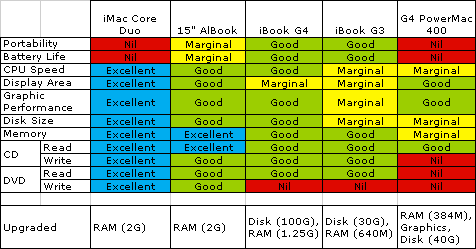 Just to prove that I have too much time on my hands, I created this little table summarizing the features some of the computers that I have around my home that run OS X. It basically shows were each system falls down (or doesn't). The table is actually an Excel spreadsheet that can be modified to suit. Other than the obvious non-portability, the iMac is excellent in every category. The next best is the G4 iBook due to it's portability. If it was lighter, it would be the portable computer that I will eventually want to replace my G3 iBook. However, I can't get my hands on it because my wife covets it too much.
Update 16 May 06
Apple did indeed announce the replacement for the PowerPC iBook. The new computer is called a MacBook as opposed to the MacBook Pro which replaced the PowerBook line. The new MacBook is nifty, not overly expensive and very powerful...just what I didn't want. It's a little larger than the old iBook, just as heavy and it'll get just as hot as my PowerBook, maybe hotter. Oh well... the old G3 iBook is going to see some longer service yet.
Update 21 May 06
After using the iMac for about 4 months, I am having difficulty figuring out what an average user will do with even more processing power, either in the form of faster clocks or more cores. This thing is faster than it needs to be. I also figure that the days of a single core computer are nearing their end. Unless the user is really looking for the cheapest possible system, adding a core will increase the price of a computer only incrementally but will increase it's sales value by much more.
I am having difficulty seeing the next "killer app" that will drive a real need for more CPU power. All I can see is:
- Heavy duty gaming
- Image processing
- Still images
- raw image processing
- Photoshop
- Video
- Rendering
- Movie production editing
- Animation rendering
- Software development
- Engineering analysis
Except for gaming, most of these tasks are commercial or professional where time is money and the fastest possible computer will often make economic sense. Your average user doesn't need the kind of power being provided now by the highest end systems.
For users that like to burn or rip video, more smoke is good. iDVD is mostly CPU bound, but then most users can just let it run overnight. The only app that I have seen that uses most of both cores is HandBrake and it runs 75% nice so that even it doesn't load down the system. If you don't know what "nice" is, open Terminal and type "man nice." Nice sets task priorities so that a task can defer itself to other processes.
Update 8 Aug 06
The final shoe has dropped. After just 210 days, Apple announced the Mac Pro (to replace the G5 PowerMac) and an Intel based XServe. This completes the Intel transition and with amazingly few problems. These machines are all quad core offerings with the Intel "Woodcrest" 64 bit server processor. From the benchmarks that I've seen, its 1.5 to 2x faster doing real world things than the 2 GHz Core Duo iMac. One would think that it should be faster than that, but the "real world" stuff apparently doesn't take sufficient advantage of the 4 processor cores....yet.
The real advantage of the new processors is the full up 64 bit support which currently allow the use of 16 GB of RAM. The Core Duo can support only 2 GB now. However, for most users, 2 GB is plenty. I keep an eye on memory usage and I have very rarely seen all the free memory used up on my iMac. I also very rarely see the CPU load reach 200% (2 cores) for very long. For the vast majority of users, the MacPro is simply overpowered and an iMac would be much more appropriate.
Update 13 Aug 06
I've had a chance to handle a UMPC (Ultra Mobile Personal Computer aka Origami). This is a device that tries to be a full up personal computer in a handheld format. These devices run a full up version of Windows, but in a form factor that is considerably larger than a typical PDA. IMHO, this device is a loser. It tries to do too much with the limited resources that can be packed into it's form factor. The version that I looked at, a Samsung, was also VERY expensive at $1100. It's most serious problem is that it will only run for a couple of hours on a charge. It also uses a stylus for input which is very slow and tedious for many applications. For it to do computer like stuff, it needs a keyboard at least and maybe a larger display. It's way overpowered to use for PDA like stuff and it won't fit in a pocket like a PDA. Since it doesn't fold, the display is not protected during transport. Maybe some people will find a use for this kind of thing, but it looks to me like a niche product, and for a small niche at that.
Update 9 Sep 06
A few days ago, Apple quietly announced that the iMac family has been upgraded to the Core 2 Duo CPU. The 2nd version of the Core family is fully 64 bit and has a bit better performance at the same clock rate as the 32 bit Core CPU. The difference in word size means that the Core 2 family can theoretically address much more RAM than the 4 GB limit for the Core family. The Core Duo iMac could actually address only 2 GB because of other limitations. The Core 2 Duo iMac can only access 3 GB although the theoretical limit is vastly more. A upgrade from the Core Duo to the Core 2 Duo is clearly not economically justifiable.
At the same time, the low end Mac Mini was upgraded to use a Core Duo CPU (it was a Core Solo) and the clocks got a minor bump. The whole Macintosh line is now at least dual core.
About a month ago the Intel MacPro and XServe was also announced. They are, as expected, quad core machine using two Intel "Woodcrest" dual core server chips. The Core Duo (and later Core 2 Duo) CPUs are not configured to operate in a dual processor arrangement. Further, some enterprising souls have stuffed two quad core Kentsfield processors in a MacPro and it works.
Now Apple's future update path is pretty clearly indicated. The high end machines will have at least double the cores of the lower tier machines and also use the upper end of the Intel CPU lineup. I expect that this trend will continue as the quad core chips (Kentsfield) are released. The MacPro will get two quad core CPUs for a total of 8 cores. The middle tier iMac machines may get quad cores, but in a single CPU. The low tier machines may or may not get quad cores, it depends on cost.
According to my 4x rule, an upgrade from the early 2006 iMac Core Duo will not be economically practical until the iMac gets at least 4 higher performance cores. Even this will not reach 4x actual performance as there are few applications that can take reasonable advantage of 4 cores. The quad core MacPro benchmarks well less than twice as fast as the dual core machines at the same clock speed because the software used to run the tests can't keep 4 cores busy....yet. 8 cores will be even tougher to keep occupied all of the time.
There is a new version of OpenGL coming out that is able to take the 3D graphics portion of a single threaded application and run it on the second core of a dual core machine while the rest of the action runs on the first core. The applications must be recoded to take advantage of this capability but it apparently doesn't require heavy rewrites to do it so we will see these upgraded games coming out soon. This may be expandable to 4 cores later. The Sony PS3 cell processor works kind of this way with one general purpose core running the basis of the game and parcelling out graphics calculations to the 8 other special purpose cores.
Update 10 Sep 06
I still have one beef with the iMac, the display is not adequately adjustable in height. As a matter of fact, it's height is not adjustable at all. The new 24" iMac announced about a week ago now has a VESA compliant mount, none of the others do. The VESA mount allows an aftermarket adjustable mount to be installed. This is good. However, in my case it wouldn't help much as the "chin" at the bottom of the computer will still hold the display off the desk by about 4". I need it snuggled right down against the desk. If I hold my head at a comfortable angle, I loose the top half of the display due to my bifocals. This forces me to hold my head up and my neck gets sore after a while. In this regard, the old PowerBook was much better as the display was in exactly the right place ... for me anyway.
One obvious solution is to get a 2nd display for the iMac with a mount that will push the display right down against the desk. It turns out that there are few displays configured this way out of the box and only one that I have found (an HP which is too wide due the attached speakers) that is 21" or so (at least 1650 pixels wide). The iMac will support a 2nd display up to 1920x1200 in extended mode through its mini-DVI port and a $19 Apple adaptor cable.
It looks like the hot setup will be to find a display that is between 1650 and 1920 pixels wide and that has a VESA mount and then find a VESA mount that sits on a desk. Most of them want to hard attach to something via bolts or a clamp. I would end up with twice (at least) the display area and have a display that could transplant to some other computer in the future. It looks like this lashup would cost something around $700+. It would certainly be cheaper to get a set of single vision lenses for using with the computer, but I'm sure that I'd walk away with the wrong glasses more often than not.
I've used dual display computers in the past. The Macintosh II that I had at work many many moons ago had two displays, one 13" color and one 12" monochrome. I found it very handy to keep my mail, calendar and other utility windows on the monochrome display while I did the majority of my work on the color display. Dual displays are good, however, TWO 20+" displays can consume much of a whole desk.
After some market research I've found that a dual display approach will indeed be expensive. The 20" monitors run about $400. 24" monitors (1920x1200) run between $800 and $900. The VESA mount arm is another $130. An Apple 23" Cinema display runs $999 ($920 after an available discount) Plus $29 for a VESA adaptor and $19 for the mini DVI to standard DVI adaptor cable. I am leaning toward the Apple display because it is 1" smaller than the other 1920 wide displays and fits in my bifocals a little better. I also have more confidence (through experience) in Apple's product quality and support than the other manufacturers.
Update 13 Jan 07
MacWorld San Francisco has come and gone and still no ultra-light laptop nor any changes to the display line. Part of the world, at least, is abuzz about the iPhone which at first blush looks to be a pretty good stab at a convergent mobile device.
Its a phone, widescreen iPod, camera and web browser all rolled into one. However, it still has some of the drawbacks inherent in such a complex device. First, it is horribly expensive to buy and maintain. I figure that the 2 year plan will run $50-ish/month, so that by the end of the contract, a user will be out $1800. It doesn't appear to have much of any full PDA functionality although it may work ok as a read-only PDA.
This device is not for me, I'll keep my $80/year Tracfone for phone coverage, iPod for music and Sony Clie for full PDA functionality. I don't need web connectivity in my pocket at iPhone rates.
Update 18 Feb 07
The rumor mills are alight with ultra-light tidbits. Maybe there is one in the works after all. After looking at the CPU offerings from Intel and others, if one exists at all, it will probably use an ultra low voltage hafnium oxide 45 nm gate dual core with a fairly low clock, something like 1 GHz. The screen may be smaller, widescreen format is cited often in the blogs. It may be all flash RAM or it may be a hybrid of flash and an iPod-like 1.8" disk. It may or may not have an internal optical drive at all. An optical drive would be necessary considering that almost all software is distributed on CD/DVD now. However, it could be external, there is precedent for an external drive, my old PB-100 came with an external floppy and the PowerBook Duo used an external dock.
I've installed Parallels using W2k on the iMac Core Duo because my wife still wants PC access for some PC only software and to allow communication with her Dell Axim PDA. She's been using the iMac this way to the point that she is lusting after a Intel based Mac so that she doesn't have to use my iMac. She also wants all this in an ultra-light form factor so that she's torn between an existing MacBook and a vaporous ultra-light Mac.
Update 15 May 07
Apple announced a new MacBook this morning. It's similar to the previous model except for a minor speed bump and larger disks for the same price. Otherwise, it's the same computer.
The next versions out will probably be MacBook Pro's maybe with the Santa Rosa supporting chip set. The differences here are a faster frontside bus, much better graphics support (hardware shader), native 802.11n wireless, support for more USB ports (which Apple may not use) and support for flash RAM. The flash RAM is supposed to allow for faster booting, but this is an advantage primarily for Windows users who don't have access to a proper sleep mode. Mac users rarely shut their computers down so that faster booting is kind of a non-issue.
The rumors of an ultra-light are getting more strident, but there's no sign of one yet.
WWDC 07 Update 15 June 07
WWDC wraps up today with no hardware announcements although none was really expected. Apple did a minor speed bump on the MacBook and a more serious update on the MacBook Pro line in the weeks before WWDC. If they had wanted to announce new hardware, they would have waited until WWDC.
As I had expected, at some point my old G3 iBook would be left behind. According to the system requirements that leaked out of WWDC, Leopard will require a G4 or better computer. The iBook will still get Tiger 10.4.10 but that will be the end of the line for it.
Update 23 June 07
The iPhone is less than a week away and Apple has a new video on their website that demonstrates the features of the iPhone. This device looks like it might actually work as a convergent device. It is clearly a FAR better stab into this market than anything previous. Perhaps it will demonstrate an entirely new market.
iPhone detractors have wailed and whined about the "obvious" failures of the device. I suspect that this is just FUD because these "failures" seem to instead be conscious design decisions made by Apple.
- No 3rd party software! Apple has provided a method to use web pages and AJAX to write useful applications and still maintain a secure environment. Many such apps have appeared BEFORE the iPhone is even out. However, this still isn't good enough for some developers. I imagine that these guys have apps that they want to port but can't because they aren't written as web based applications. Too bad. The iPhone doesn't need big apps, it needs little single purpose apps that are available everywhere.
- The camera sucks! As if 2 megapixels isn't enough for snapshots and the lens couldn't be good enough to support the sharp focus that even a 2 megapixel sensor needs.
- There is only ONE camera and it can't used for videoconferences! Can you imagine how annoying it would be for someone to be talking on their phone in public AND doing a video conference? He would have to hold the phone in front of his face and speak loudly enough to complete tick off everybody nearby. No video conference = good plan.
- There isn't enough memory! Maybe for heavy duty music and video users, but its a phone! If one wants a portable entertainment device that will hold a whole video library, then buy a device intended for that niche job.
- No 3G! 3G takes more power to run, 2.5G is good enough for light duty work and 3G isn't implemented over nearly enough of the coverage area.
- No GPS! Again, takes power and not needed. Cell tower triangulation works well enough for E911 and finding a the user's location well enough to make Google Maps work.
- Battery life sucks! Apple just announced a moderate increase in battery life AND all the other stuff that is "missing" would all consume power and eat the battery alive. You can't have it all.
- No user replaceable battery! Could be a problem but it would add to the size and weight of the device. Also, the iPods don't have "replaceable" batteries and that hasn't killed them. It would be nice, however, to have a hot spare battery though. Apple really ought to think hard about this one. I'm sure that somebody will come up with a battery powered external recharger that uses the dock port. There are many of these out there already for more conventional cell phones.
However, the iPhone is still a convergent device and carries with it the woes that come with being a convergent device.
- It is expensive to buy
- It is horribly expensive to use (probably about $1000/year)
- It has good standby time, but as soon as the other neat stuff is being used, the thing STILL may not last a whole workday, especially after the battery degrades over the life of the phone.
- It will be expensive to replace if damaged and hand held devices often turn into hand dropped devices.
- If one function or feature becomes obsolete, the whole device needs to be upgraded. For example, Flash RAM storage would be hard to upgrade. If a future version has GPS and you decide that you MUST HAVE GPS, then it's new device time. If you just can't stand AT&T for any reason, then you are simply stuck.
An iPhone won't be following me home, but I am certain that it will attract many others who really want what it offers now. I hope that it is wildly successful primarily because it will give the rest of the cell phone industry a swift kick in the backside (which they sorely need) and force innovation. I also like it because Microsoft has the most to loose with eventual failure of their Windows Mobile plans, as if they haven't failed already. If the iPhone is successful, it will also prod Apple into making more types of embedded devices and eventually one of them will be something that I could use, like an ultralight laptop or a real PDA to replace my Clie when it eventually dies.
Imagine a small laptop with TWO screens. One virtual one in place of the keyboard (think thin) and a regular fold up screen. The virtual keyboard could be multitouch so that it would accept gestures as well, act as both the keyboard and trackpad, and change context on the fly to other input formats as well. The need for backlighting would be a problem though as it would draw more power that a conventional electromechanical keyboard.
Further, think of a tablet type computer with only one screen, an iPhone stretched to 10 or 11 inches wide. The keyboard shows up transparently on the lower half of the screen when needed and vanishes when not needed, for example for viewing a movie. If the display had adequate viewing angle, which the newer displays do, then the thing would work laying flat on a desk or on a lap. With the hard non-scratch surface like the iPhone, it wouldn't need a lid either although some kind of case or sleeve might be a good plan
Update 30 June 07
The iPhone was released last night and it looks like it went pretty well for most people. Some are having serious issues activating their phones, this looks like an AT&T problem that will eventually be sorted out. Bummer for those folks though.....
I went by an Apple Store today to touch one. There was still a line of about 20 people out front waiting for a new shipment. It looks like the shipment had arrived because when I left, everybody was standing. There were about 10 iPhones configured for display at one table. Every one was being fondled by somebody.
I had about 5 minutes with an iPhone and I find that it is a pretty slick package, for what it is. It is a content consumption device, not a content creation device. It may run a version of OS X, but it isn't set up to replace, or even get close to replacing, a portable computer.
However, within it's scope, it seems to do quite well. I think that the hype over the keyboard is entirely overblown. It took me about 15 seconds to get used to it and I was flying in two thumb mode and I have big thumbs. It does a good job at rendering web pages that were not designed for a small screen (like this one). By turning the iPhone sideways to allow larger text, it was readable without sideways scrolling or magnification. When the iPhone is held sideways, the location bar goes away so that you have to turn it portrait to go to type a new URL. I made a phone call, it worked. I didn't get a chance to play with the iPod function or the other programs on it.
Update 7 August 07
Apple announced a new iMac today, faster 64 bit CPU, twice as much available RAM, more disk, 802.11n, a brushed aluminum case and a new keyboard. All good stuff, but it still has the chin, although it might be an inch shorter. The 24" version still accepts a VESA adaptor, but the chin prevents the display from sitting really low. Since, even with newly adjusted glasses, I still get neck discomfort due to the screen height of the older 20" iMac, I'll probably have to bite the bullet and get an external display. I estimate that I'll have bring the display down 6" for comfort, the new iMac would come down maybe 4" at best and cost a lot more.
Update 14 August 07
After determining that the new iMac, as nice as it appears, is not sufficient to trigger an upgrade, I bought a 20" Cinema display, which I have had for almost a week and am using now. Even using the stock stand, the bottom of the viewable screen sits 2" closer to the desk than the 20" iMac and even this little bit has been a significant improvement. When Amazon.com gets around to shipping the VESA arm, it'll be 4" lower than it is now, just 1" from the desktop. The thing worked perfectly, no dead pixels and I have twice the screen real estate. I put all the secondary stuff on the iMac display (now the secondary display). The Cinema display has the menu bar, Dock, Finder windows and is the focus for document and browser windows that I spend the most time viewing. iTunes, Activity Monitor, Mail, iChat and other stuff sit on the secondary display, visible at a glance when needed. Dashboard widgets are similarly spread across both displays. This is working out quite well.
I did have to move my Dock. I used to keep it on the right edge because, many many moons ago, the Dock would not hide itself and so many applications were not Dock aware and would underlay the dock at the bottom of my iBook screen. I got used to it there and never moved it back. That location now is in the middle of the display area so it had to move. After nearly a week, I am still not used to it, I am still reaching to the right to get the Dock. Old habits die hard.
Update 18 August 07
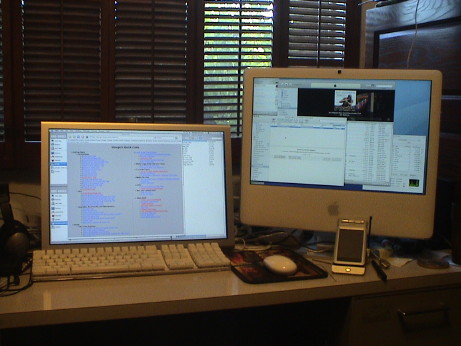 Amazon.com delivered the Ergotron VESA arm today and it got installed almost immediately. Now the monitor is in the right spot for me, probably a very wrong spot for most people, but I like it. I tend to have document windows open on the left side of the Cinema display so I offset the keyboard to the left so that my hands are immediately below the location of the window in which I am usually working I can see the whole screen and keyboard in the lower lenses of my bifocals without moving my head and my head is positioned ergonomically correctly. With the keyboard and display in this position, it is arranged like a 20" laptop.
Update 21 August 07
A couple of weeks ago, my wife bought a mid range MacBook, the 2.16 GHz Core 2 Duo model with 2 G of RAM. She had just run her G4 iBook out of smoke, too many videos would stutter on playback unless she quit everything else running. The MacBook has none of these speed issues and she likes it a lot, except that it indeed runs very hot. She bought a lapdesk so that she could place it on her lap. This is now the fastest computer in the house, probably about 40% faster than my 2 GHz Core Duo iMac. I passed on an update to a newer iMac this time around because the new ones aren't enough of an improvement to make it worth is. Now that almost every computer is pretty fast, how fast is fast enough? I ran a simple test.
Handbrake consumes lots of CPU resources, although some of that is nice so that it can be deferred. H.264 movie playback also consumes quite a bit of CPU resources and it sensitive to real time resource contention. I ran Handbrake to rip a DVD to an H.264 file, ran a backup to an external USB disk and then played an iTunes H.264 movie (1080p) switching between Full Screen mode (which clips the edges on my 1650 pixel wide screen) and Fit to Screen mode to see if all this activity did anything to the playback. The answer is no, the video played back fine with no skips at all, the backup proceeded at the data rates that I would have expected and the Handbrake encoding process slowed down from about 40 fps with nothing else going on to about 25 fps. All this time, the graphic system was driving both screens. Both CPUs were pegged at 100%, but it all worked with no perceptible impact on the user experience. From this I can conclude that this iMac is plenty fast enough, more CPU smoke is not needed now. The lowest end Mac offered by Apple today is a 1.83 GHz Core 2 Duo Mac mini which is probably faster than this Core Duo iMac although the mini's graphics performance will be worse. The bottom of the line is likely faster than an "average" user could ever actually use.
Update 28 August 07
I stopped by the MacMall computer store today and played with an new aluminum iMac. I have these findings.
The keyboard is different, but I think that it is good. I like the older keyboard too. The new one has much less key travel than the old one, but the feel is good and the flat top keys don't seem to bother me at all. I do like the lower position of the keys due to the flatter keyboard. For reference, I am not a keyboard snob and I have become used to many different kinds. The best keyboard that I have ever used is the one on an IBM Selectric typewriter (the ones with the font ball) as the keys had lots of travel and seemed to fall away after the first bit of resistance. This new Apple keyboard is completely different, but it seems to work.
You will either love or hate the glossy screen. The colors seem brighter and more saturated and the blacks deeper than the matte screen iMac sitting next to it, but the glare from reflected lights could be a deal killer. This display computer was in a large room with ceiling lights extending behind me for quite a distance. I had to tip the display upright to eliminate the reflection of the furthest sets of lights. Other positions were intolerable. In my office at home, the only lighting is directly overhead and it's reflection would not be visible in the screen. With a reflected light in the screen, I had to turn the brightness all the way up to try to wash out the reflection, then the screen was much too bright. If I ran the screen brightness down to minimum, where I like it, the reflected glare was totally unacceptable. If you are considering a glossy screen, you need to CAREFULLY evaluate your lighting situation. Place a mirror where you have your computer screen and see if you can see any lamp fixtures, windows or other light sources (including objects that may produce a bright reflection from another light source) in it. If so, you are going to have problems. If not, then the image will be better than on a matte screen.
Other than the aluminum skin, the rest of it is pretty much the same as my older iMac although the newer one will be somewhat faster and it supports more RAM. I need neither the speed nor the memory.
Update 04 October 07
While getting on a cruise ship about a week ago, I thought that I lost my Sony Clie PDA. I was in a minor panic and quite bummed about it until I found it a day later. I'd stuffed it in an unusual pocket of my carry on at the security checkpoint Xray machine and I had forgotten where it was.
However, this got me to thinking about what I am going to do when it really does die or it really does get lost or just becomes so obsolete that it isn't supported anymore. Bit rot* may get it before physical rot does. I've come to depend on the damn thing to keep my schedule, to do items, and other personal stuff. This is one of the better implementations of a Palm device and I'm not to thrilled about buying another, less capable, version of a dying breed. With the Missing Sync, it integrates with the Macintosh very well, much better than with the Palm Desktop stuff that Palm provided but no longer supports.
| * |
Bit rot is an interesting term. Bits don't actually rot, but the environment that they live in often does. Media goes bad on its own or the hardware needed to read that media becomes obsolete, in effect, making the media unreadable. Hardware also suffers from bit rot. The hardware itself may work, but the software needed to interface to other hardware and software doesn't keep pace. Driver software is especially susceptible to bit rot. As newer computer hardware and software evolves, driver software to allow older peripheral devices to work on newer computers is often not updated. Vista caused a huge amount of bit rot when many thousands of device drivers rotted all at once.
|
Apple makes attempts to allow OS X play reasonably with Windows, but Microsoft makes little effort in return. Windows is generally allergic to OS X. Windows Mobile is even worse. There are third party solutions that try to make Windows Mobile play well with OS X, but Windows Mobile is such a kludge that I surely don't want a Windows Mobile device anyway. But what else is there besides Palm?
I don't want an iPhone because I don't want the monthly bill. I hate subscriptions. I use a prepay cell phone because for all I use it, it costs me about $6/month although to get that rate I have to "commit" for a year by buying a one year airtime card. An iPhone doesn't make that good of a PDA anyway. For what I use a PDA for, old Clie is functionally better than an iPhone although the UI is a little dated. The iPod touch is not even close to a PDA, it's pretty much limited to playback or web surfing functions which is fine for it's intended scope. I need a REAL PDA and Apple doesn't make one.... yet. I hope that they get religion and extend their usage of OS X into a real PDA device to fill an obvious gaping hole in their product line. Maybe by the time that I need a replacement for the Clie, Apple will have imbedded OS X into yet another class of mobile device. I can hope anyway.
Update 16 January 2008
Yesterday was Mac World San Francisco. An ultra-light laptop was announced, the MacBook Air. It's fairly expensive, at $1800 and up, way up. With a slight processor speed bump and a SSD, it's $3100. It's almost everything I was looking for, see the specs table above, but the lack of FireWire and the cost of the SSD may be a deal killer for me. I still have a FireWire video camera and I do want to be able to stream video from tape to disk while on longer trips, such as the one I am on right now. I am in Antarctica on a cruise ship and I've used the DV streaming over FireWire to my PowerBook G4. I brought it this time because on the last trip, I just ran the old 500 MHz iBook completely out of gas. Further, Apple left all G3's and many slower G4's behind with the Leopard update.
If I decided to get a MacBook Air, which is doubtful, I'd get one with the flash memory Solid State Disk drive, but later when the prices of SSD's have come down considerably. I have a couple of external USB disks which are small and light, one is used for Time Machine, the other to store the video. Each is 160 GB, so that rather limited capacity of the 64 GB SSD is not a big problem. The PowerBook has an 80 GB disk that currently has 25 GB free. I could live with 64 GB.
The battery life is 5 hours, but that is still a little short, IMHO. Apple achieved good power performance with the Core 2 Duo processor and LED backlit display but then they put a small 37 watt hour battery in it. I'll want to see some real world tests of battery life comparing the standard 80 GB hard disk vs. the optional 64 GB SSD. The battery life with the SSD should be a little better as well as providing considerably faster performance.
It is also possible that somebody will come up with a USB to FireWire adaptor similar to the optional Apple Ethernet Adaptor. USB is actually slower than FireWire and it doesn't provide as much DC power, but a reduced performance FireWire interface would still work for many of FireWire's tasks, such as streaming DV which has a data rate of only about 4 MB/sec.
Update 27 January 2008
I've been touring around Antarctica and South America since Macworld, and I've finally had a chance to read some of the reviews after returning to Buenos Aires for a day before flying home. Apple has done their typical product design thing and built an 80% solution. This doesn't mean that it is an 80% product, but instead it is a very highly focused product which is a 100% solution for 80% of the ultralight market. This means that 20% of the potential customers will find some "important" feature lacking. It has the very minimum of features that are required to do a particular job. It may not be intended to be a user's primary computer although in some cases, it could be.
Most consumer electronics manufacturers wouldn't dare leave something out. Instead they pack in stuff that most of the customers will not likely use just to make sure that no potential customer finds a feature lacking. They love to cover the products with stickers touting every product feature in order to hook the most possible customers and in the process their products become unfocused. This is primarily because all the manufactures, except Apple, produce me too products that would simply die in the market if a customer could get nearly the same thing in competitor's version but with that one missing feature. For some reason, Apple gets away with doing it differently. Apple won't corner the market, in fact they might not even sell one to me, but I think that the product will do well.
There are a few things that the MacBook Air doesn't have that I think that I need. I agree that I can get along without the optical drive and therefore I don't need the size and bulk. However, for the time being I cannot get along without FireWire and I think that I won't be able to get along without a hot swappable battery like my Powerbook has, especially since the MacBook Air battery life is only 5 hours at best, less under heavy usage. I have a 2nd PowerBook battery and I do use it. I also want a SSD, but I am not yet willing to pay the early adopter price, which right now, is very steep and mostly beyond Apple's control. Apple however, is probably one of the leading forces pushing flash memory prices down simply because they use so much of it.
Even though my PowerBook is larger, heavier, slower, hotter and has really poor battery life, it does have FireWire so that I can stream DV from my camcorder. I have a good camcorder and I don't feel like buying another one that doesn't use FireWire, assuming that such an animal exists. I'll be holding on to the PowerBook for awhile longer. Even traveling, I find that I use it mostly on a desk so that only the weight actually matters. During the last trip, which included an 11 hour airplane ride and another 4 hour ride each way, I did use the PowerBook in a coach seat, if nothing else than to recharge two iPods for the rest of the flight. It was cramped, but it sort of fit.
Update 3 February 2008
The MacBook Air probably represents the immediate future of an Apple ultralight. If it flops, Apple will not invest in a new design soon. If it is successful, Apple's focused design philosophy will be demonstrated and Apple will not likely make another similar product for the even smaller niche not covered by the MacBook Air. This is what Apple does. They design for the biggest part of the market and leave the rest for others to pick off. This materially conserves design and production resources and provides the highest profit margin at the expense of some market share. Since they won't design an ultralight specifically for me, I either have to accept it for what it is or pass. Right now, it's a pass. This is fair.
In order to even consider the MacBook Air, am going to make a leap of faith and assume that some enterprising aftermarket vendor will make a USB to FireWire dongle for the thing that will at least support enough of the FireWire specification to allow connection to a camcorder. DV streams at something less than 40 Mbits/sec, and putting latency issues aside, this is well within USB's capability of 480 Mbits/sec (which is usually not realized in real life). I am assuming that somebody could make a combo USB/FireWire hub that runs off the Air USB port and utilizes a driver to route FireWire requests to USB and then the hub reroutes them back to it's, powered or unpowered, FireWire port. Until I get some other kind of video camera, I cannot accept the MacBook Air. If such an item ever becomes available, then I will reconsider the MacBook Air.
The USB port on the Air is reported to have somewhat extra power output capability to support the SuperDrive option which takes more than the 2.5 watts that USB is specified to provide. It turns out that most portable USB HDD's also need somewhat more than 2.5 watts. My WD Passport drives won't run off a single USB port of the PowerBook, but they will run off the USB port of my wife's G4 iBook. To get it to run off the PowerBook USB, I have to use a funny two headed USB cable that plugs into BOTH USB ports or use a powered hub. This indicates to me that the USB HDD power requirement is right on the edge the actual USB port capabilities and that the drives would PROBABLY run on the beefed up USB port of a MacBook Air. This means also means that a small, lightweight unpowered USB hub MAY be able to support one drive plus a mouse, and maybe some other lightweight device such as a PDA. I am assuming desktop usage with all this stuff attached. Right now, I use a powered USB hub to support TWO USB drives, a mouse and the PDA, but this only works at a place with AC or DC power. I have a lightweight 100 watt inverter with and airline adaptor but I have yet to sit in an airplane seat with a power outlet. At a desk, I use one drive for Time Machine and the other to dump DV. I do this in parallel now, but I could use them one at a time as necessary.
Since I am trying to determine if the MacBook Air can replace my PowerBook as a portable device, I will contrast the two. I use an iMac as my primary computer, so usage in that context is NOT considered. The table is sorted more or less by the features that are the most important to me.
MacBook Air vs PowerBook G4 (15" 1.25 GHz) Feature Comparison
| Better |
Acceptable |
Not Acceptable |
| Feature |
MacBook Air |
PowerBook G4 |
Notes |
| FireWire |
not available |
both FW400 and FW800 |
deal killer unless an aftermarket FW400 adaptor becomes available or I drop nearly a grand on a new video camera that doesn't use FireWire |
| Weight |
3 lbs |
5.6 lbs |
adding another battery to the PB to roughly match the Air's battery life adds 3/4 lb to the PB |
| Battery Life |
5 hours or less |
2.5 hours max |
PowerBook has never had good battery life but I rarely use it from the battery anyway. PB is too big to use in a coach airline seat and it it gets too hot to use on a lap. |
| Disk Size |
80 G 1.8" HDD
64 G SSD option |
80 G 2.5" HDD |
Base model Air has 1.8" HDD, similar to iPod disks. $999 upgrade has 64 G solid state drive |
| Shock Resistance |
assumes SSD option |
2.5" HDD |
Base model Air has 1.8" HDD, similar to iPod disks. In my experience, these 1.8" HDDs are very marginally acceptable as they die too easily when shocked. 2.5" laptop drives seem to resist shocks better. I've had several iPod disks die, only one laptop disk has died and it was dropped very hard. |
| Size |
a little smaller
MUCH thinner |
larger
thin enough to carry |
Thickness is a sexy sales tool but most of the advantage is in reduced weight. However it is marginally small enough to use at a coach airline seat |
| Screen Resolution |
1280 x 800 |
1280 x 854 |
pixel count is nearly the same |
| Screen Size |
13.3" |
15" |
pixels are slightly smaller |
| Battery Hot Swap |
not possible |
easy while computer is sleeping |
Maybe somebody will make a battery recharger that plugs into the MagSafe port of the Air, will be inefficient but better than nothing |
| Heat |
gets warm |
gets hot |
PB acceptable only on a desk, unacceptable on a lap for more than a few minutes |
| Wireless |
802.11n
Bluetooth 2.1+EDR |
802.11b/g
Bluetooth 1.1 |
Since the Air depends so much on wireless, the higher wireless speed is important for the Air. 802.11n is faster than 100BaseT Ethernet, slower than Gigabit Ethernet. |
| Ports |
1 USB
DVI
Headphone
100BaseT Ethernet/w dongle
Modem w/dongle
NO FireWire |
2 USB
DVI
Headphone
Gigabit Ethernet
Internal Modem
FireWire 400
FireWire 800
Line In
PC Card
Security slot |
all the PB ports are nice, but the FW 400 port is the only one missing from the Air that I really need
Air Modem and Ethernet dongles are extra cost ($29 each) |
| Internal Optical Drive |
omitted |
SuperDrive |
Air has some software features that allow software installation without a dedicated SuperDrive. External SuperDrive is available as an $99 option |
| Trackpad |
some multitouch gestures enabled |
no gestures |
|
| Speed |
much faster |
marginally fast enough |
PB won't do H.264 playback at any reasonable image size |
| Graphics |
GMA X3100 |
Radeon 9600 4X AGP |
Neither are screamers, both are good enough |
| Memory |
2 G, no upgrade |
2 G max |
2 G is plenty for portable usage |
| Glossy Screen |
reflections are a bother |
matte screen works fine |
Personal preference for non-glare screens |
| Screen Brightness and Color |
excellent |
very good |
Air is better, PB is good enough |
| Keyboard |
full size and backlit |
full size and backlit |
Air and PB keyboards have different key design, but both seem to be fine |
| Speaker |
tinny mono speaker |
reasonable stereo |
PB speakers are good enough for a portable |
| iSight |
included |
not included |
FireWire iSight available for the PB, but not really needed |
| Mic |
included |
included |
|
| IR Remote |
supported but not included |
not supported |
Air works with a standard Apple IR remote, neither needs one |
What does this all mean? It means that the MacBook Air takes away the connectivity to my camcorder and leaves me $3100 lighter for a weight savings of about 3.5 lbs. Everything else is about a wash. The cost/benefit trade says that I should stick with the PowerBook for now.
Update 3 April 2008
Now that the hype over the MacBook Air has died down a little, I am still looking forward to an ultralight. The MBA deal killer for me was the lack of FireWire to support my DV video camera. It's a Sony TRV33, an older high end model (at the time) but after doing some market research, it is still competitive with newer cameras, hence I am not inclined to drop a grand or more to get a camera that doesn't use FireWire. These would be the flash or HDD models that can be accessed via USB. Video is imported file by file from the camera, not streamed in real time (which requires FireWire). The features that my camera doesn't offer are HD (beyond 480p although it will do 16:9 widescreen at reduced resolution), a long optical zoom and a still photo capability beyond 1 megapixel. The long optical zoom (>>10x) is the most important feature and it isn't even available on the upper end cameras without resorting to digital zoom. HD is nice, but not necessary for home movies, especially because I don't have a wide screen TV. Since I use the still photos mostly for inclusion into web pages where I downsize them anyway, a high resolution still imager is not critical. Therefore a camera upgrade is not in the cards until something MUCH better comes out or my current camera dies.
Further, the MBA uses a Core 2 Duo processor which is still a power hog although it is a very good performer. Intel has finally released their "Atom" series of processors which do indeed have significantly improved power performance, less than one tenth of the power that the Core 2 Duo uses in some configurations. Usage of even one of the "higher" performance Atom processors at 2.5 watts or less could easily double the battery life of some future version of the MBA and make the non-removable battery pretty much of a non-issue. It is likely that Apple was thinking along those lines when they designed the MBA, they probably knew that the battery was truly undersized but that this would be "fixed" by technology improvements in future models. They didn't feel the need to compromise on the product design when they knew that the existing (or even smaller) battery would eventually be good enough.
An Atom powered MBA, or something with even a smaller form factor, won't have the performance of the MBA by quite a wide margin but following the arguments presented above in this page, the MBA doesn't actually need the smoke that it contains. It's akin to a small car with a BIG engine and a small gas tank. It could afford to lose the oversized engine. As long as the computer can handle H.264 playback at the full size of the screen, then the processor is fast enough.
The only irreplaceable need for FireWire now is to support FireWire equipped DV cameras which are probably a dying breed. The loss of the FireWire port on the MBA is a forward looking position with the acceptance of some current awkwardness. The rest of the usage of FireWire can be worked around, maybe with some bother. There is no workaround for FireWire DV camera support. This is typical Apple product design. They will kill off a feature that may still be needed by some users when the unit is initially sold but will not be needed in a few years time. FireWire, especially in the S3200 configuration, will probably be around for a long time on desktop machines simply because it is so fast, and in those markets, speed matters.
So, while I wait for Apple to forge ahead in the ultralight market, which I am sure it will do, I will still be lugging the AlBook around. The trigger for a new computer won't be the computer itself, but my video camera. At such a time that I need or want a new camera, then a new computer might come along to match it.
Update 16 April 2008
Since the ultra-light notebook outlook probably won't change much for year or more (for me anyway), my attention is turned more toward the PDA end. I realize that Steve Jobs killed the last PDA that Apple had (the Newton) and that he thinks that a PDA without a phone is a loser. I disagree. I have a Palm 4 PDA (Sony Clie) and my wife has a Dell Axim (Pocket PC, aka Windows Mobile). We use our PDA's heavily. I've dropped the Clie, again, and the hinge is getting very sloppy, but it still works fine. Eventually, I'm going to need to replace it. Windows Mobile isn't going to cut it. PalmOS is virtually dead. I need something that runs a good OS and that can be carried in a shirt pocket so an UMPC type thing won't do it either. I'd also like to ditch the stylus.
However, it's the applications that make or break the product. Currently the iPhone and iPod Touch don't have much, this will change in a few months when Apple enables 3rd party dedicated apps. This what I use on the PDA now, pretty much in the order of importance.
- To Do List. The Clie integrates fairly well with the Mac OS To Do items via the Missing Sync. The user interface is actually much superior to that found either in Mail or iCal. Anxiety is a 3rd party application that provides a reasonable and usable interface on the Mac side. I use the To Do List every day to keep shopping lists, Honey Do Lists and other similar stuff. There is nothing even close currently on the iPhone or iPod Touch.
- Date Book. The Date Book app on the Clie highly useful. I use it as an alarm clock and reminder, especially when I am traveling. At these times, the Date Book is the most important application.
- Klondike is a simple solitaire game but it is highly useful when I have some time to burn waiting in a line somewhere.
- Adobe Reader is useful when I have PDF'd up some maps or other stuff that I might need later, especially when traveling.
- Memo Pad is useful for keeping short notes.
I am hoping that the 3rd part application developers will provide some sort of well designed applications for the iPod Touch. I still don't even want an iPhone because I refuse to pay the monthly rate.
Update 25 March 2009
It's been almost a year since I edited this page and things have changed somewhat. The iPhone, iPod touch and the App Store are run away hits. I have held off buying an iPod touch because the Sony Clie is still working and doing what I need it to do, however, when it dies, an iPod touch is the obvious replacement. I still don't want an iPhone as I don't want to pay the monthly rate. I did however, cut my landline and transferred the number to a basic LG GSM Tracfone for my home phone usage. That will end up saving me about $300 a year which is non-trivial. The big savings is due to the fact that I don't use the phone much and the 800 minutes a year that it comes with are sufficient for my usage. Additional minutes, should I need them, cost about $0.10/minute.
The "netbook" thing has also taken off. I am looking very carefully at the Hackintosh concept but I'm not ready to pull the trigger on that one either in hopes that Apple will come up with a better, but probably a more expensive, solution.
My G3 iBook has finally been retired from laptop service as it has developed a hinge problem that causes the display backlight to shut off. This is ok, it's 8 years old has gone through three college kids before they got better computers and is now serving as a file server where the hinge issue is a non-problem. It serves a firewire disk as fast as it's "fast" (100BaseT) ethernet port will allow and it only draws 10 watts. When the 1.5 TB disk it services is running, the disk draws another 15 watts, but in a few minutes it spins down and idles at about 2 watts. The iBook also provides JMRI (Java Model Railroad Interface) services to allow the other computers to access and control my model railroad.
The PowerBook G4 has become my road computer, it is still in excellent condition and has a new battery so that it actually works reasonably well on the road, even if it is a little large and heavy. Between the new battery (which has the same actual capacity as the old aftermarket battery) and apparent changes to the OS to manage power, I can now squeak out 4 hours if I turn the backlight down to one tick and turn off the Airport. The iMac Core Duo is still working well and looks like it will continue to do so (barring massive hardware failure or other major loss) for at least several years to come.
Steve Ballmer Was Right
A few days ago, Steve Ballmer (MicroSoft's CEO) said, "The economy is helpful. Paying an extra $500 for a computer in this environment -- same piece of hardware -- paying $500 more to get a logo on it? I think that's a more challenging proposition for the average person than it used to be." In a way, he is right. This is why netbooks are selling so well. They are cheap. The problem is that the $500 applies not only to the implied Apple logo, but also to EVERY OTHER more expensive laptop and desktop computer on the market. The netbook is taking out the premium PC market at the knees because there is an attractive alternative other than a cheap clunker desktop. However, it doesn't actually seem to be hurting Apple much, if at all. I think that this is because the low powered netbook is what I have been arguing all along, it is a computer just powerful enough to do 95% of what an "average" user needs, but is cheap.
Your average computer user doesn't need all the smoke that is provided by the current generation of computers to have his computer needs fulfilled. What he wants and needs is:
- A computer that basically works
- It has to be cheap
That's it. The entire requirements set. The netbook does these two things and people recognize that fact. The "average" user doesn't need anything more and is not willing to pay for anything more.
Those that are willing to pay for the "$500 logo" are actually getting quite a bit more computer for their $500, even if they buy a higher end PC. A higher end PC typically costs the same or a little more than the same level of hardware that comes with an Apple logo. The users that are paying the $500 for for an Apple logo are expecting:
- An outstanding operating system, OS X
- Best in class bundled applications
- Outstanding security against malware
- Stability
- Usability
- Top quality components
- Excellent system integration
- Best in class support
- Much longer lifetime
- Much lower life cycle costs
The "extra $500" is in the "you get what you pay for" class. Apparently, there are enough users in this class to sustain Apple in a big way. Apple would not be well advised to go after the other users because there is little profit in it. These folks don't want to, or can't, buy more expensive stuff and also won't follow on their computer purchases with software later. They'll get their software from other sources. Part of that "extra $500" or whatever it amounts to does indeed go to sustainable margins that allows Apple to grow and continue to develop new and better products. The premium part of the market is smaller in unit volume but not in profits. Apple has much bigger share of the dollars spent, and earned as profit, than it does in units shipped. The rest of them can fight it out in the high volume, low cost end and struggle in the process.
Update 20 Aug 2009
Apple tablet computer rumors are consuming the technical press right now. Fake photos abound. They have to be fake because there are so many different ones. However, a good one might be hiding in all the noise.
This is what I wrote about a tablet on June 23, 2007 just before the iPhone release.
"Further, think of a tablet type computer with only one screen, an iPhone stretched to 10 or 11 inches wide. The keyboard shows up transparently on the lower half of the screen when needed and vanishes when not needed, for example for viewing a movie. If the display had adequate viewing angle, which the newer displays do, then the thing would work laying flat on a desk or on a lap. With the hard non-scratch surface like the iPhone, it wouldn't need a lid either although some kind of case or sleeve might be a good plan."
If Apple actually makes a tablet, and I am assuming that they eventually will, I still think that this is closest to what it might be. It could run on an ARM processor due to power consumption issues. ARM eats a lot less power than an Intel Atom and Apple has to get something neat from their acquisition of PA Semi. If it runs an ARM, then it might run an expanded form of the iPhone OS or it might run a version of Snow Leopard but with a new addition to the "universal binary" set replacing PPC code with ARM code (since PPC code is no longer in Snow Leopard). It might also use a version of Rosetta that translates x86 and PPC code to ARM to allow existing applications to run until new universal binaries are released. If it uses an Atom, then another Rosetta implementation could allow ARM code to run on an x86 platform to allow existing App Store iPhone apps to run on it. In any event, that doesn't really matter because code compatibility would be retained in some form.
I would expect the device to be priced between a high end iPod touch ($400) and a low end MacBook ($1000) even though it's initial cost may not allow Apple to reach it's traditional margins in that price range. This could be what was referred to by Apple as a product that would temporarily reduce margins but could not be reproduced by others due to unique and proprietary hardware.
Such a device would be what the UMPC was supposed to be but never was. MS and their partners could not make it work, but Apple can. It likely still won't have FireWire but it may make such an attractive toy that I would bite. I am sure that my wife would. She has threatened to buy one on sight.
Update 28 Aug 2009
It's the day of the release of Snow Leopard and it's getting pretty good reviews. In a nutshell, it is smaller, faster and less expensive that typical OS updates. I have it and it is indeed all the things that are claimed. Even though my 32 bit Core Duo iMac, which does not support much of the stuff that has changed, is indeed more responsive. The OS itself has been rewritten to take advantage, to the extent possible by the hardware being used, of the new features of Snow Leopard. 3rd party applications currently run at the same speed as they used to, but when the application developers incorporate provisions for Grand Central Dispatch (Apple's method for leveling CPU usage in multicore CPUs) those applications will run faster, especially on multicore computers. I don't have a supported graphics processor so that OpenCL (Apple's method of spinning off math intensive tasks to the GPU in concert with Grand Central Dispatch) so I'll not see those improvements either.
Snow Leopard is all about enabling increased performance through better utilization of all the available processing power in computers with more than just a dual core processor. The OS itself has, in the past, done a credible job of load sharing between cores of a dual core CPU. It started to fall down a bit with four or more cores. Snow Leopard should eventually materially improve performance where there are more than two cores (including ones on the GPU which might add LOTS of more cores).
I have seen the impact of process leveling and scheduling. Time Machine never had much impact on the user experience on my iMac. However, I have never seen Time Machine step out of the way of more processor intensive task like it does on Snow Leopard. Maybe the difference is because Time Machine has been made more "nice" (type man nice in Terminal to see what nice is) or it could be because the OS is scheduling internal tasks differently. When the CPUs are occupied doing something intensive, such as rendering video in QuickTime X, Time Machine just drops nearly out of existence until the intensive stuff finishes. This is perfectly ok for a background task.
Snow Leopard is NOT about new forward facing features. There are a few, but this update is mostly under the hood. Users with newer hardware that supports OpenCL won't see dramatic improvements until later when the applications catch up. Users of PPC machines, like my G4 PowerBook, won't see anything because Snow Leopard does not run on a PPC. It's for the next release for Apple to start piling on features. Unless this G4 dies before 10.7, I won't be replacing it. Leopard is a fine OS on this G4 and it'll serve me well for the next 18 to 24 months. I'm also a little leery of the problems that Nvidia has had with their packaging technology. I want to see how that shakes out before investing in a computer with an Nvidia GPU in it.
One feature of Snow Leopard that users with small disks will appreciate is that it weighs about 7 GB less than Leopard unless they installed only a minimal set of printer drivers in Leopard. Snow Leopard dropped the PPC code so that made it smaller, but it added 64 bit code which more than made up for the loss of the PPC code. Then they compressed many of the remaining files. The CPU in these machines has enough smoke that decompressing a compressed smaller file on the fly is actually faster than reading a larger, uncompressed version from the disk. The rest of the difference is in the printer drivers. Snow Leopard only installs drivers for the specific models of printers that have been used in the past and any that it finds on nearby networks. If it later runs across a printer that didn't have a driver installed, Snow Leopard will go and get it via the Software Update process, that is assuming that it has access to a network at the time. Some users might see much more than a 7 GB "increase" in free disk space, but part of that is an illusion. Snow Leopard now calculates disk space in true decimal "gigabytes" so that a GB is really 10^9 bytes. Leopard used the convention that a GB was 2^30 bytes (or about 1.073 decimal GB). Therefore even though the actual number of bytes on the disk has not changed, the disk capacities appear to have increased by about 7%. Not all parts of Snow Leopard use the new convention, you might see vestiges of binary GB at lower levels of the OS, for example in some reports in the Console.
For most computers, Snow Leopard boots into 32 bit mode. This is because there is a relatively small set of users that can actually take advantage of 64 bit code. If your computer has a Core 2 Duo processor or better, it can boot into 64 bit mode, BUT it will still require 64 bit preference panes and 64 bit hardware drivers. Not all of these are out yet. Once a user boots into 64 bit mode, vastly larger amounts of RAM are accessible provided that it is physically there. Few users now carry more than the 4 GB limit of 32 bit code. 32 bit applications will still run in 64 bit mode so all those don't have to be upgraded. Applications that are currently 64 bit will also run on top of a 32 bit kernel so for the most part, the user won't know the difference if the system is booted into 32 bit mode. However Java users MIGHT see a difference as Java defaults to 64 bit. If you are having Java problems, open Java Preferences (in Utilities) and reset the order in which the versions of Java are executed.
Snow Leopard's installer also runs a little differently. Gone are the "Archive and Install" and "Erase and Install" options. If the user wants to Erase, then the user has to specifically go to Disk Utilities (on the installer disk) and do the erase. Too many users didn't realize that "Erase" meant just that. The default install appears to be most of what the old "Archive and Install" option was except that there is no "Previous Systems" folder so the "archive" part is gone. However, it is a completely new system so that all vestiges of the older system are blown away. The "archive" is in Time Machine. Also, the installation of QuickTime 7 and Rosetta are optional.
If you already have a QuickTime Pro key, the installer will detect that and install QuickTime 7. If Flip4Mac doesn't appear to work right, then look for version 2.3.0.11 or later. QuickTime X doesn't appear to do ALL of the stuff that QuickTime Pro did, but it does enough for most people. QuickTime X will render and save movie files very conveniently, but it does it in .m4v format. If you need to save movies in older formats, then you will still need QuickTime Pro.
If a user just inserts the installer disk and clicks the icon, Snow Leopard doesn't immediately restart the computer and boot from the installer disk. First it streams off much of the volume of stuff that it needs from the installer disk and stashes it on the hard disk. It can then access it more easily without all the optical disk thrashing that previous installers did. The installer doesn't need any user intervention after the initial interaction so it is a "fire and forget" operation. The installer is also improved to automatically set aside software that is known to be incompatible with Snow Leopard.
If you use the Migration Assistant to migrate from another computer or locally attached disk, it will run just after the welcome splash screen. However the Migration Assistant does not appear to filter for incompatible software, at least it didn't in my case. The Migration Assistant will take another couple of hours depending on how much data is migrated. This is a very good way to make a clean system on a new disk just in case you would like to keep a bootable version of Leopard around. Later, you can reverse the process and do a clean install on your Leopard disk and migrate the Snow Leopard image back to it to retain all the changes that you've made since installing Snow Leopard. It is not likely that you will need a backup Leopard disk, but some folks, like me, are a little anal about backups. Cloning is not required.
When Snow Leopard first boots, the initial login may take much longer than normal. Spotlight and maybe Time Machine may also be busy so the computer may be pre-occupied for awhile. These background process do not seem to have nearly the impact as they did in Leopard. After the initial shock of the brain transplant has passed you'll start to see the increased responsiveness of the system. It'll look much the same, but there are little goodies scattered all around.
I do find something amusing though. Windows 7 fanboys can be found claiming that Snow Leopard "knocked off" features of Windows 7. It is a little bit of a stretch to say that an OS that has been in work for almost two years has somehow "copied" an OS that won't even be released for two more months. The two year old Leopard OS was generally considered to be way ahead of Windows. Windows 7 doesn't appear to be dramatically different, smaller, lighter or faster than Vista. It would seem that Windows 7 might fall further behind the Mac OS but we'll see in a couple of months. After thinking back on it awhile, I don't see ANY version of Windows after NT that was significantly different from NT and I've had some experience with all of them except Windows 7, mostly while I working and was forced by the IT department to use a WinTel machine. The UI has changed, but the mechanism underneath is still creaky and irritating, and more bloated and slower with each new version.
Apple's pricing of Snow Leopard at $29 should also be a little embarrassing to Microsoft who is going to want MUCH more for Windows 7. Windows 7 doesn't seem to offer even as much as Snow Leopard does except it has a less crappy UI than Vista. I am going out on a limb, but I think that Windows 7 will sell better than Vista did, but it won't sell as well as Microsoft wants. They are trying to sell the wrong product. It will not be faster than Vista, nor smaller. It won't be less expensive either. It'll still take some pretty high powered hardware to run it properly. Said hardware will tend to be more expensive than the stuff that runs XP now. They're trying to sell a high powered and expensive OS into a market that wants cheap computers. Those that want a high quality OS and hardware will tend to buy a Mac or have done so already. Somehow this doesn't sound good for Microsoft.
The rumor mill is running stronger than ever on the tablet front. Now there are 6, 10, 13 and 15" tablets in the works, according to some rumor or other. This seems highly unlikely but we'll see what it is if and when Apple chooses to release such a beast at all.
Update 27 Jan 10
The mythical iPad is no longer a myth. It was announced today. My wife is already trying to order one. My take is that it is indeed an iPod touch on steroids, but with optional GPS and 3G data. There are no provisions for voice calls except that somebody will certainly make a VOIP application for it. It is clearly targeted as a content consumption device and not as a content creation device which is what I want. However, it may do the job. I am sure than somebody will write a basic html text editor, an an FTP tool for it. It has the ability to download photos from a camera with an optional camera adaptor. I have one that was intended for the iPod photo, it may the same thing, or at least work the same way. It doesn't look like it has any ability do deal with personal video so the lack of a connection for my FireWire video camera is kind of moot. The 3G data plan is a pay-as-you-go plan, month to month in the US on AT&T so the thing won't work at my cabin which has zip AT&T coverage. No word on tethering either but I expect not until the iPhone gets tethering. If it worked on Verizon with tethering, I could drop my land line there and get good internet speeds at the same cost. I am forced to use dial up there now, no other option is available out in the boondocks.
Update 28 Jan 10
After carefully reading the specs on the iPad and thinking about what the iPhone OS does, this is NOT the device that I was looking for. It has been VERY CAREFULLY AND DELIBERATELY designed to NOT be a general purpose PC. Apple does not want this device to do to it's laptop business the damage that the netbook did to the laptop PC business. It is designed to do a certain subset of PC tasks particularly well, and from the initial hands on reports, Apple has succeeded in doing what was intended. It wanted to make a media browser/email/communications device easy to use but NOT replace a PC. This device is intended to be used in ADDITION to a desktop or laptop PC. However, that comes at a cost. The applications are all sandboxed so that there is no general file structure for shared files. Your photos stay within iPhoto, you mail within Mail, your word processing documents within Pages and so on. It is possible to share these files with a Mac, but not with the general file structure that exists on the Mac. Files to be shared will need to be sandboxed into a shared folder.
It looks like that the iCall iPhone VOIP app will work on this box, I assume that there will be dozens others. This means that I could use it to make outgoing VOIP calls (via WiFi) to save me from burning pre-paid cell phone minutes on calls that I know are going to be long ones. VOIP does not do so well for incoming calls, that is what the pre-paid cell phone is for. It will work well for browsing away from my desk and be a lot more convenient to use than a laptop for simple browsing. Of course, it will do all the iPod things as well.
Apple says that it has a 25 watt-hour battery. USB provides 2.5 watts. This means, that out of the box, it will take about 12+ hours to charge it. The optional 10 watt power adaptor will charge it in 3+ hours. This is ok because it can sit on it's dock overnight and charge and the claimed battery life is enough to run it all day.
There are lots of blogs already that are whining about "essential" features that are missing. These are only essential in the mind of the writer and are omitted from the device by specific intent to differentiate it from a full up laptop. These guys need to get over it. We've seen what it is and this is what it will be for the immediate future. I doubt that it will ever support CDMA (same as with the iPhone). Verizon won't get it until everybody goes to LTE in a few years. It won't run OS X so that it doesn't compete with Apple's laptop product directly. It won't get HDMI output (too messy). It doesn't even have 720p output but that's life. It will DISPLAY 720p but only letterboxed for HD so that it doesn't actually have 720 lines of resolution. There is no Flash in the iPad, big whoop. Flash deserves to die. There is no multitasking, another non-issue for a content consumption device. It WILL multitask, but only with SOME Apple apps running in the background. General multipurpose multitasking is not allowed to preserve the battery and to provide the horsepower to the running app when it needs it. It has a closed application ecosystem. Some folks don't like this, but Apple's implementation works for most people. It doesn't have a camera. Few are going to want to take pictures with a device of that size and shape. No user facing camera means no teleconferencing, a very small niche. No camera keeps the price down.
Some folks won't like this thing and will be very vocal about it, especially if they have an axe to grind. Most will love it when they accept what it does do because it does that stuff very well. This is another of those 80/20 things. 80% will love it, 20% will hate it.
Update 8 Mar 10
The iPad will become "available" (if you can find a way to get one) on April 3 with pre-order opening on March 12. My wife intends to order the top end one as soon as she is able.
The fear in the "tablet" market place is palpable. There are a lot of vocal folks with personal or financial stakes in other platforms who are trying their best to poison the market. That isn't going to work any better than it did with the iPhone. That thing just steamrolled everybody else. Before the iPhone, there was NOTHING that looked or worked anything like it. Now, almost EVERY new phone at least looks a little like an iPhone. The same will happen with the tablet market. We will see dozens of models of tablets that either run Windows 7 or Android. There will be nothing in the class of the iPad. Apple can suck up the majority of the market and leave the scraps for 20 other tablets to divide up. Few others will have the ability to survive on the small share that they will get. The iPhone entered an existing and competitive market and it is kicking backside. There is virtually no existing market of any size for tablets. This situation is more like that of the iPod. There were other music players out there in 2001, but none could really compete against the iPod. Nine years later and the iPod has ~75% of the market. I smell another bloodbath in the making.
Update 2 Apr 10
The circus opens tomorrow when the iPad ships. Sandy doesn't get her's until the last part of April because she ordered a 3G version. However, the reviews are in and are mostly quite positive. However, it doesn't look like it will do what I want it to do. Too bad for me.
My PowerBook is not feeling well. It is starting to kernel panic very often, sometimes it will panic before it finishes booting from the last panic. This appears to be due to TWO bad RAM sticks, but I haven't been able to get a RAM test program to prove that because it usually crashes the program before it can test the RAM. This is probably because the bad bits are in the memory space used by the system and test program itself so those areas are not explicitly tested. It is stable with the original pair of 256M sticks in it so I suspect that the rest of the computer is ok. If I can convince myself that the problem really is bad RAM, then I'll just pony up for a new $50 1G stick and get back on the road. If something else is wrong then I am looking at $2K for a new computer. A $1K MacBook does not have Firewire.
Update 23 Apr 10
A few days ago, Apple did release a new batch of MacBook Pro laptops. These look like great computers, they are all fast and have extraordinary battery life. The 15" models also have optional high resolution matte displays. The cost of a stock Apple Solid State Disk is coming down fast. The upgrade cost from an internal hard disk to a factory installed SSD is actually LESS than it costs to upgrade after the purchase. This is all great, except for the cost. This hardware is all high end in performance and quality and it is priced that way. I was looking at them because of my failing PowerBook G4, but I just don't want to spend that much, over $2500 with options, for a high end laptop that I don't really need.
Further, I think that I've found the problem with the PowerBook G4. I did have two bad RAM sticks. I went back to the 512 MB memory configuration that it came with and the instability has completely vanished, not a single panic in three weeks. However, 512 MB isn't enough. The computer runs but I have to quit every application that I am not currently using or suffer the consequences in the form of beachballs. One of the RAM sticks has a lifetime warranty so it has been returned for replacement. 1.25 GB should be plenty, I never got close to filling up the 2 GB that I had in there anyway.
Sandy's iPad is due in a week. As the software matures on that platform over a period of time, we'll see what it can do.
Update 30 Apr 10
Today is the BIG DAY. Sandy's iPad 3G arrived and I've had a chance to play with it. As I suspected, for the things it was designed to do, it does those things VERY well. This thing is going to steamroll this market. HP's Slate has been put to sleep for awhile until HP gets their new toy, WebOS, up to speed. Microsoft has outright cancelled Courier (as if it ever actually existed at all). Both the Microsoft Courier and the HP Slate were futile attempts to freeze the market ahead of the iPad. It didn't work at all and there was no point in keeping up the charade so the projects are gone for awhile. HP apparently has been rethinking the usage of Windows 7 on their slate... to the point that they spent $1.2B to get their own OS. They must not think much of Android or Symbian either as they could have got either of those for "free."
For the things I wanted the iPad to do, it does nada. Oh well... back to the PowerBook G4. The PB got a replacement 1G RAM stick yesterday which seems to be good. The computer has been stable for over 24 hours which it would not do before with more than 512 MB of RAM in it. It now has 1.25 GB which is enough for a PPC. I won't have to spend a pile of money on a new computer now. I can sit back and wait to see how the iPad software situation settles out. However, I suspect that due to the inherent sandboxing of documents with their applications, it'll never be able to deal with a hierarchal file structure with mixed file types that I need to replicate what goes up to my web server.
Update 2 May 10
After a couple of days to play with the iPad, I find that it is a well executed piece of hardware with an OS that is clearly a work in progress. It is MUCH faster in rendering web pages than an iPod Touch and the result is vastly more readable due to the larger sized screen. It makes for an excellent web surfing experience, especially in the middle of the night. There is no issue with lighting on a physical keyboard that doesn't exist and it is much more natural to use. The iPod portion is pretty much the same as all iPods. The internal mono speaker sounds pretty good considering it's size and is completely usable. I usually hold the thing in landscape mode so that the charger cord, if plugged in, or a headphone, also if plugged in, stick out toward the sides and I can rest a flat edge on my chest. The eBook reader is quite good, no quibbles there at all but I'll I've read is a bit of Winnie the Pooh, the book that came with the free iBooks reader. Sandy has loaded up a bunch of books that are also on her iPod touch and she is pleased. She was having problems reading the iPod screen at night. She can actually read the iPad without eyestrain.
However, on the web page creation front, the news she ain't so good. It won't work with the current software. Since documents are sandboxed with the app that created them, it is either hard or impossible to merge text (html), photos and video into the same place so that the resulting page can be rendered in Safari. There is an FTP tool, but I haven't even tried it yet. I don't want to have to develop web pages online, I prefer to do it offline. I could FTP all of the pieces up to a web server and THEN render the result in Safari to see what it looks like, but this would be a pain, especially when traveling when there is no network to use. 3G can't be used everywhere (on airplanes or internationally without extreme data charges) so that on line composition isn't going to cut it. The "cloud" isn't everywhere just yet.
The camera connection kit is still out of stock at the local Apple Store so I haven't been able to try importing and editing photos. I had an older USB Camera Connection Kit for my iPod photo, but it has apparently vanished. It may not be the same hardware either.
So, for the foreseeable future, I will still be carrying the PowerBook with me because it does what I need to do, the iPad doesn't even come close.
Update 8 May 10
This iPad thing is starting to look really useful. It still doesn't do what I want it to do, but improved software down the road may help that.
It appears to be a nearly ideal web surfing toy, especially for surfing while in bed in the middle of the night. It is easier to hold and MUCH easier to use than any laptop I've tried in that service. The browser is quite fast and once one gets used to the bookmarks method, it is quite efficient.
The speakers are OUTSTANDING, much better than the ones on my PowerBook. They are clear and loud enough to use as a portable radio. The frequency response is very good for their size so it makes a great iPod without the need for a headset or ear buds.
The keyboard is a little cramped even in landscape mode, but I have been able to touch type with it. I wouldn't want to do that for hours at a time, but for casual use, it is fine.
The screen is bright, clear and sharp. We run it at minimum brightness, turning it up all the way is much to bright to actually use indoors. It does wash out in the sun, but when the intensity is turned up, it is readable. The screen gets absolutely covered in fingerprints but they don't seem to have much impact when I am looking directly at the screen. The haze caused by fingerprints makes it unusable when smudged and off angle. This makes it hard for somebody to glance over at the screen and see what you are doing, so that the smudges make a useful security screen.
It would appear that the thing is overall a winner and a very useful gadget.
Update 24 May 10
I've traveling with my laptop for a few days, doing web surfing with both the laptop and the iPad. Overall, I find that the iPad is easier to use for surfing. I think that this is because it removes one level of abstraction when actually selecting something on the screen. I don't have to use a trackpad or mouse to point, I just point directly. Web surfing is all about pointing and scrolling and the direct action of pointing and flicking is much more natural than pointing and clicking on a link or scrollbar.
The iPad wants to reload pages that it has recently loaded too often. This is likely a software issue that may be resolved in some future update or via hardware with more RAM.
Many fewer people do content creation than content consumption so that the lack of convenient ways to do multimedia content creation is not a big drawback for the device's intended usage.
It needs a MUCH better sync system. It takes too long and requiring a wired connection is a pain. I would hope to see a WiFi connection to sync with iTunes sometime in the future.
The Apple Maps application works quite well. It's not turn by turn, but that is not a priority for me. The fact that once the map is loaded that it doesn't need a network connection at all to work is good. We have a 3G version, but hardly use the GPS for maps anyway.
We finally signed up for a $15 data plan to see how long 250 MB lasts and have been using it lightly in that mode. It seems to work fine but we don't need it that much. If AT&T ever allows tethering AND if they fix there coverage (currently nil) on one spot, THEN the 3G could be the eventual route that I could use to finally give dial-up the heave ho at my cabin. Then the $30 plan would make sense as I spend that now for a landline telephone just so I can get internet access at all. There is no DSL or practical cable service there either. I spend $30/mo for the phone and I would drop it in a heartbeat as I have a basic CDMA cell phone that works there. I could get a MiFi device and a Verizon data plan, but it would be $60/mo, too much for the time that I spend there.
Update 4 Jul 10
About a week ago, I dropped my Clie one too many times and this time it died. About 20 columns of pixels on the left side of the screen went white and stuck there. The rest of the display flickered badly. It was time to retire it after more than 10 years of service.
My wife offered up her iPod touch to replace it for the summer until the traditional September iPod event where Apple often releases new models. I expect that the new iPod touch will pick up some features from the iPhone 4. I am slowly getting used to it, but some of the software available for it doesn't work as well for me as the Palm software did. It does do more stuff than the Clie, but even after reviewing all the ToDo apps, the best one is still not as usable as the simple ToDo manager on the Palm.
We still have the 250 MB plan for the iPad as when AT&T changed the terms of the data plans after just a month (dirtbags that they are), we were grandfathered into the old plan for as long as we keep it active. We don't even use the 250 MB that we get.
We did see and recognize the signal strength calibration problem that has existed since the original iPhone. At our cabin, AT&T coverage is really bad, AT&T cell voice coverage is nonexistent. However, the iPad was able to grab a hint of a 3G data signal from the nearest cell site which is a long way away and not even close to line of sight. It could not find an EDGE signal at all. Whatever 3G signal we get is just a bunch of multipath. When the iPad said it had 5 bars, it hardly worked at all. If I moved a few feet from a magic spot, it would transition to "no service." It was clear to me that the strength indicator was completely bogus. However, the 3G radio seemed to be doing well to find ANY usable signal. Outside on the deck, I could get data rates that were, at times, at least better than dial-up but the data rate was not reliable. It was clear to me that tethering was not going to work even when AT&T enables it.
I am not surprised that some folks are having "antenna" issues with the iPhone 4. The external antenna has to be more susceptible to upset by contact with absorber (human flesh) that ones with less efficient internal antennas. Many folks have claimed that the iPhone 4, when NOT upset, works where previous iPhones never did so that users can get into worse and worse areas and still use the phone. With the poor response of the signal strength indicator, a user could think that they were in a strong signal area and then kill off the antenna efficiency by a few dB and lose connectivity completely. I see that same thing happening to the iPad at my cabin but instead of upsetting the antenna physically, I get the upset from different phasing of the multipath signals as I move around just a little. I can get 5 bars and ZERO data rate.
Update 16 Jul 10
After two weeks of using the iPod touch as a PDA, I am getting used to it. The ToDo app that I bought seems to work well enough but it could use some tweaking. I've barraged Appigo with suggestions, they may or may not take them. At least the application is under active development and not bit rotted like the Palm OS is. Even the Missing Sync for Palm was bit rotting. Mark/Space can't see much in the way of future sales for that branch of their product so they haven't been actively updating it and I can't blame them.
ToDo for the iPhone has some odd behaviors related to completed items which are important to me because I make new todo lists by picking items from the completed items list and re-instating them to make new shopping lists. The Solitaire City app is harder to use on the iPod touch because the screen is so small. It's a lot easier to use on the iPad. Further, that app really whacks the battery hard. In two or three hours, it can totally flatten the iPod touch. It also requires much more hand movement that the Palm app did. I use WiThrottle for a model railroad DCC throttle, it works well for that. Safari is good, but easier to use on the iPad. Mail seems to work but there is no junk mail filter so I really get to see how much phishing email I really get. If those emails were real, I'd be a very rich man. Pocket Tanks works, but is too hard to play on the small screen. The Mac version is much more playable. Hopefully, they will come out with an iPad version that is easier to use. I have not got the hang of the movement controls on Wolfenstein 3D. The game will not be playable without better controls. I've tweaked and tweaked, but I just cannot get the rapid and precise control that I'd need to even get off level 1.
Update 6 Sep 10
After using the iPad and iPod touch for a few months, they are both useful, but neither could replace a real laptop for flexibility. I've tried to use it for updating my web pages, and even dealing with the text is difficult. The editing part is ok, but the photo and video editing are nonexistent on the hardware that we have. FTP is hard. We have a tool, but it has to be side loaded via the developer's tools and it doesn't work all that well. The file system in iOS does not allow me to keep an image of my web site locally so that managing changes is difficult. Some people say that it is a content creation device because they can edit text and update blogs. I disagree because it can only create a limited kind of content in a limited way. iOS does not currently even get close to a laptop replacement. My PowerBook G4 will continue in that role until it breaks. The PB G4 is long of tooth, slow, heavy, hot, and has marginal battery life but it does the whole job that I need done. An iPad won't.
My original update philosophy still holds. I need a powerful desktop machine and a much less powerful, but flexible, portable machine. A new MacBook Pro would be way too expensive and therefore too valuable to haul around and I don't really need the smoke on the road. A runner up solution would be a low end Macbook, but those don't have FireWire anymore. My son's old Powerbook G4 just died. My wife was running her older MacBook out of smoke and just ordered a new 13" MacBook Pro. My son will get her MacBook as he didn't want my PowerBook as it won't run StarCraft II. He'll take the crummy Intel GMA 950 graphics to get a better CPU. My other son has a loaner MacBook that I'll get back eventually when he graduates college and gets a job so that he can buy his own toys. Maybe this PowerBook G4 will last long enough so that it could be replaced with a competent, but low value used MacBook.
Update 20 Oct 10
Apple had their "Back to the Mac" event today and the highlight for me was the new MacBook Air. It still doesn't do FireWire, but that may not be the deal killer it was for me last year. The only time I would need FireWire is to download my video camera while on vacation. My wife's MacBook and MacBook Pro could do that when we travel. I am not ready to pull the trigger on the new MBA because my PowerBook G4 is still doing the job it needs to do as a portable desktop. I don't really need the long battery life, I haven't nearly discharged the PB battery in a very long time and it gets only 2+ hours. I cannot really use it on an airplane in coach because it is too big. The last time I tried that, the guy in front of me dropped his seat back suddenly, the tray table inset caught the top of the display and the whole thing was rammed into my gut. That was painful but at least the computer was none the worse for wear. If I need to entertain myself on an airplane now, I either use an iPod touch or my wife's iPad. At least the batteries on those last long enough.
The new MBA is still pretty expensive, but A LOT less than an older MBA with an SSD. A pretty respectable 128 GB SSD can be had for a $200 premium over the $999 entry 10" model with a 64 GB SSD (don't call it a netbook). A 256 GB SSD can be had for $300 more than the $1299 base 13" model. Any model can be upgraded from 2 GB of RAM to 4 GB for $100. The MBA does not have an option for an internal optical drive but an external one is available. The system restore "disk" now comes on a USB dongle. The battery is not user swappable, but the cost to get it replaced is $129, the same cost as a new swappable PowerBook battery.
When the PowerBook G4 (now 7 full years old) finally goes to the computer graveyard, one of these MacBook Air models is probably what I would use to replace it. The computers are pretty powerful but have good battery life, are small and light. I am not really enamored with the glossy glass displays, but to get a matte display, I would have to spend $1000 more and get another 15" MacBook Pro with SSD. I still think that a reasonable desktop and a less expensive laptop is the right combination for me. A $1200 10" MBA and a $1200 iMac is still more cost effective than a $2300 17" MBP. The only addons to the basic model would be for a larger SSD for the MBA.
I am not going to buy ANY more portable or handheld devices with hard disks in them. The things simply cannot take the shocks that they get in a portable environment. I've had too many laptop disks and hard disk iPods crap. Some have survived, but many have died.
Update 7 Jan 11
Santa brought me a new 4G 64 GB iPod Touch and I gave the 2G one back to my wife. This is a nice gadget, the Retina Display and faster A4 processor make it fully usable as portable web browser so I will probably never again need to drag a laptop to bed, or to many other places for that matter. Although I could pick up my wife's iPad to surf at night, I use the iPod instead because it is configured for my email. Also, since I am nearsighted, I can see the display just fine close up so I really don't need the nicer and larger iPad display.
Between the iPod and iPad, I use my PowerBook less and less which makes me realize how limited my needs for the laptop really are. Much of what I used it for is now covered by the iPod or iPad. But, after using the iPad for awhile I have also determined that it will NOT completely meet my needs for a portable computer. As nice as it is for doing the stuff that it does, it doesn't do some of the things that I need, like working on these web pages. It lacks a generalized file system and I don't feel like working around that to do do web page creation. It doesn't have a good photo editor so I cannot edit photos very well. It doesn't have a good FTP tool so I cannot upload any work that I have done on web pages (I prefer to roll my own HTML as straight up text) to my web server. It doesn't allow me to edit my movies (again using DV because my DV camera is still doing fine).
And now, back to the MacBook Air. Lots of folks were wondering why it had a Core 2 Duo. It is the common consensus that Apple chose to remain with a better graphics solution (Nvidia), than Intel integrated graphics which, 1) suck and 2) do not support OpenCL. Apple can't use a newer Intel processor including integrated graphics because Intel sued Nvidia and prevented them from making graphics chips that integrates with the newer architectures so if Apple wanted a low cost Nvidia OpenCL compliant graphics chip they were stuck with a Core 2 Duo. Also the Core 2 Duo has a pretty good Ultra Low Voltage version which the MacBook Air needed.
Some future version of Intel integrated graphics may support OpenCL, but the next version of Sandy Bridge does not. This HAS to piss Apple off and irritating a big customer is not a good way to retain the customer.
I can assume that Mac OS X can run on ARM because iOS does. The ARM chips don't have the smoke of the Intel chips.... yet.... but lots of smoke is NOT needed in a MacBook Air. Further a dual core version of the Apple A4 is likely in the cards for something. It is not a long stretch for a faster clocked ARM dual core, or a 1 GHz clocked quad core ARM to beat a Core 2 Duo clocked at 1.6 GHz (where the MacBook Air currently is) and draw less DC power to boot.
I am guessing that a future version of the MacBook Air will give direct Windows compatibility the boot and move to ARM.
Update 27 Jan 11
This is sort of a look forward to the future of the MacBook Air. I have absolutely zero hard information to work on, other than what is in production now, this is speculation.
The late 2010 10" MBA looked like a pretty good computer but I didn't pull the trigger because I don't trust Nvidia's packaging technology and the Core 2 Duo is getting pretty old in computer years, it's 5 now and that is elderly. It's a good processor, but there are better architectures out and around the corner. Now that Intel has settled their lawsuit with Nvidia (clearly a win for Nvidia), Intel can use some actually functional graphics chip designs to do the next version of their integrated graphics that supports OpenCL too. When that goes into the chip set that follows Sandy Bridge, they'll have a competitive medium to low power solution where fast CPU performance is required but extreme graphics smoke is not required. The graphics should do at least as well as the low end Nvidia solution that is in the current MBA.
Now the real speculation part. For the low end ultra light laptop applications NOT covered by the iPad, there is a reasonable possibility of Apple dumping Intel and using a dual core ARM chip. All the infrastructure to support dual architectures are there already with Universal Binaries and code translation. The OS X kernel already runs a couple of hundred million ARM devices. ARM will continue to stomp Intel for power consumption at the low end for years to come. Intel might be right that if a RISC architecture does as much as an Intel chip, it will draw as much power, BUT the question is HOW LITTLE power can the CPU draw when it isn't required to break a sweat. ARM has Intel nailed in this respect. If one isn't asking a lot, ARM draws much less power than Atom or any other Intel solution that exists now or likely to exist for a few years.
By that time, the MBA will meet my expectations for a laptop solution. My iMac will also be very old by then and it is really hurting for memory now. I may end up getting the dual computer solution, just 7 years or so later than I originally anticipated.
Update 7 May 11
Last Tuesday Apple announced the new Sandy Bridge iMacs with AMD graphics. The low end model was close enough to my specs (the hard disk is "only" 500 GB, twice what I have) so I bit. It cost me about $1500 with a RAM upgrade and AppleCare, tax and tip. Since it was a BTO, the delivery was not immediate, it is scheduled for 10 May 11.
I was just running out of RAM on the old iMac too often and it could not be upgraded past 2 GB. I'll likely hand it down to one of my kids as a loaner, after that, it will likely become a file server.
I am still planning on getting a new laptop, maybe a new MacBook Air when they have dumped the Nvidia graphics. Hopefully, it would contain integrated Intel graphics based on Intel's purchased patent rights to Nvidia design technology. This means that it could contain an i5 type dual core CPU as well. However, assuming that a new MacBook Air will cost the same as an existing model (a good assumption considering Apple's pricing history) the sum of this iMac list price (without a RAM upgrade) at $1200 retail and an MBA at retail ($1000) is STILL less than a 17" MacBook Pro ($2500). All of these systems would need a RAM upgrade. I am still following my original plan, just many years later than I anticipated.
Thunderbolt is interesting. This is the new high speed interface previously called Light Peak. An MBA with a Thunderbolt port could, with an external dongle, provide the FireWire port that I've wanted all along. I am sure that Apple or 3rd parties will take advantage of ThunderBolt in interesting ways.
Update 28 May 11
The new iMac arrived on 12 May 11 and it has been just fine. I am completely happy with it. It handles Snow Leopard just fine. It even has enough RAM to run windows "properly" and Windows 7 at least runs without the dragging that it did with only 1 GB allocated to it. The display is stunning. It is very bright, the colors pop, the viewing angle is as wide as it could be and this is the SMALL display. There are no dead pixels. I still use the iMac as the secondary display and the 20" Cinema display for the primary. The one problem with the iMac display is that it is glossy. I can see reflections of the bookshelves behind me in it.
I had some 2nd thoughts after I ordered it that I maybe should have bought the next version up. It has the goodies to support more than 8 GB of RAM but 8 GB is turning out to be plenty. It has the ability to support a SSD plus a 1 TB hard disk. The SSD would have been a lot faster but I really don't need the larger disk. It also could have been upgraded with an i7 CPU. However, the upgradable configuration would have been $300 more BEFORE the upgrades. The CPU upgrade is another $200, the RAM upgrade another $200 and the hybrid-drive configuration would have been another $600. All that stuff is more than the base price of the low end model where I spent just $200 for the extra RAM. Apple's RAM prices are STILL higher than aftermarket RAM and I could have got the RAM for a little less in the aftermarket, but I didn't want to mess with it. I doubt that I would have been $1300 happier if I had got it loaded so I am at peace with my decision. The low end iMac is working out just fine.
The rumor mill is alive with MacBook Air with ARM prototype rumors. I doubt that this will apply to the next version if at all though.
Update 3 Jun 11
There are widespread reports of the flattening of Windows sales, declining PC and PC notebook sales and tanking of netbook sales. iPad sales are high and would be higher if Apple could make enough of them.
There has to be a connection here. I think that many other potential laptop buyers have reached a similar conclusion to mine. They can indeed get away with some desktop or even a laptop used as a desktop for use at home and something "less" on the road if it is lighter and has better battery life.
There will be a market for higher end laptops for some time to come. There are people that just want to carry around a more powerful and flexible machine, be it an Apple or WinTel. It is good that there is a wide range of solutions to the portable computing problem.
I'm still in the camp where neither an iPad (or any other tablet) or a full on laptop will do the job. I'm still waiting on the perfect MacBook Air. My old G3 iBook has been transferred to a less demanding server job at another location. My PowerBook G4 has replaced it but the G4 might get replaced by my wife's G4 iBook once I get around a disk problem that it has. I am using my wife's MacBook now on the road as she has converted fully to her new MacBook Pro. The current MacBook Air systems still don't support FireWire. Either one with FireWire will come out or my FireWire camera will die and I'll have to replace it but a MacBook Air is probably in my future sometime.
Update 28 Jun 11
I'm on travel and on the first day, my external USB hard disk that I was using for Time Machine crapped. I'll do without Time Machine until I get home and buy another disk. In the meantime, I'll backup changed files on two USB jump drives. However, I am tired of buying disks and computers with disks in them. I've had too many crap out.
Desktop drives aren't too bad for reliability but the portable ones just cannot take the hard knocks that portable hardware experiences. It's hard to beat hard disks for storage space and cost per GB but they just don't last. The devices are amazing examples of engineering but a metal platter spinning fast with a read/write head gliding over the surface by a few microns is just a disaster waiting to happen. Flash RAM solid state disks (SSD) are much faster but cost about 10x scaled by storage. Their long term reliability in real world usage is up for debate, but when they fail, they can go two ways. They can either crap instantly due to electronics failure or they can wear slowly (flash RAM does have a wear out mechanism that depends on the number of writes to any given part of the device). The capacity will go down, but the thing may still work provided that the controller can properly map out the bad chunks of memory. The cost of flash RAM will come down too, but probably by not enough to make them directly cost competitive to hard disks. Hard disks scale to larger sizes by improvements in the technology used to make them. Their cost tends to stay constant as the newer and larger drives reach mass manufacturing. Flash RAM doesn't scale nearly as well. Newer technology can pack more bits onto a chip but the size limits of the memory cells are being pushed and will not grow as fast as rotating media, at least for awhile. Perhaps other, denser, solid state memory technology will displace flash RAM in awhile and reduce the costs.
In the meantime, Flash is king for small, lightweight, low power, fast but expensive non-volatile storage. The MacBook Air uses SSD technology exclusively so one of them will probably be my next computer, but it'll cost me.
Update 20 Jul 11
Things changed as of this morning. Apple has released Lion in the Mac App Store, released new MacBook Air models, new Mac Mini models and dropped the white MacBook.
I am currently using my wife's old MacBook2,1 and the PowerBook is semi-retired. During recent travels, I found myself using the FireWire port quite a bit so I am not yet ready to bite on a MacBook Air until some enterprising 3rd party releases a ThunderBolt "everything" hub that has a FireWire port, similar to the built in ports on the new 27" Thunderbolt Cinema Display. Otherwise the new MacBook Air models look pretty attractive although the graphics, Intel 3000, are marginal at best.
Lion is a different cat indeed. Some will like it, some will not. It makes basic changes in the user interface, although many of those changes are reversible via system preferences. I'm not going to discuss the advertised features here, go to the Apple web site for that. I am going to discuss the impact of some of the changes, in no particular order.
Scrolling. Apple has changed the scrolling method to be gesture centered and to replicate scrolling on iOS. Regular Mac users will be shocked to find that scrolling is "backwards." First, don't panic, use the Mouse or Trackpad preferences to turn off "natural" scrolling or simply get used to it. I find that the iOS type scrolling works well on an iPad, but not so well on a Mac. The addition of the abstraction of interacting with a mouse or trackpad instead of directly with the screen just makes the "natural" scrolling unnatural to me. YMMV.
Scroll bars default to off but can be turned back on. When they are in the default state, they provide a sense of place in a document. If you are quick enough, you can grab the scroll indicator and use it as a scroll bar. I find that scrolling through a long document with simple gestures is a pain, I have to flick way too much so I show the scroll bars continuously and use them for scrolling.
Overall, gestures don't work well for me due to RSI issues, the mouse and keyboard do better. Again, YMMV.
AutoSave, Versions and Resume. Some applications (TextEdit, Preview and GraphicConverter v7.3) have implemented these new features. AutoSave is pretty much what would be expected from it's name. Versions keeps all saved back versions available in a Time Machine like browser. The versions are apparently kept via Time Machine too. These two features are pretty hassle free.
Resume, however, has impacts. Resume does two things, it relaunches apps that were open at the last shutdown or restart and it reopens document windows when an app is closed and reopened. The first part is ok if you just let it do it's thing. You don't need to make a list of login items. However, document resume can be a problem as it usually opens stuff you don't actually want to see again. This can be a security issue or just plain embarrassing when it reopens previously viewed documents or web pages (use your imagination). Document resume can be disabled in system preferences. Application resume can be suppressed at each restart but it cannot be turned off.
Dock. The Dock is mostly unchanged except that the little indicators under running apps are suppressed by default. You can turn them back on.
Expose/Spaces. These have been rolled into a new feature called "Mission Control." Spaces are managed in Mission Control. MC also shows all windows, but it groups them by application. It's different but it works ok.
LaunchPad. LaunchPad is an application that shows all your apps arranged as icons like iOS does. IMHO, it is a PITA and would be really useful to only a very small portion of users as it takes quite a bit of work to get it arranged in such a way as to be even remotely useful.
Fullscreen apps. Many apps now have a full screen mode. This likely works well on an 11" MBA, but I haven't found a use for it on larger screens. Further, with dual screens, it blanks the 2nd screen. Enter FS mode by clicking on the arrow icon in the upper right of a window. Leave FS mode by running the cursor to the top of the screen until the regular menu bar pops down, them click the similar blue icon at the upper right.
Rosetta. Rosetta is toast. Apple fired a warning shot in Snow Leopard by making Rosetta an optional install. It is no longer supported in Lion. For any mission critical PPC apps that you still have, you will have to find an Intel alternative. Be ready for this one.
32/64 bit support. Lion will run in 32 bit mode in machines that have only a 32 bit EFI. This actually saves a lot of RAM and makes Lion usable in 2 GB of RAM. 64 bits pretty much requires 4 GB for adequate performance, more is better. 32 bit only processors, such as the Core Duo and Core Solo, are NOT supported at all.
~/Library. The user Library folder is hidden. In terminal, type chflags nohidden ~/Library to unhide it or simply hold down the option key in the "Go" menu to see it again.
Time Machine. Time Machine works pretty much the same as before EXCEPT a new flavor appears on laptops. There are now "local backups" that save changes to the boot disk as long as there is room or up to a week. This is handy when traveling without access to a regular disk based TM backup. Note that local backups DO consume your disk space but TM will give that space back in a hurry if you need it for storage. DO NOT EMPTY the trash if you have deleted files that you may need. They will vanish from the local backup space instantly. Wait until you get home and get a real backup to empty the trash, although files that were stashed in the trash do not get backed up by TM either.
You browse through the local backups in the same way as regular TM backups with the TM app. White ticks along the right side of the screen are local backups, pink ones are hard disk based backups. If a backup is not available, it will be visible, but dimmed.
Installation. Installing Lion is done via the Mac App Store only. You will buy and download a 4 GB application that does the install with little user interaction. The installer app is saved to your Applications folder. You can install Lion on as many machines as you own and control, no more family packs. It is $30. Sometime in August, Lion will be available on a USB dongle. This is as strong a signal as Apple can provide that the optical disk is dead, at least from their perspective. MacBook Airs and new Mac Minis do not even come with an optical drive.
Once Lion installs itself, it will delete the installer app too. If you want to keep it, copy it elsewhere for safekeeping BEFORE you double click the installer.
I've been busy with Lion. The notes above are what I have discovered so far by test or reading internet based sources, when I find more, I'll update this page.
Update 31 Jul 11
After 10 days of thinking over the MacBook Air models and using Lion, I have come to the conclusion that I should wait. I don't need a new laptop right now, I probably wouldn't use one for more than 30 days out of the coming calendar year as there are no serious travel plans afoot until after June 2012, only trips to my cabin and the MacBook, or even the old PowerBook will do well enough. Further, I find that Lion running in 64 bit mode will "fit" in 4 GB of RAM, but it prefers 8 GB. The current MBA models max at 4 GB and the RAM content cannot be expanded (soldered in). Further, the Intel 3000 graphics sort of sucks for performance and, more important, it doesn't support OpenCL. The next version of Intel integrated graphics will likely make use of the patents that Intel licensed from Nvidia and then the the Intel graphics will probably support OpenCL.
Lion is mostly stable but it may be having some difficulties with the beta version of Flash that Adobe supplies to more or less support Lion. Even though Flash is sandboxed, it has still managed to hang the graphics on both the MacBook and the i5 iMac more than once. The system is still running underneath but there are no screen updates except for mouse movements. At that point, a reboot is required.
Update 8 Aug 11
This update concerns Resume. I have re-enabled all the functions of Resume and I find that it works pretty well IF I adopt some simple workflow changes. One can live with Resume if one does these things:
- Never quit applications. Let the OS manage them.
- Instead of Quit, use Close. (no cmd-Q, just cmd-W) This causes the document not NOT reopen should you quit and relaunch an app. Note that closing a window associated with a app that is not document based will cause the app to quit anyway. Disk Utility and Airport Utility are in this category. Either just let them fade to the background or hit the close button and let it quit if it designed to do that.
- Avoid logging out. If another user needs the computer, use Fast User Switching instead.
- Avoid restarting the computer. Don't shut it down, let it sleep instead. This avoids relaunching applications which in some cases, may cause documents to reopen (usually for apps that have not been updated for Lion).
Making these changes will leave memory images of idle apps in RAM, but they usually consume only 10 MB to 100 MB each and the apps are ready to "relaunch" very quickly making the whole computer seem more responsive. If you actually do run out of RAM, the OS will start killing least recently used applications. It'll take a little longer to launch them again, but it causes no other difficulties.
For apps that have been updated, AutoSave will be enabled. Let it work. For those apps, you won't have to use the Save command (cmd-S) again. If you want to save a document under a new name, use Duplicate.
There may be some odd issues with apps that haven't been updated for Lion. Check for updates for the ones that you use most to get an updated version.
If you feel that you need a "clean" restart, then do that by unchecking the Resume box in the dialog that you get at shutdown. Your system will restart with nothing but the Finder running (if you have removed all your login items). Start using the apps that you need and you will find that you end up with a reasonable working set running.
Update 22 Aug 11
10.7.1 came out last week and it was a small bug fix update. The serious bug where playing a Flash video, even an h.264 one, would sometimes hang the GPU has been fixed along with other hardware dependent issues.
Also, last week reports surfaced that Apple had warned Intel to get real about power consumption or face losing Apple's business. If this was true, and indications from Intel indicate that something like that might have come down, then Apple might be thinking of turning more toward ARM for the low power consumption stuff. I can see them splitting their product line with MBA type computers that run ARM and the more powerful stuff and desktops running Intel. Users could take their pick of lower power and lighter or Windows compatibility. This is not totally unreasonable. If PPC code can run on Intel via Rosetta, then Intel code can run on ARM via a new version of Rosetta. Maybe this is one reason that Apple nuked Rosetta in Lion so that they could reincarnate it.
Update 13 Oct 11
iOS 5, iCloud and Mac OS 10.7.2 went live yesterday, virtually all at once. This caused a partial meltdown of Apple's servers and some ISP's networks, but the load seems to have abated 24 hours later. There are still some minor issues, but they will get ironed out over time. There is nothing apparently fatal there now for the vast majority of users. However, there are always folks that have a problem and a good backup is essential. Get a good TM backup and a full up clone before you plunge in.
I did it all. There are lots of writeups on the net so I am not going to repeat that stuff here. I just wanted to talk about Apple's apparent concept of the cloud.
If you watch Steve Job's last 2010 WWDC keynote, it's pretty much all there. The Mac has been demoted as the "digital information hub." That honor, in Apple's case, moves to iCloud. This means that the data that iCloud deals with no longer lives in your computer. It gets moved to the cloud and what was your master becomes a slave. If you choose to leave the cloud, the data vanishes from the device you signed out from but it will still exist in the cloud. You can always get it back from the cloud, but when you actually sign out, it goes poof. This allows you to transfer your computer to somebody else while nuking the cloud data on it. On your new computer, you sign in and all that data comes back.
This change will jar most people, some will simply not accept a fundamentally different way of doing things. If you cannot accept this change, do not sign up for iCloud.
Note that you can make local backups of iCal and Address Book data with their own export mechanisms, sign out of the cloud and then import that backup into their respective applications to get back on a local footing if desired.
Even if you don't want to deal with the cloud, 10.7.2 and iOS 5 are worthy upgrades. However a note to Bootcamp users. There have been problems with the bootcamp partition during an upgrade to Lion. Be sure that you've got your bootcamp partition well backed up before upgrading to Lion. You probably won't need it, but you just might.
Update 11 Nov 11
After being in the "cloud" for about a month, I have some observations. YMMV.
Contacts have been pretty painless. Changes to Address Book move through the cloud pretty quickly, usually within 10 seconds and I haven't had any memorable difficulties with them.
Calendars are another story. I ended up with spurious events which I had to manually delete. The real problems were with Reminders. The old "to do" items, now Reminders, were stored within Calendars in the old version of iCal. With the advent of the cloud, events and to dos were split apart into their own separate data structures. Now the Reminders and Calendars can have the same name but be COMPLETELY different. If all you use is iCal and the iOS Reminders app, this all works ok. The issue is when 3rd party stuff reaches into the iCal database. The older 3rd party stuff doesn't know about the changes and this can cause considerable grief.
Appigo Sync, is a program that works with an iOS ToDo app. Appigo uses their own sync system so that the iOS app will work with Windows too. However, Appigo Sync completely nuked my Todo data which wiped it off the cloud too. This happened twice. I had to manually rebuild my Reminders from a copy that existed in Snow Leopard. Do not use it until they've fixed it.
Another Mac application, Anxiety, is a simple front end to allow adding and checking off Reminders. It nows sees the split Calendars as separate but it doesn't tell you which is which. If you try to add a Reminder to the wrong Calendar, iCal will reject it. The best solution here is to go to iCloud.com, where it DOES show you the separate lists, and rename the duplicates to something else so that there is no overlap between Calendars and Reminders.
After the 3rd party stuff was resolved, the cloud worked pretty well. It syncs in a few seconds and is reliable enough to be useful. However, sometimes iCal gets unresponsive and refuses to either (or both) submit changes to the cloud or accept them. A quit and relaunch of iCal will usually give it a sufficient kick in the backside to get it working again.
Safari Bookmarks sync well but sometimes it can take considerable time for the sync to occur. Be patient.
PhotoStream is probably good for folks that use iPhoto as their main photo database AND have an iPhone. With a persistent network connection, your photos get backed up immediately. For those that use other software to archive photos, it isn't so hot. I turned it off.
Mail and Notes is applicable only to a me.com email which I don't actually use. A note created in Mac OS X Mail appears in the iOS Notes app.
Documents and Data is clearly a work in progress. It officially works only with iWork data, but only between iOS devices because iWork '09 doesn't support it yet. You can either email the documents or drag and drop them to iCloud.com from the Mac side. Those should appear in the appropriate application on the iOS side.
Back to My Mac is supported but I haven't used that service and actually haven't seen it work.
Find My Mac does work but ONLY if WiFi is turned on. The computer needs to reach out to visible WiFi networks to identify one so that it can determine an approximate location. If you turn on "wake for network access", you computer will wake up every hour or so momentarily all night long. I found this annoying so I turned that feature off.
iCloud will mature over time and it does have useful functions now, but I expect that it's true power won't be obvious for some time.
I used to use a ToDo manager from Appigo because it worked well for my specific requirements. I've had to stop using it because of the Appigo Sync issue. Instead, I use the iOS 5 Reminders app which is nearly as good and works well with the cloud. However, there is one problem that I have with it. I use it for all kinds of lists of Reminders, but the one that are specifically at issue are the shopping lists, grocery lists in particular. Grocery items tend to reoccur over intervals. You'll buy milk, eggs, bread, butter and other perishable stuff nearly every week. I add new Reminders to lists by scanning completed Reminders from those lists. That is a lot easier than typing it in again and then I don't end up with dozens of "eggs" Reminders in the completed Reminders list. We also have a paper list in the kitchen that the family adds items to when it is obvious that more should be purchased. When I transcribe those written lists I have to find the completed Reminder in the app's list. Since they are sorted by completion date and not alphabetically, I have to scan the whole list to find them. This is a problem when the completed Reminder list is 100 items long. Also, the date when a Reminder is completed is not very valuable so sorting them that way makes little sense. They should be sorted alphabetically with that letter list down the right side so it is easy to jump to the location of any given item. Also, since a sideways swipe gesture doesn't do anything in the completed reminders list, that could be used to start a swipe-touch delete action to clear the completed items list of one-off items.
Note that the completed items list does not show itself by default. You have to scroll the list down just a bit and it will appear at the top.
Update 25 Nov 11
iCloud is working pretty well but some things still don't work or work a little oddly.
Communication with the cloud seem to be governed by the particular app that uses the data. Calendars are managed by iCal. If iCal is not running, then no data is pushed down to iCal. This can be seen if a 3rd party app, such as Anxiety (a simple todo creation tool), is being used to view Reminders. Updates that are known to be in the cloud do not show up in Anxiety until iCal is launched, then they happen immediately. This is the same for Reminders created in Anxiety. They are not pushed and visible on another device until iCal is launched. Further, even if iCal is running, sometimes changes are not pushed to the cloud or received from it. When iCal is quit and relaunched, changes that should have already been made, happen all at once. iCal is apparently loosing contact with the cloud at times.
Safari bookmarks do indeed sync, but very slowly. It often takes a day or more before changes made in one device show up in another. Quitting and relaunching Safari does not seem to prod the changes to happen, they do so in their own good time.
iCal or Address Book changes to calendars or contacts can be demonstrated with two devices. Take a Mac or iDevice off line by turning off WiFi (or going to airplane mode) so that one device is not connected to the internet. Then make a change to a calendar or contact. Watch on the other, connected, device to see that nothing happens. Then quit iCal or Address Book on the first device and then connect it back to the internet. Nothing happens. Then launch iCal or Address Book and the change will show up on the other device in about 10 seconds.
Documents in the cloud seems to only work between iDevices. The file formats for iWork for iOS and iWork for Mac OS are different. iCloud.com is supposed to deal with that but it does not appear to be working as of this date. One can create a document in iOS and it will appear at iCloud.com, but that is as far as it goes. I have not found a way to be able to get it from iCloud.com to Mac OS. Documents can be dropped into iCloud.com from Mac OS but that is as far as they go. They do not show up on any other devices.
iCloud seems to have been pushed out in a partially baked form. It would appear that we'll have to wait awhile before Apple actually implements working code.
Update 21 Dec 11
As you can tell from previous discussions of laptop computers, I still want a new one, but there isn't one out there that rings my bell... yet.
I have pretty much retired the PowerBook G4. It is still sitting on my desk now, I'm using it to test some Time Machine issues. Even the older iBook G3 is essentially retired. I was using it as a JMRI and printer server at another location but I replaced it with a slightly newer iBook G4 that used to belong to my father in law. It partially died due to a dousing of French onion soup so the trackpad and optical drive are dead, but it makes a good, low power consumption, server. It also runs Leopard so that it can act as a Time Machine disk server in an officially supported configuration. My main laptop now is my wife's old MacBook2,1 (mid 2007). She has a 13" MBP. The Macbook can run Lion, but just barely.
However, the MacBook's screen is just too small. My eyeballs are not getting any younger and, even with the 20" Cinema Display on my iMac, I find that I use the double tap to zoom gesture a lot in Safari. I thought that I could get along with an 11" screen, but now I don't think so. I used the PowerBook a lot last weekend while the MacBook was tied up with some more Time Machine tests and I really appreciated the 15" screen even though it is no wider than the MacBook by pixel count.
Another thing that changes the situation a little is Thunderbolt, the high speed data port on all new Macs. It is now possible to get a FireWire adaptor that connects via Thunderbolt even though the current 3rd party solutions are still pretty expensive. Even Apple makes a Thunderbolt to FireWire (and USB) hub for $999. It's not very portable as to comes with a 27" display but it is an existence proof that FireWire is still usable on a new Mac without a dedicated FireWire port. Actually, the external monitor solution makes is economically practical to use a laptop (like a MacBook Air or Pro) as one's only computer. It's small and light on the road but has lots of display space and can support large connected disks on a desk. This combination may start pushing hard on desktop sales. I am still completely pleased with my iMac/Cinema display solution so it's going to stay around for awhile. However, for somebody considering doing a serious upgrade, a $1200 MBA and a $999 Thunderbolt display is the same cost as a $1200 iMac and a low end MBA.
Note, however, that while Lion will run in 4 GB of RAM (the most an MBA will hold) it really likes 8 GB much better.
Since the PowerBook G4 is at the end of it's useful life and the MacBook is so marginal running under Lion, I am looking at a better laptop. Now I am getting back to the original question that I asked when I originally wrote this mess in 2005.
What to do?
Obviously, I'll get a new laptop, but which one? Actually, it doesn't exist yet. But I do have a list of general requirements, more or less in order of importance.
Screen Size. I'd like a smaller size, but my eyeballs are telling me that I need a 15 inch screen. It will also have to be a matte surface. The glossy MacBook drives me nuts. I have the reflections from the iMac under control but I use the matte 20" Cinema display most of the time anyway. The matte display on the PowerBook suits me MUCH better than the glossy MacBook display.
RAM. 8 GB MINIMUM.
Thunderbolt. Required. This will not be an issue as all new Macs will have Thunderbolt already.
Battery Life. 8+ hours preferred.
Disk. NO MORE HDDs IN PORTABLE ELECTRONICS. It's going to have to have a solid state disk drive. Since I won't be keeping music, photos or movies on it (this is what iPods are for), I could get by in 50 GB or less. They all come with a minimum of 128 GB now, this won't be a problem. 256 GB might be extravagant, but we'll see what the costs are when the rest of it comes together.
CPU. It'll likely be a dual core i5 or maybe something better, but it HAS to be an Ivy Bridge version if it is an Intel CPU. The integrated Ivy Bridge graphics are good enough. At the very least, the new Intel graphics support OpenCL.
Thin. Thin is good, but even a MacBook Pro thickness would be acceptable. A MacBook Air profile would be better.
Optical Drive. Optional. A MacBook Pro (at least the current form factor) would have one, a MacBook Air profile will not.
Backlit Keyboard. Preferred.
Retina Display. Preferred. Most current Apple displays are 130 pixels per inch or so. At a typical laptop viewing distance, a retina display would be about 200 ppi. This is not a great leap from the current technology.
We'll see what the next round of Apple laptops brings. I can afford to wait until the configuration is right.
Update 10 Feb 12
Mac OS X 10.7.3 is out with some bug fixes but no major feature changes. iCloud is settling down some and is fairly reliable. Sometimes I note that iCal seems to have lost contact with the cloud and needs a kick in the backside. Cmd-R (refresh) will generally do it. Safari's bookmarks also tend to get disconnected from the cloud at times. I have had to actually sign out of iCloud and sign back in to get it to reconnect.
The rumor mill is running strong with iPad3 rumors. If they are all to be believed, then the thing will be awesome. I think that my wife will probably lust for one to replace her original iPad (which still works just fine but the battery is starting to show it age). New iPads are expected sometime in March.
Rumors are also running strong for a complete revamp of the MacBook Pro line during this year. The first new one out is projected to be a 15" model along the lines of a MacBook Air. It might or might not have a higher resolution display. Actually, it might or might not be practically anything. These rumors are sometimes spot on, sometimes far off the mark.
Update 13 Jun 12
The WWDC 2012 keynote is over and a bunch of new stuff, including laptops, were introduced. The 17" MacBookPro is toast, replaced by a new 15" MBP with a 220 ppi Retina display and a quad core i7. It is expensive at $2200 for the base model, but by the time that the older style is upgraded with the same sized SSD and a widescreen (130 ppi) anti-glare display and enough RAM, it is $2400. The MacBook Air does not have an antiglare option at all and with 8 GB of RAM would be $1600 with a dual core i5. So it looks like its a new Retina display for me. However it ships with Lion (with likely a special version with special hardware enablers) so I am going to wait until August when Mountain Lion has shipped. For a variety of reasons, I won't be able to take advantage of it until August anyway.
This is the paradox of Apple users. Often, to get specific bits of hardware that are required, one has to buy really nice, but unnecessary, MORE bits of hardware which drives the cost up. There is no doubt that the new Retina display MBP is an awesome piece of kit, but it is TOO awesome, really more than I really want or need. The Retina display may be really nice but I don't have Retina eyes. I care barely tell that my 100 ppi Cinema display is not Retina.
New MacBook Specs
| Better |
Acceptable |
Marginal |
Not Acceptable |
| Spec |
My Spec |
Base Model Retina MBP |
Upgraded MacBook Pro |
MacBook Air |
Notes |
| RAM |
8 GB min |
8 GB |
8 GB |
8 GB |
Except for upgraded MBP, not upgradable after purchase |
| Thunderbolt |
required |
yes, 2x |
yes |
yes |
Standard on all Macs |
| Battery Life |
8 hours |
7 hours |
7 hours |
5 hours |
5 hours |
7 hours |
7 hours |
Retina MBP has a massive battery |
| SSD Size |
128 GB min |
256 GB |
256 GB |
64 GB |
128 GB |
128 GB |
256 GB |
64 GB is really too small, included for reference only |
| CPU |
Type |
i5 min |
i7 |
i5 |
i5 |
i5 is fine. 2 cores is adequate for a laptop. Even the slower MBA clock speeds would be ok. |
| Cores |
2 |
4 |
4 |
2 |
| Clock |
no spec |
2.3 GHz |
2.5 GHz |
1.7 GHz |
1.8 GHz |
| Thickness |
1" max |
0.71" |
0.95" |
0.68" |
all of them are very thin |
| Optical Drive |
not reqd |
optional external |
internal |
optional external |
$79 USB add on |
| Backlit Keyboard |
yes |
yes |
yes |
yes |
good thing |
| Display |
Size |
15" preferred |
15.4" |
15.4" |
11" |
13" |
11" is pretty cramped, 13" is ok, 15" is well big enough. The Retina MBA has reduced glare due to removal of one layer of glass but it is NOT matte. MBA is built the same and has the same glare characteristics. Retina display will pixel double for apps that are not configured for a Retina display.
Note that 220 PPI is ranked as "acceptable" and not "better" because this table is my trade table and for my aging eyes, 130 PPI IS retina resolution. YMMV
|
| Surface |
full matte |
reduced glare |
partial anti-glare |
reduced glare |
| Pixels |
no spec |
2880x1800 |
1680x1050 |
1366x768 |
1440x900 |
| PPI |
130 min |
220 |
130 |
135 |
130 |
| Graphics |
Intel HD4000 |
Intel HD4000
Nvidia GT 650M |
Intel HD4000
Nvidia GT 650M |
Intel HD4000 |
| USB 3 |
no spec |
2x USB3 |
2x USB3 |
2x USB3 |
all dual mode ports, USB2 and USB3 |
| Other Ports |
expandable |
FW800 and Gigabit Ethernet via Thunderbolt dongles |
included |
FW800 and Gigabit Ethernet via Thunderbolt dongles |
$29 for Ethernet, FW was mentioned in the keynote but is not listed in the Apple Store, likely the same price |
| Weight |
light |
4.46 lbs |
4.5 lbs |
2.38 lbs |
2.96 lbs |
MBP's are still a little heavy, mostly due to the larger batteries |
| Cost |
lower |
$2199 |
$2499 |
$1099 |
$1199 |
$1299 |
$1599 |
SSD size is the single biggest cost driver, Retina display is next. |
The new MBP way exceeds my technical requirements and is too expensive. I will need to see the anti-glare screen. Phil mentioned in the keynote that it has reduced glare by 75%. We'll see how well that works. I am also concerned about the heat. The Retina MBP has a much larger battery but the same run time. It therefore draws and dissipates more power. It may get hot depending on how well Apple did the thermal design.
The Retina MBP is a virtually perfect description of the high end laptop that I have complained about in the arguments earlier in this page. I simply do not need it and it costs way more than I want to spend.
The "missing" FW and Gigabit ethernet ports that I have complained about in earlier MacBook Air models can be restored with extra cost Thunderbolt dongles but at least they ARE available at $29 each. There was a USB dongle for 100BaseT Ethernet for the older MBA's but that is slower than 802.11n WiFi so that it didn't serve much of a purpose.
The real problem with the Retina MBP, besides cost, is that it is WAY overkill for my usage. I use a year old iMac desktop most of the time and it is completely satisfactory. Even the 100 ppi displays that I use now are good enough, they appear to be "retina" to my degraded eyes. I cannot see any jaggies in any of the rendering at my typical working distance. My aging eyeballs fuzz them out. Nothing is truly in sharp focus for me at any working distance. The 220 ppi Retina display would be pretty much wasted on me.
Even with my aging eyes, I can see the difference between a 4g iPod touch and a 2g version (326 ppi vs 163 ppi) at my typical viewing distance of 9" (without my glasses which don't even start to work until about a foot out). At my computer viewing distance of typically 27", a 109 ppi display would match the sharpness of the 326 ppi iPod touch at 9". For me, this is still at the retina level. The MacBook Airs are 130 to 135 ppi and appear to be retina resolution to me.
The glossy displays on the MBA's though are a sticking point. I have been using a MacBook with a glossy display and it really irritates me. The glass glossy display on my wife's 13" MBP (2010 model) has even worse reflections than the plastic display on the MacBook. Paying almost $1000 more to get an anti-glare display (which boils down to the major differentiator) doesn't seem like a good deal. Further, from photos I have seen on the web, it is not matte or anti-glare, but just reduced glare.
I guess the remaining question is whether I want to spend $300 for an extra 128 GB of SSD in a 13" MBA. The 64 GB SSD is really too small if I want to have a virtual machine available, and it is only available on the 11" model which I find too small. The 13" model is also a little small compared to my PowerBook, but I have managed to use the 13" MacBook. The old 15" PowerBook G4 pixel count is smaller than the 13" MBA at 1280x864 vs 1440x900. I could get more stuff on the MBA screen but it would all render a little smaller. The PowerBook is 102 ppi and looks to me to be as sharp as anything gets at my laptop working distance.
Decisions, decisions. I believe that I have talked myself into a 13" MBA this go around. With any luck, it'll last me until computers don't even look like computers anymore.
And it has occurred to me what that could be. In the short term I would assume that all macs will be coming with 802.11ac (faster WiFi) and 802.11ad (even faster WiFi at 60 GHz, short range within a room) as these circuits will come on the same chips as the 802.11ac version.
The 15" Retina MBP may not get a big change in a year but they will likely bring Retina to other models before next year. Expect to find most macs with "no user serviceable parts inside" as this is the way to make them thinner and lighter at the cost of serviceability. We've seen the path forward even though we may not like the look of it. The MBA started the trend, the Retina MBP fleshed it out. iMacs and mini's will follow soon.
I think that the MacPro will really be dead by next year. Tim Cook said they'd have something for the pros in 2013, but he didn't say what it would be. I would expect that it will be a super iMac or even a super Mini but that will infuriate some people because it will also have "no user serviceable parts inside." It might be the way that the "Cube" should have been done. A little box with fibers connecting to any collection of stuff that the user wants. The expansion capability of the current MacPro will be via Thunderbolt, probably with optical connections for peripheral speeds far beyond what a MacPro can do now with it's internal hardware. Imagine enough RAM close enough to cache a huge bank connected externally so that you can have 4 or 8 GB inside and tons outside with access that is just as fast as the internal memory bus. There may be a small SSD inside to boot from and an ocean of flash or HDD storage outside if you need it. Graphics hardware could be outside as well, maybe packed inside the associated display. With optical Thunderbolt, there will be no need to pack the high speed hardware in the same box as the CPU. The user will configure his "pro" system by interconnecting little boxes with strands of glass.
Update 14 Jun 12
I made a pass by the Apple Store near here and I have a quick report
Retina MBP - The display is amazing, very crisp, no sign of jaggies. However, the "anti-glare" claim is maybe overblown. With the display blanked out and compared to a MBA on the same table (also blanked), the dim reflections of me and the ceiling lights was a little worse in the Retina MBP but they were not nearly as pronounced as other glossy displays. Both count as poor mirrors with the display blanked. With the displays set to bright, the reflections were washed out on both.
Heat - There were four Retina MBP's on the table, each was occupied with somebody doing something. I felt the bottom of each and it was perceptibly warm, definitely not hot. I don't know how it would be if the thing was breaking a sweat, but this is a good sign.
15" non-retina MBP with a hi-res widescreen anti-glare display. This one also looked sharp at any viewing distance beyond 16" or so. The glare is definitely reduced from the glossy displays, but the images of ceiling lights still resolved into individual fuzzy balls. In a test at home with my 9 year old matte 15" aluminum powerbook display, the ceiling lights to do not individually resolve. The 4 bulb cluster on a ceiling fan above my head resolves into one big fuzzy lump. This is the same as my 20" matte Cinema display when I tip it so that I can see the lamp reflected. My glossy iMac display, if tilted so that the ceiling light reflects from the screen resolves a clearly focused image of each lamp and all of the detail on the globes surrounding the bulbs. The reflection of the lamp has all the same detail as is seen looking at the lamp directly. The iMac display counts as a good mirror, which is a bad thing. However, I have it positioned so all that it reflects is a bookshelf behind me so that reflection isn't a problem in this particular case. The reflection of the glossy iMac display is clearly much worse than I found in the Retina MBP and MacBook Air displays.
My wife's mid 2007 MacBook also resolves the lamp reflection in good detail, but with some color distortion. However, I did figure out one reason why it bothered me so much. The viewing angle of that old display is really poor. If I tip it less than 10 degrees away from a dead on view, the LCD panel starts to really lose it's color and contrast in a big way. Therefore I have found it difficult to find a position where I could eliminate glare and still have the panel work. The newer displays are usable very far off angle so that this is much less of a problem.
MacBook Air. The Air I was playing with is a lot lighter feeling than the Retina MBP. There is only a 1.5 lb difference, but it feels like it is more than that. I tried to see if I could see any jaggies in it's 130 ppi display and I could start to see some at 12" to 14", way under a reasonable working distance. At a proper working distance, there was no sign of jaggies and with the same background showing on both the MBA and the Retina MBP, I could not actually tell if one was sharper than the other. I also tried it with rendered text in web pages displayed in Safari, no jaggies visible at more than 14" viewing distance on MBA, none at all on the Retina MBP.
I also compared an iPad2 against a new iPad. With a grayish background (the water drop wallpaper) I could see a faint pixel grid on the iPad2 and none at all on the new iPad at about 12" working distance. Both looked sharp when viewing web pages and other backgrounds. The iPad2 is 163 ppi, significantly better than the 130 ppi of the MBA or hi-res MBP.
Based on this experience, I think that the base configuration 13" MBA (with just a RAM upgrade) is my next computer. It is as anti-glare as I am going to get (not as good as my PowerBook, but good enough) and it meets all the other requirements. After 7 long years, I will finally have the desktop and laptop solution that I was looking for all along.
Update 19 Jun 12
This update is primarily about displays, and more to the point, about display reflections.
The "old" way of making a laptop or desktop display was to package an aluminum framed display panel behind a plastic or metal bezel. The surface of the display is exposed, soft and subject to damage. It could be matte or glossy. The matte surface ones in particular were very resistant to reflections off the surface. The PowerBook G4 has a matte surface, the MacBook has a glossy surface.
The matte surfaces reduce the glare but also tend to fuzz out the pixels some. This impedes the use of really small pixels to improve the sharpness of the display as even a retina display behind a matte surface would not have the resolution that it could have, hence the glossy surfaces on the new Retina MBP.
Later Apple transitioned to placing the panels behind a cover glass that extends to the edge of the computer. These have a hard smooth surface and a black bezel. iPhones, iPods and the original iPads were done this way too. The display panel itself likely has a soft plastic surface. The cover glass, however, provides more surfaces to get internal reflections from and these displays tended to suffer from glare problems.
By building the display right on the back of the cover glass, a couple of reflecting surfaces can be eliminated and the display still has a hard, damage resistant surface. I do not know if an antireflection coating is in use on the inside surface of the cover glass of new Retina MBP but there doesn't appear to be one on the outside. It would not last long if it was there. The new Retina MacBook Pro is also built with an IPS (In Plane Switching) LCD panel. IPS provides better viewing angles and allows the manufacturing of a Retina type display without severe light loss. The Retina MBP display is not as bright as the lower resolution panels, but it would be terrible without IPS.
Based on observations of various systems, the glare mitigation falls in several distinct categories, best to worse. I used the MacBook and PowerBook in side by side comparisons. However, the comparison to the PowerBook really isn't fair. Apple does not currently make ANY kind of a matte display with even close to that degree of anti-glare performance as it would also reduce the resolution of the display.
True Matte : My 15" PB, Cinema displays, and older iMac displays fall into this catagory. There are no perceptible reflections of any kind of image of a reflected light source. A reflected light source washes out the whole display but does not form an image at all, instead you get a fuzzy blob of a reflection from a point source. The problem with matte is that it also fuzzes out the images to the point that it would ruin a Retina display, but doesn't really impact the sharpness of a 100 ppi display.
Recent anti-glare. The most recent 15" non-Retina MBP with a widescreen "anti-glare" display is the only current model with this level of anti-glare. It is better than glossy, but not nearly as effective as true matte. In comparison to the MacBook, the reflections are fuzzy but not particularly reduced in intensity. Due to the diffuse reflection, it is a little bit harder to tip the display to get rid of all of a reflection, but not by a lot.
Anti-glare due to removal of the extra cover glass. The Retina MBP falls into this category. The active panel is built right onto the back of a hard cover glass. This method is necessary to produce a display thin enough for these designs. This reduces reflections but makes the display virtually impossible to disassemble and repair. The Retina MBP's panel cover sheet extends all the way to the edge and is captured by the shell. There is no need for an external bezel, the black border on the cover glass does that. However, from a reflection perspective, they are identical to the glossy plastic faced displays. Glare intensity is reduced by a significant factor compared to the other MacBook Pro glossy displays but reflected images still resolve sharply on the display. Side by side, the reflections from the old MacBook, Retina MBP and new MBA were pretty much the same. The difference is that the IPS structure of the Retina MBP provides for absolutely amazing view angles. The MBA is very good, but not as good as the Retina MBP. The viewing angle of the old MacBook simply sucks. Fortunately, the viewing angle of the newer computers is wide enough so that the screen can be tipped to get some bothersome reflection off the screen with little or no degradation in color or contrast. Somewhat increased screen intensity can wash out most interference.
Newer Glossy Displays. These are in the more recent MacBook Airs. The MBA has the older configuration with a discrete panel with a soft surface on the panel. The edges of the panel are concealed by a metal bezel.
Glossy. Glossy MBP, iMac and current Thunderbolt displays fall into this catagory. They have severe reflection issues. These reflections are much worse than the old MacBook and MBA. Very high screen intensity can wash these out but I find that the high light intensity hurts my eyes. Tipping the display to get a bright source to not reflect into my eyes works most of the time because the viewing angle of the panels is good. I have one of these in my iMac. It is only usable because there are no bright light sources that reflect off the screen into my eyes. I use the full matte Cinema display most of the time anyway.
Old Glossy displays. Older MacBook and other low end displays fall into this category but none of these are available in current models. They have some reflection problems that are hard to mitigate because the viewing angle of the older panels is so poor that just adjusting the display angle causes the color and contrast of the display to wash out. I often have to change where I sit to find a spot without light sources behind me. Outdoor usage is not really practical.
Update 30 Jul 12
Today I bit the bullet and bought a 13" MacBook Air that matches the spec for the upper end configuration that I listed in the table above. I should have it in about a week.
Update 6 Aug 12
The MBA arrived a day early and I have been setting it up.
The one thing that I noticed immediately and continually is that the thing FEELS much faster than I expected. It has a dual core 1.8 GHz i5 but it feels MUCH more responsive than my quad core 2.5 GHz i5 iMac. This has to be the SSD at work.
This has stiffened my resolve to find a Thunderbolt external SSD, probably just 128 GB, to use as a boot disk for the iMac but at reasonable cost. The only one that I know of that has 2 Thunderbolt ports is the Little Big Disk from LaCie but until LaCie gets some competition, it's price won't come down. A 240 GB SSD version is $750.
The USB3 ports help too. I am using an ordinary USB2/3 WD external hard drive for Time Machine and I can get sustained data rates over 75 MB/sec from Time Machine. Under USB2, this drive never exceeded 20 MB/sec when I was using it with the MacBook2,1.
The display is much better than the MacBook as well. When the MacBook is viewed off angle by more than 10° or so, the images start to fade. By 30°, it is useless. The MBA can be viewed about 45° off angle before the white areas turn light gray.
I'll have more to report about this thing later.
Update 7 Aug 12
This is the computer that I wanted. I don't have the Thunderbolt FireWire adaptor yet because it isn't available at my local AppleStore yet, but it is available on the on line store so it will be in stock soon. I have been running a battery discharge test all day with the computer prevented from sleeping and the display prevented from turning off the backlight. It is down to 14% after 6 hours and will likely go the claimed 7 hours before it runs out of juice. The computer does not get warm at all under light usage. I have found an app (Solitaire from the Mac App Store) that causes the current to increase about 4x over the standby current, about 650 mA, so I'll try that for awhile on the power adaptor to see how warm the thing gets when it is working hard.
The WiFi is kind of flakey, it doesn't achieve the data rates that it should even with a very strong WiFi signal. The old MacBook does much better than this computer for WiFi throughput. I assume that there are still some bugs to get worked out.
The keyboard is good and the keyboard backlight works well. The trackpad is responsive and all the gestures work. The screen is sharp and clear and the reflections are manageable. The screen size is adequate, a bit smaller in pixel count than the 20" Cinema Display, but big enough.
The GeekBench score is about 6100 in 32 bit mode, about 80% of the score I get on my quad core iMac. With 8 GB of RAM, I can run a Windows 7 Virtual Machine with 4 GB allocated and it runs fast enough.
One thing to note is that the Sandy Bridge i5 chip set in my iMac is not hyperthreaded, it runs one thread per core for a total of 4 threads. The Ivy Bridge i5 CPU in this MacBook Air is hyperthreaded so that it looks like it is a 4 core CPU but it is really a dual core. Being able to run 2 threads per core makes process scheduling a little more efficient as the OS sees each core as two cores and schedules tasks accordingly. The CPU then manages how those two threads are then run on one care.
Update 8 Aug 12
After my discharge test yesterday (ran 7 hours and 20 min), I plugged it back in with a Kill-A-Watt AC power meter in use to measure the power consumed. With the computer close, it ramped right up to 39 watts. This is ALL recharge current. This is consistent (considering power management losses) with the 4.58 amp battery charge current at 7.5 volts at the initial part of the charge. The MBA has a 3 cell battery as opposed to the 4 cell batteries typically used in Mac laptops. The fully charged battery voltage is about 8.25 volts. I left it sit putting initial charge into the battery for a couple of minutes and then opened up the lid. The AC power input increased to 49 watts and stayed there for quite a while. The power adaptor is rated at 45 watts so it was doing a little more than it's rating.
I tried using it to surf while in bed last night and it does better than any previous computer that I have tried but I think that I still prefer my iPod touch. As small and light as the MBA is, it is still much larger and heavier than the iPod. I placed the MBA right on my chest with the screen about 12" from my eyes (my sharpest focus distance with uncorrected vision). I can barely see the jaggies (as expected from my tests in the Apple Store) but they are not really a problem. The heat generated by the computer is so low (about 5 watts, half of the lowest previous which was the dual USB iBook G3) that it is essentially not an issue. The keyboard is backlit so I can see what I am typing (usually just passwords). The case is narrow enough so that I can reach the trackpad easily. The two finger scrolling works fine, much better than using a scroll bar. The display at minimum brightness is still too bright.
The iPod is a little too small in some cases, some things I just cannot see well enough. However, in all other respects, it is better for surfing in bed. The MBA is the best computer for this use yet, and by a long shot, but the iPod still wins. An iPad would eliminate all the remaining iPod related issues. My wife's iPad does not have a retina display as it is a first generation unit, that is all it has going against it. However, it's display is still pretty good.
I am having some WiFi related difficulty that may be a result of combination of factors. It appears that the WiFi antenna patterns on the MBA are not as good as those of the MacBook, but this may just be the metal vs plastic case issues that have cropped up on many Apple laptops in the past. My office also has the worst WiFi coverage in my whole house. Also, it appears that there might be a Mountain Lion related issue. When the MBA is booted off a clone of the MacBook, the net data rate of a large file transfer is more stable and somewhat faster than than when the MBA is booted from it's internal Mountain Lion SSD. This will take more work to sort out.
I picked up a Thunderbolt to FireWire adaptor while we were at the Apple Store getting the battery replaced (under AppleCare) in my wife's MacBookPro. When I got home, I tried it with my FireWire camcorder and it worked fine. I did get the FireWire port I wanted all along.
Update 11 Aug 12
The WiFi issue has been partially resolved. There is nothing broken with this particular hardware, but the software could use some work. The WiFi menu in Lion and Mountain Lion is horribly inaccurate when displaying 5 GHz networks and apparently has been that way for quite a while. On the MacBook, the link can get really bad before the computer displays anything less than 4 bars. On the MBA, I have never seen less than 4 bars unless it shows zero bars. This combined with the poor WiFi antenna performance on the metal cased MBA and a WiFi coverage hole in my house, my office to be exact, lead to a condition where the WiFi on the MBA was always just about ready to crap out. Any small disturbance would cause it to drop entirely.
The resolution to this problem was to fix the WiFi hole. I did this by adding a 3rd 5 GHz base station (an old 1st generation Airport Extreme which is not simultaneous dual band) in bridge mode from my ethernet. Almost all our computers now use the 5 GHz WiFi or a wired Gigabit Ethernet connection. The 2.4 GHz WiFi is used for iDevices or my old PowerBook which itself is nearly retired. The Airport sits on top of a bookshelf in my office and covers my office and the adjacent living room solidly. The Fast Ethernet connection on the Airport is somewhat slower than the actual WiFi connection now, but it limits the maximum speed only marginally from about 17 MBytes/sec to 11.7 MBytes/sec. The important part is that the connection is steady and does not drop. This is faster than my Airport router supports an AirDisk, which I use for Time Machine backups. If I need a faster computer to computer connection I can always plug in the Thunderbolt Gigabit Ethernet adaptor and let it rip at a 113 MBytes/sec sustained rate.
The pixel density of the MBA is about 30% higher than I am used to so that my click targets are 30% smaller. I find that I am missing some of them so I have to slow down just a little and be more careful before I click.
Update 18 Aug 12
I've had the MacBook Air for just under two weeks now and I can conclude that it was the right computer for me. It is just big enough to be really useful. It is sharp enough so that I can't see any pixelation at all. It feels faster than my desktop (the SSD makes all the difference in the world). I spent maybe $400 more than I could have by future proofing it. It is clear that it has a future with me. I will likely be using it for a long time provided that I last that long. So the question I started out with 7 long years ago has been finally been answered. The right solution is a desktop with adequate speed, display area and storage AND a small, light and cool running laptop. It works.
Resistance is futile, you will be assimilated.
I have fallen under the spell of the SSD. It is clear that I am going to end up with one for my iMac. I need to find a Thunderbolt SSD with two Thunderbolt ports at reasonable cost. I need to daisy chain my 20" Cinema Display's mini-display port from the 2nd Thunderbolt connector on a disk enclosure. There is only one version out there that I know of now, the LaCie Little Big Disk, but it is still pretty expensive. A 240 GB SSD solution is about $750.
Update 13 Sep 12
I have been using the iPod touch to surf at night when I cannot sleep. It does the job marginally well, but the display is just too small and I have to work around it by rotating the thing or zooming and panning at times. My previous laptops weren't doing it very well as the PowerBook was too big and got too hot. The MacBook was sized better but it still gets too hot and the keyboard isn't backlit making any typing virtually impossible without turning on a light and disturbing my wife.
I was considering an iPad, I can use my wife's as it is usually in the headboard but not always. Besides, she uses it a lot at night too. A new iPad, even the rumored "iPad mini" would be pretty expensive for this usage.
However, the MBA seems to be doing that job well enough. It is light and cool and the keyboard is backlit. The most important thing is something I had not realized. The trackpads on the PowerBook and MacBook are basic. The PowerBook one is single touch, the MacBook one can scroll with two fingers but that is about it. The MBA has the full gesture set and I have finally found a use for them. I can click, scroll, double tap to zoom, pan, switch spaces, and all the other good stuff from the trackpad with only one hand. The iPod is a two handed device, one to hold it, one to use the multitouch display. The MBA display can easily be placed at my optimal focus distance of 12" (unaided) while sitting on my chest and even at that distance, it is as sharp as my eyes allow, I see no jaggies. It would appear that this problem is solved too.
The keynote for the iPhone 5, iOS 6 and the new iPods was yesterday. I was impressed with the new iPod touch, especially for it's significantly improved camera. The camera in the 4th gen iPod touch can hardly be called a camera, it takes truly poor pictures at best. Also the microphone is poor so that sound accompanying video is poor. If the 5th gen iPod touch has a good microphone (and I mean REALLY good) then I might consider one as an upgrade for the 4th gen unit and then hand it down.
Update 18 Oct 12
The iPhone 5 and iPod line for this year have begun to ship. Next Tuesday, Oct 23, there will be another announcement. This one will likely be the rest of the product updates for this year. There isn't time before Christmas to do yet another major announcement and still have enough time to sell the things on the scale on which Apple operates. I have been reading a lot of what has been written about potential new products, some I agree with and some I don't.
The hottest topic will be the "iPad mini" or whatever name it will get. I think that this is a done deal. Steve Jobs dissed the smaller 7" tablets, but the mini will likely be 7.85", closer to 8" than the current 9.7" iPad is to the "10 inch" class. It will not be retina, although 163 ppi is getting there anyway, to keep the weight, thickness and cost down. There might be a "feature bump" of the standard iPad to remove the 30 pin dock connector and use the Lightning connector instead. If it doesn't happen this time, it will soon. I don't see any other changes except maybe the to the camera and maybe to the same CPU that is used in the iPhone 5.
The MacBook Air has already been updated this summer so it likely won't change. But I do expect that more of the Mac line will get some of the same treatment as the retina MacBook Pro and MacBook Air got. The MBA has become the entry level Mac. It will be product differentiated from the "Pro" laptops by NOT having a retina display and therefore being thinner, lighter and less expensive. A lot would have to happen to display technology and to graphics processor technology to allow a retina display to fit into the entry level lineup.
The Mac mini will likely get more RAM, USB 3, Ivy Bridge and not a lot else. It's cost structure doesn't allow an SSD.
The 13" MacBook Pro will likely get a retina display, USB 3, Ivy Bridge and an SSD. It will likely lose the HDD and optical drive completely along the lines of the retina MacBook Pro. It is unclear what will happen to the older MacBook Pro line this time, but I feel that that those models are destined for the scrap heap sometime soon.
The iMac is due too. I expect it to get Ivy Bridge, USB 3, new display fabrication technology to reduce glare (like the retina MBP has) and maybe an SSD option that uses the same SSD card as the new MBA and retina MacBook Pro have. I don't see retina displays for those larger screens yet.
Mac Pro has been discussed here before. I do not expect to see anything in that line this go around. Maybe next time, early in 2013, is when we will see a complete revamp of that product that relies on Thunderbolt to connect user customizable configurations as opposed to the current configuration of a great big box.
iTunes 11 is supposed to be released soon, it may or may not be released at this event.
Update 19 Oct 12
LaCie has released a new version of the Little Big Disk. It is listed in their Mobile Devices section. As of this writing, this is the only external Thunderbolt SSD that I have been able to find that has TWO Thunderbolt ports so that it can be a part of a Thunderbolt daisy chain. Since my 2011 iMac has only one Thunderbolt port and I use an external Mini Display Port display (20" Cinema Display), I need to run the display at the end of a daisy chain to use any Thunderbolt accessories at all. The 512 GB version of the Little Big Disk has two SATA III 256 GB SSDs in it which are nominally striped in a RAID 0 configuration to make a single very fast 512 GB disk. The claimed read and write speeds are in excess of 600 MBytes/sec or about 9x faster than an external FW800 hard disk. This puppy costs $699 MSRP with the Thunderbolt cable. It is pretty expensive but the performance of the device is very good. Working the numbers for the 512 GB and 1 TB configurations ($999), the Flash RAM itself is $0.60/GB plus $400 for the housing, cable and the non-flash parts of the actual SATA III drives. The cost for the Flash itself is about right, the cost of the rest sounds a little high, but unless something better and cheaper comes out in the next couple of months, I'll get one. If Santa doesn't bring it, I'll order one from somewhere. This is a far cheaper way to get bang for the buck than getting a whole new computer with a smaller SSD. Further the performance should be better than a single internal SSD. Thunderbolt is much faster than even SATA III so that an external RAID 0 device should be faster than a single internal SSD, assuming that once an SSD is used, then the extra speed of a striped set will even be noticeable.
With the external SSD and internal HD being the same size, it will be straightforward to clone the HD to the SSD to start with and then to use the internal HD as a backup clone of the SSD after that. Creating a clone of the SSD periodically, in addition to the hourly backups that result from Time Machine will easily offset the reliability increase of a mirrored RAID 1 configuration.
The difference in perceived performance between the 2.5 GHz quad core i5 iMac and the 1.8 GHz dual core i5 MBA is pretty striking. User response is much better on the MBA and the GeekBench scores (which should not be influenced by the SSD very much) are close (7300 for the iMac and 6100 for the MBA). Unless the GeekBench score is heavily weighted by the turbo boost performance (to 3.3 GHz for the iMac and 2.8 GHz for the MBA), then the only other difference is a somewhat faster memory buss (1600 MHz on the MBA, 1333 MHz on the iMac) and the SSD.
Update 23 Oct 12
The Apple Event has happened and most of what I though would occur did occur. Below, I describe what changes I didn't predict.
I didn't predict the new iBooks iOS app or Mac iBook Author app. There was no mention of iTunes 11.
The older MacBook Pro's are still in the lineup at least for this product cycle. I didn't know if they would be dumped immediately or not but it will happen eventually as they got no changes at all.
The biggest surprise is that the full size iPad got more than just a lightning connector. It did get a full product cycle update after the iPad 3 was just 6 months old. Nobody's 10 or 11" tablet comes close.
The iPad Mini is the official product name. It is pretty much as expected although the starting configuration might be a few dollars more than most of the world expected.
The Mac Mini got an option for a $300 256 GB SSD in addition to the expected changes.
The iMac got a major update as well. It was pretty much what I expected, but they dropped the internal optical drive. An external optical is an option. The "Fusion" drive concept looks pretty good where an SSD and HD are logically merged together in an automatic fashion. The pricing for these options has not been revealed yet.
Update 25 Oct 12
The only thing that really interested me from the new product announcement yesterday was the Fusion Drive that is available as an option in the new iMacs and Mac mini's. My iMac is only 17 months old and it is far too new to be eligible for an upgrade but none the less, I evaluated what I could because Apple has not posted the prices for the BTO upgrades. Assuming that they are the same as the 2011 iMacs, then the cheapest model with a Fusion drive will be $900 more than the base model. Mine was $100 more than the base model due to the RAM upgrade that I ordered. The 2012 models base models are also $100 higher than last year because they already have the RAM upgrade to 8 GB. A $900 upper is a lot of money and significantly more that even the relatively expensive $700 Little Big Disk.
Apple has posted a knowledge base article about the Fusion Drive. Based on that and what was said at the presentation, the Fusion Drive merges a small SSD and a large mechanical disk into one logical volume. A 128 GB SSD and 1 TB hard disk look to the computer to be a single 1.28 GB volume. The OS manages where files reside, they are either on the SSD for fast access or on the hard disk for bulk storage of less accessed files. This is an interesting concept similar to "tiered" storage on older mainframe hardware although that was done at the block level, not the file level.
With the relatively small SSD, this would not work too well for me. I access several very large virtual machine files quite often. The four VM's total 185 GB or half again more than the SSD that is offered in the current Fusion Drive. The system may elect to keep the really large files on the hard disk even if accessed a lot or it may be forever swapping them in and out of the SDD, I just don't know the details. In any event, I want them on the SSD and they won't fit.
I am using somewhat less than 400 GB total on my internal hard disk drive so everything fits with a reasonable amount of wiggle room in a 500 GB volume. The Little Big Disk SSD is 512 GB so all this stuff would fit on the SSD just as nicely. In my particular case, a dedicated SSD is a better solution. Further the RAID 0 SSD has double the data rate of single SSD so that the performance would be better. I am not sure how much that would be in practice as the 635 MB/sec read speed of the Little Big Disk may not actually improve overall performance all that much because there will likely be some other factor that limits the net read speed when the SSD is integrated into the total system.
With the highest performance SSDs now available (the expensive ones almost make 500 MB/sec), a RAID 0 array of just two SSDs (which is what the Little Big Disk is) SHOULD be able to nearly saturate Thunderbolt. The Little Big Disk gets to only about half the capability of Thunderbolt so I assume that it isn't using the fastest Flash RAM out there. The read speed of the SSDs that LaCie uses is more likely to be 320 MB/sec or so, just about the measured speed of the SSD in my MacBook Air. The flip side of using Thunderbolt is that a second Little Big Disk could be chained into a 4 element RAID 0 and it would saturate the Thunderbolt if the computer could swallow that much.
Even if I could sell my iMac for what I paid for it (highly unlikely), an upgrade to a newer configuration would cost more than than the external Little Big Disk. Further, the Little Big Disk configuration will likely work better with the large VM files. So my course is obvious, I keep the iMac and upgrade the boot disk to a RAID 0 SSD even if it is not the Little Big Disk. OWC or some other vendor might come up with one before Christmas.
The other significant advantages of the newer Macs are that they have dual Thunderbolt ports, USB 3, Ivy Bridge CPUs, and a reduced glare display. They also lose the internal optical drive although a $79 external one is available. None of this stuff really matters much to me. I would only need one of the Thunderbolt ports anyway for my MiniDisplayPort interface for my Cinema display. USB 3 is nice but my clone disk is FW800 already and the interface is faster than the disk itself by 30% or so. My USB 2 Time Machine disk could go faster, but since TM runs in the background, it really doesn't matter how long it takes to do it's job. The Ivy Bridge CPU is a little faster than the Sandy Bridge version I have but the CPU speed doesn't seem to be limiting the performance of the iMac. The reduced glare display would be nice but I have positioned this one so that the glare that it does get is minimal and doesn't impact me at all. I do use the optical drive quite bit for archiving and retrieving data so I would need to spend another $79 to get one. Also note that the 21.5" 2012 iMac does NOT have user upgradable RAM. It has to be purchased with the RAM it is going to have for the rest of it's existence. The 27" iMac does have upgradable RAM and can hold up to 32 GB. I have 16 GB now in my iMac (4 x 4 GB DIMMs). I could upgrade it to 32 GB at some time in the future but it doesn't appear to needed for anything I do now. Running all 4 VMs at one time taxes it pretty hard but it does run however I typically don't do that. I do run two VMs at once fairly often and it does fine.
Both iMac models lose the FW800 port. This is a minor deal as the $19 Thunderbolt to FireWire 800 adaptor works on my 2011 iMac and should work on the new iMacs for folks that need FireWire. The new iMacs have a second Thunderbolt port so that two end-of-daisy-chain devices (like the TB to FW adaptor) can be used.
I don't see the location of the access port for the RAM on the pictures of the back of the 27" model so I assume that it is in a single row across the bottom between the speaker ports. There may not be room there on the 21.5" for four slots but there should be room for two slots. Apple's documentation indicates that the RAM in the 21.5" model is not upgradable so there are likely no external slots at all.
The 21.5" iMacs come with a 5400 RPM drive while the 27" one has a 7200 RPM drive. All the models have been bumped to 1 TB of hard disk as opposed to 500 GB. Fusion Drive is configurable on both 27" base models, but only on the more expensive (+$200) base 21.5" model. This is similar to the SSD option availability on the 2011 models.
I also looked at the 13" MacBook Pro with Retina display in comparison to my MacBook Air. Configured with the same RAM and SSD, I'd get the same battery life, a 30% faster CPU, the same graphics processor, an extra 0.6 lbs of weight, another Thunderbolt port, an HDMI port and the retina display for about $500 more. None of these things, separately or in combination, are even close to being worth $500 to me. YMMV.
Update 26 Oct 12
After rereading the comments I've made about SSDs in the last 2 months, I realized that I didn't make very clear what the impact of an SSD is. The MacBook Air has a pretty low spec'd CPU. An i5 is no slouch, but in a dual core configuration clocked at 1.8 GHz, it's not a screamer from a spec sheet perspective. However, it FEELS faster than the quad core 2.5 GHz i5 in my iMac by a significant amount. It is true that the iMac has a slower memory bus (1.333 GHz vs 1.6 GHz) than the MBA, but that doesn't explain it. The difference is that the computer is virtually never waiting for the disk. A higher spec'd CPU can really improve the GeekBench scores and in some heavy computation cases (like applying Photoshop filters or rendering video) the CPU performance is key. In games, the graphics performance has everything to do with smooth scene rendering and low latency game play. In both of these cases, the MBA would hurt in comparison. But in the subjective case of how fast it responds by launching apps, opening files, booting or even shutting down, the MBA simply stomps the iMac. All of these cases involves heavy disk access and the SSD virtually removes delays causes by reading the disk.
Relative Time to Perform Some Disk Intensive Tasks on an HD vs an SSD
| Task
| Time to Complete in seconds
|
| iMac
| MBA |
| Boot to Login Screen
| 70
| 12
|
| Boot Windows 7 VM to Login Screen
| 30
| 14
|
| Shutdown
| 29
| 24
|
Opening files, booting VMs, booting the computer, and launching apps are things that take a while and the user has to wait for them to finish. These are not things that happen in the background and can finish whenever. These are things that the user requested and that the user has to wait for and they happen all the time. No matter how fast a computer with a hard disk is, it will STILL cause the user to wait. Faster computers really don't help much here. The SSD allows even a slow computer to feel MUCH faster than a fast computer while doing some things. Overall, the impression is that the slower computer is actually much faster than the faster one. The implication here is that if this bottleneck is removed, then the fast computer will feel REALLY fast. I want a desktop computer that feels fast and the least expensive way to get that is upgrade the disk to an SSD. This is where the really large leverage is. It is true that a newer computer with a faster memory bus and a faster CPU and an SSD will be faster yet, but the difference, except that provided by the SSD is an incremental improvement over an already pretty fast, but somewhat older computer. The SSD doesn't make these tasks 20% faster. It often makes them 200% to 500% faster. The more intensive random disk access or reading of very large files are involved, the more an SSD helps.
Since I have this iMac already and I won't be selling it for awhile, or ever, an SSD upgrade makes sense. However, for a new computer purchase, buying one WITHOUT and SSD is just not reasonable even with a non-trivial cost upper. The cost data for an iMac is not posted yet in the Apple Online Store, but the delta for a Mac mini is. To get a Fusion Drive, one has to spend $200 to get the upgraded base model, then another $250 to get the Fusion Drive added to the 1 TB base hard drive. That is a $450 upper on a $600 computer, but I would not hesitate to do it if I were actually buying a new computer. The other alternative is to buy the $600 base model, rip out the HDD and put in your own SSD. The cost upper for a reasonable sized SSD is about the same.
Update 29 Oct 12
Now that the iPad mini, iPad 4 and Microsoft Surface RT have been formally announced and released, the brouhaha over the tablet space MAY start to calm down a little bit. The respective companies pushing these things will get down to selling them. The pundits reports will be replaced sales reports, which is all that really matters from a commercial perspective.
I haven't seen any of them yet but I am also not particularly interested in any of them either. If I am going to spend some money on something, it has to serve a need. My wife has an iPad 1, I have a iPod touch 4 and a MacBook Air. Between them, they do what I need. All I would use any tablet for is to surf at night when I can't sleep. I can, and do, use any of those for that task. The iPad is not optimal because it does not have my email accounts on it, although it could. It also is not set up to sync my bookmarks but I could also do that if I really needed to. The iPod screen is a little small but it is crisp and sharp. The MBA does it all. Further, the MBA with Power Nap enabled on battery filters my email every hour while it is sleeping so that it acts as the spam filter that the iPod and iPad don't have. When I run across a page that doesn't render particularly well on the iPod touch, I pick up either the MBA or the iPad, whichever is handy, and use that. The lack of Flash on the iDevices doesn't actually seem to be even a small problem.
My daytime usage is a little different. When I am home, I use my iMac most often as I prefer the desktop format. When I am out about town, I carry the iPod touch primarily for the Reminders app. When I am traveling, I carry the MBA to substitute for the iMac. A tablet form factor doesn't fit there anywhere.
Update 1 Nov 12
One question that some have asked is if they should upgrade to Mac OS 10.8, Mountain Lion from Lion. The answer is yes if the user's hardware can support it. Basically, if the Mac App Store will let you purchase Mountain Lion ($20), then you can run Mountain Lion and you should. There is nothing that I have found in Lion that would indicate that you should NOT update if you can. Mountain Lion is what Lion should have been.
Mountain Lion requires newer hardware, generally from late 2007 to 2009 depending on the model. You can check your computer specifically at Apple's Upgrade Page.
For users that currently have Snow Leopard, the answer is less clear. I actually like the UI in Snow Leopard more that either Lion or Mountain Lion. The color icons in the Finder were much easier to use, especially for those with aging eyes. Snow Leopard still supports the Mac App Store for software purchases. Not all software in the store will run in Snow Leopard, but most will and the stuff that won't can't be purchased anyway. Snow Leopard still supports Rosetta so that the older PPC software will still work. Snow Leopard does not support iCloud, but if all you have is an older computer and maybe an older iDevice (one that does not support iOS 5) then the cloud functions either don't work at all or have very little to offer. Snow Leopard requires any Intel based computer, those mostly dating from 2006 onward. By late 2006, the whole Apple line had been converted to Intel. Lion is not even offered for sale in the Mac App Store anymore so that if you don't have it now, you can't get it anyway. Try purchasing Mountain Lion instead. If that works, then go for it realizing that you may have to upgrade any PPC apps that you now use and that will cost some money too. If you cannot upgrade to Mountain Lion, be content with Snow Leopard. It is the last of it's breed. It's both good and stable but it lacks some of the new wiz bang stuff.
To determine what software will require an update, go to Apple > About this Mac > More Info... > Software > Applications and look in the "Kind" column. You may have to scroll sideways or reduce the width of visible columns to see that column. If it says PowerPC, it won't run in Lion or Mountain Lion. If it says nothing, locate the application and do a Get Info on it. If the application is Intel or Universal, it will run in Lion or Mountain Lion.
If you use Parallels 5 or earlier, you will need to upgrade to Parallels 7 or 8 to use it in Mountain Lion. Parallels 6 will run in Lion.
You can check the compatibility of other apps from the crowd sourced website Roaring Apps.
Update 12 Nov 12
I use iMovie HD (v6.0.3) to do most of my movie editing work. Even though there are new and "better" versions of iMovie available, I still prefer iMovie HD as it keeps the whole project in a self contained file. When I use iMovie I usually do it on the iMac. While copying large DV clips from one project to another it can take awhile. I just did some while on a cruise with the MacBook Air and moving large clips around happens MUCH more quickly. This is all due to the significant read/write speed advantage of an SSD.
Even an average SSD is about 5 times faster than a typical desktop HDD and it really shows when copying a bunch of files that can total many gigabytes. An average SSD runs 300 to 400 MB/sec. A SATA HDD typically runs at 70 MB/sec. There are faster hard drives, ones that spin at 15,000 RPM, but these are typically more expensive and consume quite a bit more power. They find most of their use in really high performance workstations and servers. There are also faster SSDs, ones that run 500 MB/sec, but these are more expensive too. A RAID 0 set of SSDs can run even faster, such that a RAID 0 set of average SSDs can run 10x the speed of a single desktop HDD.
Apple's new "Fusion Drive" realizes that speed advantage by merging an average SSD and an average HDD to get the speed of an SSD and the capacity of an HDD without breaking the bank. The SSD used in the current implementation of the Fusion Drive is 128 GB, not big enough to really be a users boot disk by itself, but when augmented with an HDD to keep the bulk of the rarely accessed files, it actually does work. The reviews of the Fusion Drive are generally quite positive with the only beef being that Apple's implementation has absolutely zero user tweakability. It is just supposed to work. True geeks will find the lack of customization annoying, but the average user won't care. As long as it works, it will be fine.
I am now one day into a one week cruise and I am using the MBA to update my travel log. I realize that I could not do this very well on a tablet. The MBA is a little bigger than a tablet and a little heavier, but I don't have to support it with my hand so that it's weight doesn't matter that much. I can use it on a desk or actually on my lap. The keyboard is good, MUCH better than the onscreen keyboards on a tablet. The screen is bigger and I can edit and update my web pages with no difficulty. If I had an accessory keyboard for a tablet it would be nearly the same weight as the MBA and less convenient. A tablet may be a cost effective solution to 80% of the computer users out there, but it isn't an adequate solution for me. I'd still need a laptop to travel with. This MBA is fast enough that I could possibly use it as a desktop as well if I had a large external monitor like my 20" Cinema display or a 27" Thunderbolt display. The storage space is a little on the light side but that will likely be corrected in the coming years with the inclusion of larger SSDs.
I still like the concept of a large external SSD to add to my iMac desktop. It will be very fast, faster than the single SSD in a new iMac's Fusion Drive. Instead of using the internal HDD as part of a Fusion Drive (which might be possible later if Apple decides to allow it), using the HDD has a bootable clone of the SDD sounds very attractive since both are nearly the same size (the SSD would be just a little larger).
Update 6 Dec 12
I speculated back on 13 Jun 12 what the new MacPro might be. Today, Tim Cook's interview was posted where he said that a product in the Mac line would be brought back to the US for manufacturing in 2013. The speculation is that that product will be the MacPro. I tend to agree with that because the MacPro has the smallest volume of any Mac but it also has the most configurations. Virtually every one is a CTO (Configure To Order) job and Apple's typical manufacturing logistics seem ill-suited to a product where every one is a little different. Further, Apple could avoid international shipping on a larger, heavier product so that it could deliver, at least to the US, more quickly.
However, I still think that a new MacPro won't look like the existing one at all. It will be a set of smaller boxes that can be mixed and matched as needed, all interconnected with Thunderbolt. Further, this method provides an advantage that could hardly be obtained in another way. The advantage is based in thermodynamics.
The MacPro is a high performance machine. To obtain this high performance, it consumes quite a bit of AC power. Virtually all of that power, monitors included, has to leave the box as heat. A very little bit leaves as light and acoustic energy in the form of noise. The noise comes mostly from the fans required to cool the thing.
The heat is rejected in the form of heated air. Any other cooling mechanism would not be practical. A given volume of air can only hold so much heat for an acceptable temperature rise so that more heat needs more air. More air driven through a concentrated space means more noise. Unless some other cooling mechanism than forced convection is used, it is really hard to get around this problem when all the heat comes from a relatively small region.
The way to solve the cooling noise problem is to spread the heat generators over a much larger area. Then a larger volume of slower moving air can be used resulting in lower noise levels to move that air. High performance graphics cards typically have their own fans and heatsinks because they make a lot of heat. If these functions are in separate housings, perhaps inside the associated monitor, then they can be cooled with a slower moving air stream because there is less hot stuff around them. For example, an iMac can have a large display and even though there are low speed fans running inside, they are hardly audible. A display with a high performance graphics card inside would have roughly the same heat load as a whole iMac and could run quietly. With the reduced heat load in a CPU box, due to the missing graphics cards, less air flow would be required there and it could be quieter. Other heat generators, such as disks, could be natural convection cooled as is common with external desktop drives now. With the heat load spread around, a high rate of airflow would not be required anywhere and the whole system could run more quietly.
I am looking for this kind of radical design change to the MacPro. Simplification of the individual boxes could ease manufacturing logistics as the individual boxes could be assembled and stocked or assembled to order and boxed more easily. All the bits and pieces don't even have to come from the same factory and could be drop shipped as required.
[ Previous Tip ] [ Mac Tips ] [ Next Tip ]
This page has been accessed  times since 3 Apr 2005
© 2005-2012 George Schreyer
Created 3 Apr 2005
Last Updated December 6, 2012